
Gizmo review
Een solide en toegankelijke tool voor wie met eigen materiaal wil studeren of een bibliotheek met kant-en-klare content wil verkennen, met een minimale leercurve.
Gizmo profileert zich als een solide AI-tool om te studeren. De grootste kracht: eigen materiaal razendsnel omzetten in flashcarddecks van goede kwaliteit, zeker als de bron een geschreven document is. De bibliotheek met publieke decks, ingedeeld op niveau en onderwerp, biedt meteen waarde voor wie geen eigen materiaal heeft om te importeren.
De grootste beperking zit in het genereren van quizzen over bredere onderwerpen: de resultaten zijn wisselvallig als het onderwerp niet precies genoeg geformuleerd is. Ook importeren vanuit YouTube geeft gemengde resultaten bij lange of complexe video's.
Gizmo is een solide en toegankelijke keuze: heeft je team eigen materiaal in digitaal formaat, dan zet deze tool dat in minuten om in een werkend studieprogramma.
Gemiddelde van onderstaande verdeling
- Professionals in opleiding die technische documenten of handleidingen doornemen.
- Ondernemers die een toegankelijke tool zoeken om teams te trainen met intern materiaal.
- Mensen die talen leren met specifieke woordenschat of niet-Latijnse schriftsystemen.
- Teams die gezamenlijke real-time herhalingssessies willen organiseren.
- Gebruikers die op zoek zijn naar een begeleid, gestructureerd leertraject vanaf nul, zonder zelf materiaal aan te leveren.
- Docenten die lessen of lesmateriaal voor anderen moeten voorbereiden.
- Gebruikers die vooral video als bron gebruiken bij complexe of lange content.
Belangrijkste functies
- Automatisch flashcards en quizzen genereren uit documenten, afbeeldingen, audio, video en webpagina's.
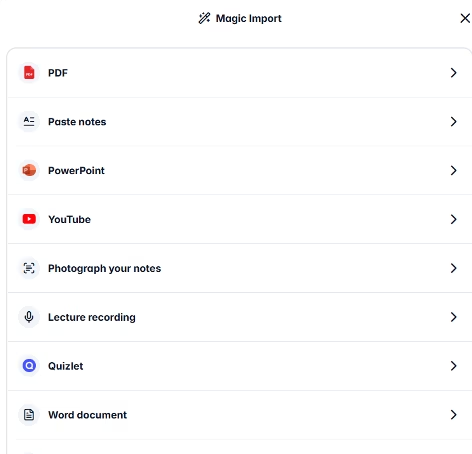
- Importeren vanuit pdf, Word, PowerPoint, spreadsheets, Quizlet, YouTube, foto's van handgeschreven aantekeningen, opnames gemaakt binnen het platform en links naar websites.
- Specifieke pagina's selecteren bij het importeren van een document, zodat je thematische decks maakt zonder het hele bestand te verwerken.
- Bibliotheek met meer dan een miljoen publieke decks, ingedeeld op onderwijsniveau en onderwerp.
- Studiemodi Memorise en Challenge met spaced repetition en active recall.
- AI-tutor beschikbaar in de chat van het platform, die op basis van een leerdoel gestructureerde cursussen over een onderwerp kan opzetten.
- Gizmo Live: real-time sessiemodus waarmee je in groep of alleen kan herhalen via een uitnodigingscode.
- Samen studeren door decks te maken en te delen tussen gebruikers.
- App beschikbaar voor iOS en Android.Dankzij deze functies kunnen ondernemers interne handleidingen, bedrijfspresentaties of technische documenten omzetten in actieve trainingsprogramma's, zonder de content vanaf nul te ontwerpen. Dat scheelt voorbereidingstijd en verbetert hoeveel mensen onthouden.
Dankzij deze functies kunnen ondernemers interne handleidingen, bedrijfspresentaties of technische documenten omzetten in actieve trainingsprogramma's, zonder de content vanaf nul te ontwerpen. Dat scheelt voorbereidingstijd en verbetert hoeveel mensen onthouden.
AI-functies
- Automatisch flashcards en vragen genereren uit geïmporteerde content.
- Tekstherkenning in afbeeldingen, ook bij niet-Latijnse schriftsystemen zoals Japans, om papieren aantekeningen om te zetten in digitale kaarten.
- Audioverwerking om kaarten te genereren uit opnames die je binnen het platform zelf maakt.
- AI-tutorchat die leerdoelen interpreteert en gestructureerde cursussen genereert met oefeningen en theoretische uitleg.
- Quizzen genereren over een specifiek onderwerp vanuit vrije tekst.
- Adaptieve spaced repetition die de herhalingsfrequentie aanpast op basis van jouw resultaten.
Wat Gizmo onderscheidt van standaardsoftware is de combinatie van de meertalige herkenningsengine, die ook bij complexe schriftsystemen zoals Japans goed werkt, en de AI-tutor in de chat, die jouw doel interpreteert en een leertraject uitstippelt. Hoe goed de “decks” zijn, hangt rechtstreeks af van de kwaliteit en specificiteit van het ingevoerde materiaal - daarin verschilt Gizmo van een volwaardig pedagogisch redeneersysteem.
Integraties
- Quizlet: bestaande sets rechtstreeks importeren en omzetten in Gizmo-decks.
- YouTube: kaarten genereren op basis van videolinks.
- Bestanden vanuit clouddiensten door compatibele formaten te uploaden: pdf, Word, PowerPoint en spreadsheets.
Of er een publieke API beschikbaar is, staat niet vermeld in de officiële informatie van het platform.
Beveiliging en compliance
Gebruikers blijven eigenaar van hun content, maar door de servicevoorwaarden te accepteren geven ze Gizmo een onherroepelijke, eeuwigdurende en wereldwijde licentie om de geüploade content te gebruiken en te reproduceren, voor zover nodig om de dienst te leveren en te verbeteren. Het bedrijf geeft aan dat het geen broncode uit het materiaal van gebruikers deelt met derden, behalve voor het onderhoud en de verbetering van de dienst zelf.
Content van gebruikers en door AI gegenereerde content gelden volgens de servicevoorwaarden niet als vertrouwelijke informatie. Gizmo is niet verplicht back-ups te maken van gebruikersinhoud.
Taal: klantenservice en interface
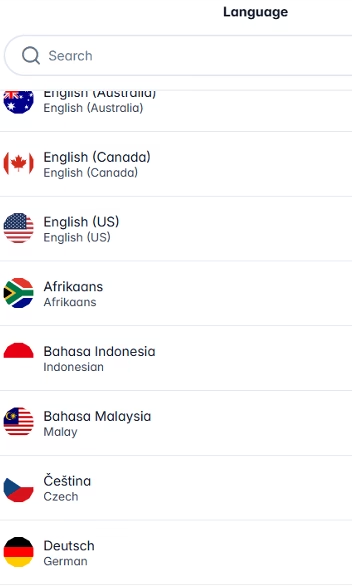
De interface van Gizmo is alleen in het Engels beschikbaar. Ook het helpcenter is Engelstalig, en klantenservice loopt uitsluitend via e-mail in het Engels. Er is geen real-time support via chat of telefoon.
Taal van de AI: de tool zelf
De AI van Gizmo is meertalig en verwerkt tekst in veel talen correct. Bij de tests voor deze review herkende het platform moeiteloos Japans schrift op foto's.
Het platform werkt goed om content in veel verschillende talen te studeren en te importeren, terwijl support en documentatie in het Engels blijven.
Mobiele toegang
Naast de webversie heeft Gizmo een officiële app voor iOS en Android. In de mobiele app kan je bij je decks, studiesessies starten, meedoen aan Gizmo Live en de foto-van-aantekeningen-functie rechtstreeks via de camera van je toestel gebruiken. De mobiele ervaring is gemaakt voor korte herhalingssessies, in lijn met het dagelijkse formaat van vijf minuten dat het platform als studiegewoonte aanraadt.
Support, onboarding en accountbeheer
- Het helpcenter bevat artikelen, ingedeeld in zes categorieën: account, decks, instellingen, abonnement, leren en veelgestelde vragen.
- Support loopt via e-mail, via het contactformulier van het platform.
- Er is geen real-time support via chat of telefoon.
- Er is geen persoonlijke onboarding of dedicated accountbeheer.
- De tool is intuïtief genoeg zodat je zonder technische ervaring binnen enkele minuten decks kan maken en studiesessies kan starten.
Gebruiksgemak / UX
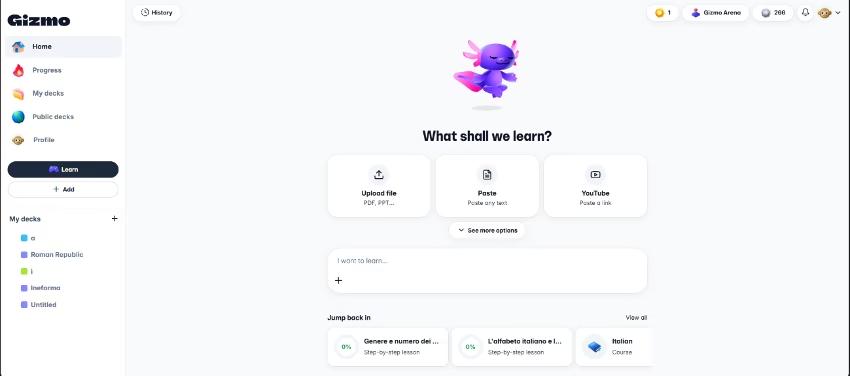
De interface van Gizmo is eenvoudig en vereist geen technische kennis. De magic import-functie brengt alle beschikbare bronnen samen op één plek, waardoor de ervaring vanaf het eerste gebruik simpel aanvoelt.
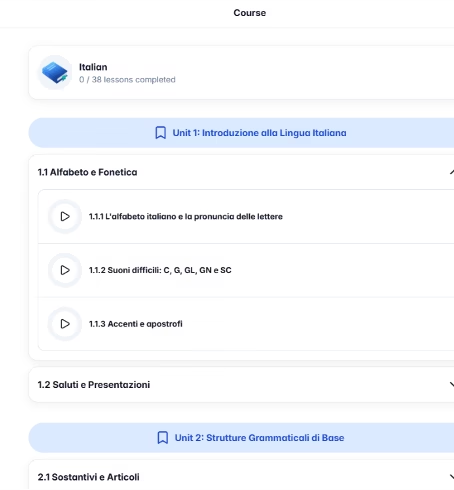
Hoe goed de AI-gegenereerde deck is, hangt rechtstreeks af van hoe specifiek het ingevoerde materiaal of onderwerp is. Een goed gestructureerd document levert vanaf de eerste import kwaliteitskaarten op. Quizzen genereren over een onderwerp via vrije tekst werkt het beste met een precies afgebakend onderwerp: in de tests leverde een algemene prompt zoals “inleidende cursus Italiaans” wisselvallige resultaten op, met vragen die meer gingen over wat een inleidende cursus doorgaans inhoudt dan over echte, inleidende Italiaanse taalinhoud.
Prijzen en abonnementen
Gizmo werkt met een freemium-model. De gratis versie is prima bruikbaar voor dagelijks gebruik. Het betaalde plan heet Unlimited en sluit je af vanuit de accountinstellingen, via de knop “Try Unlimited”.
Er zijn twee abonnementsopties voor Unlimited:
- Jaarplan (langetermijnplan): je betaalt vooraf voor 365 dagen. De handigste optie als je het platform het hele jaar door blijft gebruiken.
- Weekplan (last-minuteplan): je betaalt per week, en het abonnement wordt automatisch verlengd zolang het actief is. Flexibel voor wie het abonnement maar kort nodig heeft.
Bij beide plannen krijg je automatisch studentenkorting tijdens het aanmeldproces, als je daarvoor in aanmerking komt. Abonnementsbeheer verschilt per toestel: op iOS via je Apple ID, op Android via Google Play, en in de webversie rechtstreeks vanuit de accountinstellingen. Alle abonnementen worden automatisch verlengd en kan je op elk moment opzeggen.
Praktijkvoorbeeld
Een leraar Engels op een technische school werkt met meer dan tien groepen tegelijk, elk met een andere specialisatie: automechanica, verpleegkunde, administratie en elektriciteit. Technisch Engels lesmateriaal op maat van elke specialisatie voorbereiden, kostte hem meerdere uren per week.
Met Gizmo upload de leraar de technische woordenlijsten per specialisatie in pdf-formaat en genereert hij in enkele minuten flashcarddecks op maat van elke groep. Studenten herhalen de woordenschat zelfstandig via hun telefoon, met korte sessies voor elke les. Aan het einde van elke unit organiseert de leraar een Gizmo Live-sessie waarin de groepen in real time de kernbegrippen herhalen, wat de betrokkenheid verhoogt en de tijd voor informele mondelinge toetsing vermindert.
Het resultaat: aanzienlijk minder tijd kwijt aan het voorbereiden van materiaal en een zichtbare verbetering in hoe goed technisch Engelse woordenschat blijft hangen, zonder extra kosten voor de instelling dankzij het gratis plan van het platform.
Gizmo AI vs. alternatieven
| Product | Gebruikersprofiel | Focus | Belangrijkste beperking |
|---|---|---|---|
| Gizmo AI | Student of professional in opleiding | Zet eigen materiaal met AI om in flashcards en quizzen; bibliotheek met publieke decks; spaced repetition en gamification. | Gemengde resultaten met YouTube; onderwerpgestuurde generatie vereist nauw afgebakende prompts. |
| NotebookLM | Onderzoeker, consultant, ondernemer met Google Workspace | Analyseert je eigen bronnen met verifieerbare citaten en genereert verschillende contentformaten, waaronder flashcards, quizzen, audiosamenvattingen, infographics en presentaties. | Integraties beperkt tot het Google-ecosysteem; geen gamified studiemodi. |
Gizmo en NotebookLM kunnen allebei flashcards en quizzen genereren uit je eigen materiaal, maar ze passen bij een ander gebruiksprofiel. NotebookLM is ideaal voor diepgaande documentanalyse: het combineert meerdere bronnen, levert verifieerbare citaten en genereert output in veel verschillende formaten, wat het een completere tool maakt voor onderzoek en documentgedreven werk.
Gizmo is specifiek gemaakt voor actief studeren en memoriseren: de kracht zit in spaced repetition, gamification en de mogelijkheid om in korte sessies of in groep te herhalen via Gizmo Live.
Veelgestelde vragen
Is Gizmo AI een goede optie voor ondernemers?
Ja, zeker voor teams die interne training willen opzetten met eigen materiaal, zonder dure oplossingen.
Welke bestanden kan ik importeren in Gizmo?
Pdf, Word, PowerPoint, spreadsheets, Quizlet, YouTube, foto's van handgeschreven aantekeningen, lesopnames gemaakt vanuit het platform en links naar websites.
Wat zijn de beste alternatieven voor Gizmo AI?
NotebookLM voor studeren en documentanalyse met verifieerbare citaten; Duolingo om talen te leren met een begeleid traject vanaf nul.
Zijn de AI-resultaten altijd correct?
Dat hangt af van de bron. Bij geschreven documenten zijn de resultaten goed. Bij YouTube zijn ze wisselvallig bij lange video's. Onderwerpgestuurde generatie werkt het beste met specifieke, nauw afgebakende prompts.
Twijfel je nog over Gizmo?
Vergelijk het met de andere tools die we in AI voor Research hebben beoordeeld.