
Quickbooks Review
Discover what QuickBooks offers: AI-powered automation, invoicing, bank reconciliation, and 750+ integrations. Full review of features and alternatives.
This tool has established itself as one of the mostversatile accounting platforms available for professionals and small businesses. It stands out for its focus on automation, advanced reporting, and flexibility to integrate with other popular solutions.
Its main strength is its modular ecosystem: from QuickBooks Online to the Advanced and Ledger versions, designed for different levels of complexity. Among its limitations, some features (like bank integrations or tax modules) may vary by region, and the initial setup curve requires some time if the business has never used online accounting software.
AgentAya Recommendation: Ideal for SMEs looking to professionalize their accounting management and reduce manual work through intelligent automation.
Averaged from the breakdown below
- Freelancers, startups, and SMEs that need comprehensive accounting and invoicing control.
- Accountants and advisory firms that manage multiple clients from a centralized dashboard.
- Teams that want to automate repetitive financial processes and issue professional invoices in multiple languages.
- Large corporations with custom ERPs or multi-level consolidation needs.
- Businesses that require extremely localized tax features without support in their country.
Key Features
QuickBooks is not a single program but a family of products within the Intuit ecosystem (the same company behind TurboTax, Credit Karma, Mailchimp, and ProConnect). The QuickBooks brand brings together solutions designed for every stage of a business: QuickBooks Online (with its Simple Start, Essentials, Plus, and Advanced plans), QuickBooks Ledger for low-activity clients, Intuit Enterprise Suite for large multi-entity businesses, and Intuit Accountant Suite for accounting firms. Added to these are QuickBooks Workforce (payroll and people management), QuickBooks Capital (financing), and the Intuit Business Credit Card. The main features include:
- Cloud-based accounting: real-time control of income, expenses, VAT/sales tax, and cash flow.
- Professional invoicing: customized invoices with logo, payment terms, automatic reminders, and recurring invoicing.
- Bank reconciliation: connection to bank accounts to classify transactions and keep the books current.
- Inventory management: stock control, low-stock alerts, and automatic cost of goods sold calculation. Recent updates include automatic quantity adjustments through physical count sheet uploads, support for the moving average cost (MAC) method, item receipts to document received merchandise, and sales order improvements (custom fields, bundle support, and direct conversion to purchase orders).
- Advanced financial reports: balance sheets, income statements, and customizable tax reports. The modern reports view is now the only one available and includes more than 150 standard reports with filters, comparisons, and export options.
- Account locking: the ability to lock accounts in the chart of accounts (for example, parent accounts) to prevent improper posting, with a dedicated filter and batch locking.
- Project and budget management: task tracking, margins, and progress, with milestone billing.
- Multi-user access and custom roles: permission controls for employees and external accountants.
- Multi-currency and multi-device: transaction recording in different currencies and access from any device.
- Payments and collections: with QuickBooks Payments and QuickBooks Bill Pay, businesses can schedule autopay for recurring bills using free standard ACH, and even offer customers a buy now, pay later option through Affirm on invoices.
With all these features the platform works equally well for a freelancer and for a growing company: it scales by adding products and users without changing platforms. It is worth keeping in mind that features, plans, and prices vary by product, country, and region, so the availability of certain capabilities (local taxes, bank integrations, financing) depends on the market.
At its accounting core, QuickBooks brings together everything an SME needs in one place, without advanced technical knowledge.These features allow SMEs to save time and reduce errors by centralizing all financial information in a single synchronized environment.rrors by centralizing all financial information in a single synchronized environment.
AI Functions
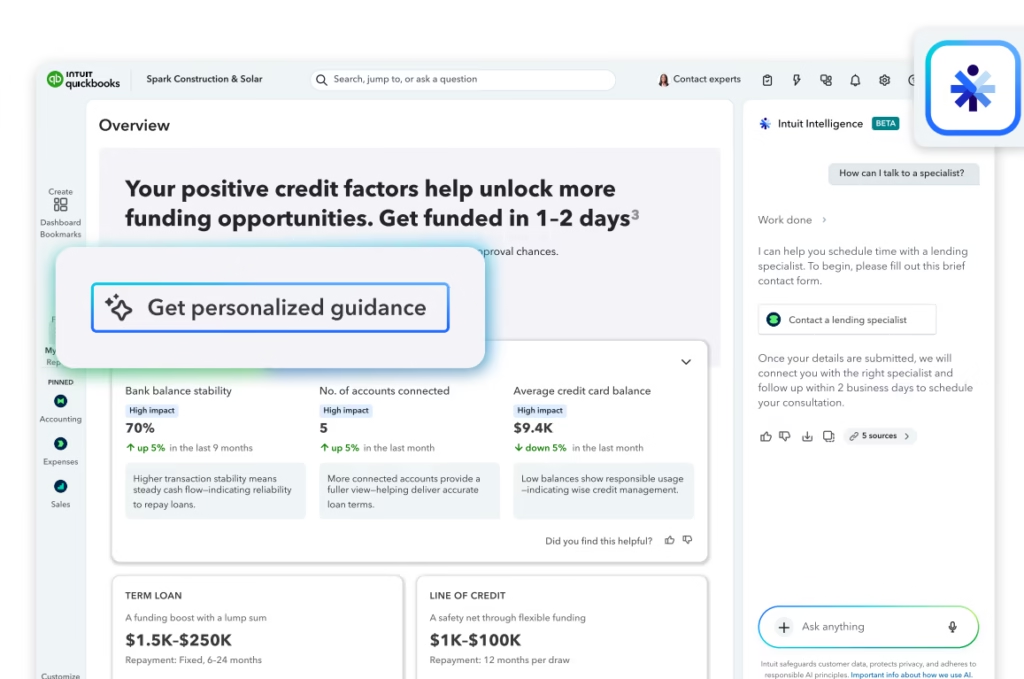
QuickBooks' artificial intelligence revolves around Intuit Intelligence, now available across QuickBooks Online, Intuit Enterprise Suite, and Intuit Accountant Suite. It is a conversational layer that lets users ask questions in natural language about their business data, receive contextual answers, and also carry out tasks within the platform. Its main capabilities include:
- Conversational assistant: answers questions about the books in natural language with performance summaries, trends, comparisons, and suggested actions; for example, it can summarize last month's profit or the key points from a client.
- Done-for-you workflows: creates invoices, expenses, and payments, connects bank accounts or fixes connection errors, adds accounts to the chart of accounts, runs payroll, and generates exportable PDF or CSV reports from a single command.
- Specialized assistants: Accounting AI organizes and cleans up the books and fixes errors; Customer AI identifies opportunities and helps with follow-up; Finance AI delivers tailored financial insights; Project Management AI speeds up the start by pre-filling details.
- AI-powered banking (now the default): recognizes patterns, identifies partial matches, combines operations, and suggests categories based on history, with speed improvements of more than 50% and the ability to keep working while rows are processing.
- OCR and continuous learning: extracts information from documents or PDFs and records it automatically, learns from the business's prior behavior, flags potential errors, and fills in accounting fields.
- Payroll Tax AI: guides payroll tax setup, explains calculations and rejected filings, lets users download forms from the chat, and references official resources to flag compliance risks.
- Financing insights: surfaces available offers and explains, based on the business's data, the factors that affect eligibility for a term loan or line of credit.
- Accountant handoff: when a human perspective is warranted, it sends the accountant a summary of the conversation so they can pick up the question.
The availability of these features and the query limits vary by plan, with higher tiers offering greater capacity. Intuit applies responsible AI principles, does not use customer data to train models without consent, and notes that AI can make mistakes, so the user remains in control.
Integrations
QuickBooks maintains one of the most extensive integration libraries in the industry, with over 750 applications organized by category. Among the most common are:
- E-commerce: Shopify, WooCommerce, Amazon, eBay, BigCommerce, and Wix.
- Payment gateways: Stripe, PayPal, and Square.
- Productivity: Google Drive, Dropbox, and Zapier.
- Expense and receipt management: Dext and Pleo.
- Analytics and operations: Syft Analytics, Katana, Jobber, and Knowify.
- Data import and export: SaasAnt and Business Importer.
- Advanced inventory: Stockpit, Erplain, and SOS Inventory.
On a technical level, it offers an open REST API and webhook support, enabling custom development or connection with internal systems. These integrations help SMEs connect QuickBooks to their existing ecosystem without duplicating data, and they can be tested during the 30-day free trial.
Security and Data Compliance
QuickBooks complies with international data protection standards and applies TLS 1.2 encryption in transit and at rest.
Users maintain full ownership of their information, and data is hosted on servers with automatic backups and disaster recovery policies.
Key practices include:
- Multi-factor authentication (MFA) for secure access.
- Custom roles and permissions to control sensitive information visibility.
- Automatic backups with point-in-time restore.
- Compliance with regulations like GDPR and regular security audits by Intuit.
The tool does not use customer data to train AI models without explicit consent, and offers data processing agreements (DPA) for enterprise clients and accountants.
Language – Customer Support and Interface
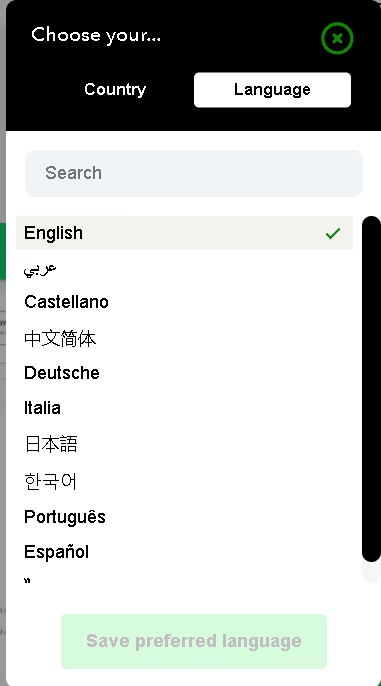
The tool offers its interface and support in multiple languages, including English, French, Italian, Portuguese, Spanish, and Traditional Chinese.
Technical support is provided via chat and email, and higher-tier plans include phone support and assistance via video call or screen sharing. Learning resources include QuickBooks Academy, webinars, downloadable guides, accounting templates, and manuals for advisors and small businesses.
AI Language – The Tool Itself
Currently, automation features are based on learning accounting patterns, which allows QuickBooks to be used in any language without loss of precision. With the arrival of Intuit Intelligence, the ability to make natural language queries will also be available.
Mobile Access
QuickBooks has official mobile apps for iOS and Android. From these, users can create and send invoices, capture receipts with the camera, review reports, and approve payments.
The mobile design maintains most desktop features, although certain advanced settings (like user roles or custom reports) are only available in the web version.
Support, Onboarding, and Account Management
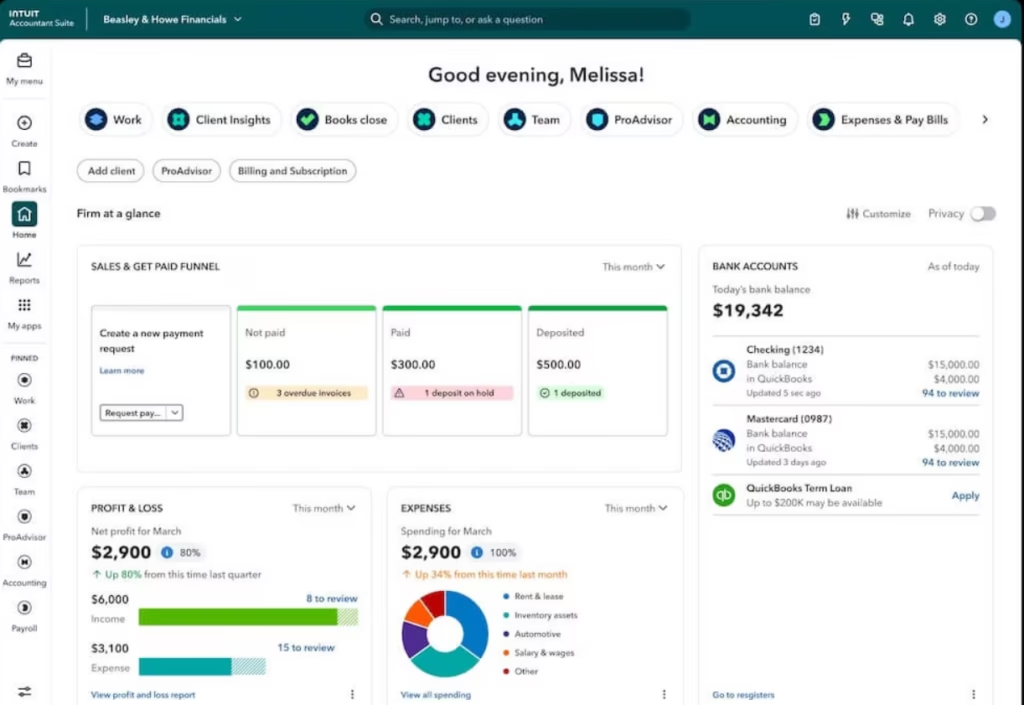
Accountants have a dedicated environment that is evolving: QuickBooks Online Accountant is being replaced by Intuit Accountant Suite, a platform to manage the firm, clients, and team in one place, with Intuit Intelligence, a client KPI dashboard, request management, book close, and tax preparation. Firms can migrate free of charge to Intuit Accountant Suite Core. In parallel, the ProAdvisor program is becoming Intuit ProPartner Accountants, with expanded benefits, education, and community. For low-complexity clients or inactive entities, QuickBooks Ledger makes it possible to keep the books economically and centrally.
Ease of Use
User experience is one of QuickBooks' best qualities. Its dashboard organizes features into clear modules (bank, invoices, reports, expenses, projects) and offers intuitive navigation and preconfigured templates.
The learning curve is short, and SMEs can start issuing invoices and recording expenses within hours.
Additionally, the system provides contextual suggestions and automatic reminders that facilitate gradual adoption without overwhelming the user.
Price and Plans
QuickBooks operates on a monthly or annual subscription model and offers a free trial for new users. Because it is a suite, there is no single price: each product has its own plans, and features, availability, and rates change by country and region. The lineup spans several products:
- QuickBooks Online: the accounting core, with plans that scale from freelance work to businesses with large teams.
- QuickBooks Ledger: a low-cost option for firms with low-activity clients or inactive entities.
- Intuit Enterprise Suite: for large, multi-entity businesses.
- QuickBooks Workforce: payroll and people management.
- Financial modules: QuickBooks Payments, QuickBooks Bill Pay, QuickBooks Capital, and the Intuit Business Credit Card.
Within QuickBooks Online, the main plans are:
- Simple Start: designed for freelancers or micro-businesses looking to control income, expenses, and issue invoices.
- Essentials: adds payment management, additional users, and multi-currency support.
- Plus: includes inventory tracking, budgets, and accounting classes.
- Advanced: aimed at businesses with higher volume or large teams; adds workflow automation, customizable dashboards, spreadsheet synchronization, and advanced permissions.
- Ledger: designed for accountants and advisory firms; allows them to manage low-complexity clients or inactive entities from QuickBooks Online Accountant economically and centrally.
All plans offer access to support, guided migration, and online training. QuickBooks allows plan changes at any time, user count adjustments, and module additions as needed.
Case Study
Nils Peters is a German entrepreneur who moved to South America eighteen years ago and put down roots in Bolivia. There, together with a friend, he founded Hiplus, a bike and components shop that started in his living room, moved to a shared office, and today has its own brick-and-mortar store.
As happens with many small businesses, his biggest problem was not sales but not knowing how much money he was actually making. "I didn't know if I was losing money, or how much money I was making each month. It was disastrous," he recalls of the period when he relied entirely on external accountants. Four years in, he decided to take charge and look for software that would give him a clear picture of his business at any point in the month.
After an extensive search for a secure, scalable cloud accounting solution, and after trying a few alternatives, he chose QuickBooks and started with the 30-day free trial. He was won over by its ease of use (no accounting background required), a smooth data migration from Excel, and the fact that it was much more than an accounting program. Today he bases every decision on its accounting and reports, online invoicing, and inventory management, working from real, up-to-date information.
His advice to other small businesses captures why a tool like this makes the difference: own your data, and choose easy-to-use software that gives you accurate, real-time figures. For a small business, that control can be the difference between growing with confidence and flying blind.
You can read the full case study here.
Tool vs Alternatives
- QuickBooks vs Xero
QuickBooks leverages AI in bank reconciliation, with automatic suggestions to match and classify transactions, plus Excel synchronization in advanced plans. Added to this is Intuit Intelligence, its now-available conversational assistant, able to answer questions and carry out tasks within the platform. Its other major advantage over Xero is localization: QuickBooks offers stronger tax adaptation for Latin America and full Spanish-language support.
Xero matches reconciliation automation through rules and machine learning and stands out for its extensive marketplace of verified integrations. Its conversational agent, JAX (Just Ask Xero), is available across all subscriptions at no additional cost: it creates invoices and quotes from a prompt, answers with real-time data, and combines the business's Xero information with public data from the internet. On the other hand, its interface and support are geared primarily toward English.
- QuickBooks vs Zoho Books
QuickBooks distinguishes itself through its broader integration ecosystem, its wider global presence, and advanced features like automated workflows, role-based controls, and direct spreadsheet synchronization. It also offers phone support on higher-tier plans.
Zoho Books offers more affordable plans and very deep integration with the Zoho ecosystem (CRM, Analytics, Inventory, and more), along with solid tax localization and Spanish-language support for Spanish-speaking SMEs. Its AI, Zia, works as a background automation engine (receipt scanning, transaction categorization, payment reminders, and cash flow prediction), though it is not enabled by default and requires Zoho One or add-on modules. Its main limitation is the absence of direct phone support and of deep integrations with non-Zoho software.
FAQs
Is QuickBooks a good option for SMEs?
Yes. It centralizes accounting, invoicing, inventory, and financial reporting in a single cloud-based platform.
Does it support multiple languages?
Yes. The interface, documentation, and support are available in several major languages.
What kind of automations does it offer?
QuickBooks uses AI to suggest bank matches, categorize transactions, detect duplicates, and generate automatic reports.
Does it have a mobile app?
Yes. QuickBooks is available for iOS and Android with invoicing, receipt scanning, and report viewing features.
What alternatives exist?
Among the most comparable are Zoho Books, Xero, and Holded, although QuickBooks stands out for its level of automation and its global accounting ecosystem.
Still weighing up Quickbooks?
See how it compares with the other tools we've reviewed in AI for Accounting.