

Suno Review
Suno stands out for how fast it works and how good the results are, with a free tier that lets you put it through its paces.
Suno is the most straightforward choice for an SME that needs original music without the budget or the timeline of traditional production. Its biggest strength is speed: a written idea becomes a finished song in seconds, in whatever language you write the prompt. For small marketing teams, content creators, and businesses that publish in short form, the value is obvious.
The main catch isn't the tool itself but what comes after. Commercial use rights only kick in with a paid plan, and publishing on platforms like YouTube means adding real visual value, since a track laid over a single still image counts as low-effort content. The same prompt also produces different results every time you run it, which adds a welcome bit of variety.
Our recommendation: an SME that produces content steadily can justify the paid plan for the commercial rights and the editing tools alone.
Averaged from the breakdown below
- Content creators and community managers who need original music for short video and social media.
- SMEs with small or one-person marketing teams and no musical training.
- Businesses that want a sound of their own instead of stock music.
- Composers and musicians who want to speed up the ideas stage or add their own voice to what they create.
- Companies that need native integrations with their business software stack, since that information isn't available.
- Cases that call for a copyright guarantee on the output, since the platform itself says it doesn't offer one.
Key Features
- Song creation from a style field (genre, tempo, vocal style, and more) and a topic or lyrics field, with the option to leave it blank for an instrumental.
- Several ways to start: from an idea, from the lyrics, from uploaded audio, or with no fixed starting point at all.
- Writing your own lyrics, shaping and structuring every word with full control.
- Uploading or recording your own audio to use as the basis for a track.
- Creation controls: vocal personas (Voices), inspiration (Inspo), exclusions, vocal gender, and style and weirdness sliders.
- Editing and remixing: rewrite lyrics, reorder sections, give any song a new spin by changing its style, mood, or genre (Remix), combine two songs (Mashup), take a section as a starting point (Sample), and build samples or loops from scratch (Sounds).
- Hook creation and the Hooks feature, a feed for pairing a short vertical video with a song and distributing it in short form.
- Community features: browse other people's creations, lists organized by genre, remix and mashup contests, and a profile with playlists.
- Suno Studio, a web-based generative audio workstation that pairs the functions of a traditional workstation with multitrack editing and control over tempo, volume, and pitch.
- Export of up to twelve time-aligned WAV tracks, and from Suno Studio as audio or MIDI, for use in workstations like Ableton or Logic.
- A labs section with three tools: Suno's radio, new-genre discovery, and a synthesizer.
- A synthesizer with a step-by-step guide when you open it and MIDI support: import MIDI files, generate rhythms with Ideas, load audio Samples from songs, add Master FX to the output bus, save snapshots to pick up where you left off, and download the result as WAV.
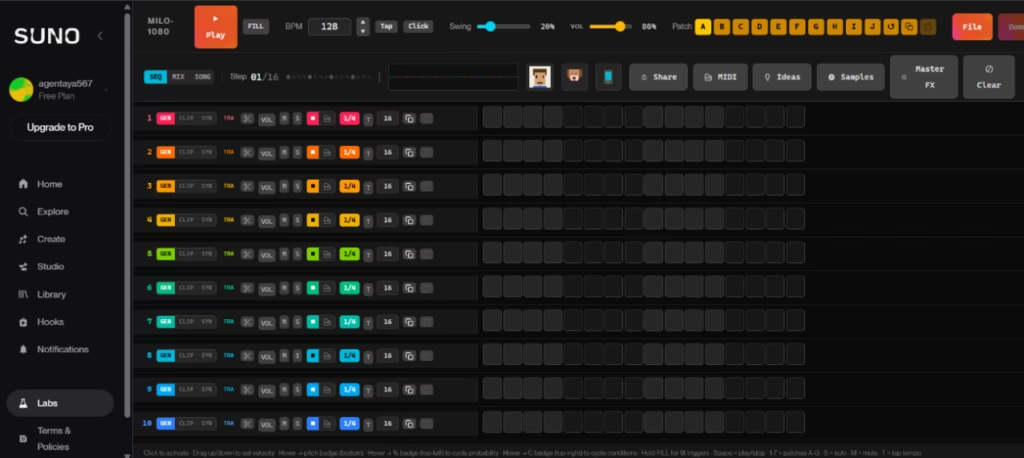
Together, these features cover the full music production cycle for content without any outside services: generate the idea, refine it, edit it, and distribute it, all from one place. The savings run in two directions, in production time and in stock music licensing costs, and you come away with a recognizable brand voice.
AI Features
- Generation of complete songs from natural language, with lyrics, vocals, instrumentation, and structure built from a simple text description.
- Music models across different generations, including v4.5-all (free) and v5.5, the newest and most personal, with richer arrangements and crisper vocals.
- Lyrics generation through dedicated models, with a selector to choose among several lyrics models.
- Voices, which analyzes speech characteristics to build a voice model that can generate audio resembling the user's own voice.
- Custom Models, which train a personalized version of v5.5 on at least six tracks of the user's own audio.
- My Taste, which learns the user's genres, moods, and references over time and applies them through the Magic Wand.
- AI-powered stem separation: Auto Split and Split from Mix pull the mix apart, while Advanced Split regenerates each stem from scratch with the newest model for cleaner isolation, with nearly 100 instruments to choose from.
The genuinely clever part here is turning a single phrase into a coherent, complete song, alongside the voice modeling, the custom models, and the way it learns user preferences.
Integrations
- Sign-in through third parties such as Apple, Discord, Microsoft, and Google.
- Export of stems in up to twelve time-aligned WAV tracks for audio workstations like Ableton or Logic.
- Export from Suno Studio as audio or MIDI to carry your work into another workstation.
- On iOS, integration with the Notes app and Voice Memos to transcribe lyrics and attach audio automatically, plus compatibility with Apple CarPlay and Android Auto.
Data Security and Compliance
The terms state that the user keeps ownership of their Submissions, meaning the material they upload, and warrants that they hold the rights to it. In return, they grant Suno a worldwide, non-exclusive, perpetual, and irrevocable license to use, reproduce, modify, and distribute that content and, where it applies, the voice model, including the user's likeness and voice rights. As for the generated output, Pro and Premier subscribers receive an assignment of Suno's rights over the songs they create during the subscription, though the platform notes that, given the nature of machine learning, it doesn't guarantee copyright on the result. Free users are limited to personal, non-commercial use with attribution.
The privacy policy says Suno uses certain activity information, Submissions, interactive chat information, and other content to improve its services, which includes training and refining the models that power the platform. On retention, Suno keeps information for as long as it's reasonably necessary for the purposes described, and for the biometric data tied to voice features it caps this at three years after the user's last interaction, unless the law requires otherwise.
The documentation mentions GDPR compliance for residents of the European Economic Area and the United Kingdom, along with rights under California's CCPA and similar privacy laws in other U.S. states.
Language: Customer Support and Interface
Suno's interface and documentation are in English. Customer support runs mainly through email, with dedicated addresses for support, billing, legal matters, and copyright claims, plus a presence on platforms like Discord.
AI Language
The AI is multilingual and generates the song in the language of your prompt: a Spanish description produces a Spanish song, true to whatever speech you specify, and an English description produces an English one. The platform understands prompts across a wide range of languages, as its own community catalog shows, with songs in Spanish, English, Korean, Russian, French, and Portuguese, among many others.
Mobile Access
Suno offers dedicated mobile apps for iOS and Android. These apps let you create music from text, record audio on your phone and turn it into a song, discover community tracks, and share what you make. Recent updates have brought the mobile experience closer to the desktop one, with features like vocal gender selection, memory of your last prompt, the lyrics model selector, and profile management. Even so, a few advanced capabilities, Suno Studio among them, still work only on the web for now.
Support, Onboarding, and Account Management
Suno folds onboarding right into the creation of your first song, with a step-by-step guide that takes about three minutes and walks you from sign-up to your first result. The platform includes a getting-started list that points new users toward creating songs, sharing, building a playlist, publishing, and following other creators. The synthesizer in the labs section also offers a quick guide when you open it.
The knowledge base sorts help into several categories: music creation, accounts and billing, mobile app, rights and ownership, Studio, Hooks, and community resources. Music creation holds the most material, while the rights-and-ownership and Studio categories provide detailed documentation on two topics that matter to an SME: song ownership and advanced production.
Ease of Use / UX
The experience is built so anyone can get a result in minutes. The core three-step flow, describe, create, and listen, keeps the barrier to entry as low as possible, and the guided onboarding takes users to their first song without a hitch. Advanced features like Suno Studio, vocal personas, and stem separation add depth for those who want it without getting in the way of anyone who just wants a quick track. An SME gets value almost immediately on the Free plan, and the learning curve only steepens if you choose to dig into more advanced editing and production.
Pricing and Plans
Suno offers three plans (Free, Pro, and Premier), billed monthly or annually (annual saves 20%). Taxes are calculated at checkout.
- Free: access to the v4.5-all model, 50 credits that renew daily (about ten songs a day), standard features only, audio uploads up to 8 minutes, and a shared creation queue. No commercial use, no stem separation, and no add-on credit purchase.
- Pro: access to the v5.5 model, 2,500 monthly credits (up to 500 songs), commercial use rights for new songs, standard and Pro features (personas and advanced editing), stem separation in two modes (Auto Split and Split from Mix), audio uploads up to 30 minutes, the ability to add vocals or instrumentals to existing songs, your own voice, custom versions of v5.5, a priority queue of up to 10 songs at a time, early access to new features, and add-on credit purchases.
- Premier: everything in Pro plus access to Suno Studio, 10,000 monthly credits (up to 2,000 songs), and stem separation in all three modes (Auto Split, Split from Mix, and Advanced Split).
For an SME, the Free plan is a way to test the tool before paying, while Pro and Premier earn their keep mainly through commercial use rights and advanced editing. If a user creates a song on the Free plan and later upgrades, that song becomes cleared for commercial use too. When the monthly credits run out, subscribers can buy more and automatically receive a daily credit bonus until the cycle renews.
Case Study
An artisan bakery with three locations sold well in its neighborhood but barely registered on social media. Its communications lead, with no musical training, was losing hours hunting for stock music that always sounded generic.
They started on Suno's free plan, pasting real phrases from the counter into the text-to-song feature and getting complete tracks with vocals and lyrics within minutes, in English and true to the way their regular customers actually talk. Once they saw the tracks land, they moved to a paid plan for commercial use rights, the newest model, and advanced editing. They built their own vocal persona to give the brand a recognizable voice and separated stems so they could reuse the instrumental base.
The jump in reach came with Hooks. They shot a short vertical clip in the shop, paired it with their song inside the platform, and led with a hook in the first few seconds. Publishing on YouTube showed them that commercial rights were necessary but not enough on their own: it was the original video with real editing that let them meet the platform's criteria. The payoff was a steady, low-cost stream of content, a sound that was theirs alone, and a discovery channel that didn't hinge on paying for ads.
Suno vs Alternatives
| Criterion | Suno | ElevenLabs |
| Product focus | Interface-first, for creating, editing, and distributing music | Broad AI audio platform where music is one capability alongside text to speech, voice agents, and dubbing |
| Strength | Vocal quality, advanced editing, and Suno Studio | Audio research breadth, a documented API suite, and music trained on licensed data |
| Origin | Commercial platform | Commercial platform built on its own foundational audio models |
| Pricing model | Free plan and paid subscriptions (monthly or annual) | Free plan and paid subscriptions billed monthly, with credits shared across features |
| Commercial rights | Paid plans only | Commercial use of music starts on a paid plan |
| Best for | Consumer use and producing finished songs | Embedding music and audio into products through an API, or teams that need voice, music, and agents in one platform |
The key difference for an SME comes down to the use case. An SME that just needs music for videos, social media, ads, or podcasts will likely find Suno the more complete music experience, with stronger vocals and a dedicated workstation. An SME that wants music alongside other audio needs, such as voiceovers, voice agents, or dubbing, or that wants to generate music programmatically inside a product, will find ElevenLabs the broader fit, thanks to its API suite and its music trained on licensed data and suitable for commercial use.
FAQs
Is Suno a good choice for SMEs?
Yes, especially for SMEs that produce content steadily and need original music for video, social media, ads, or podcasts. The free plan lets you put it through its paces, and the paid plans add commercial use rights and advanced editing.
Can you use Suno songs commercially?
Only if you're on a paid plan.
What happens if I run out of my monthly credits?
Subscribers can buy add-on credits at any time and also receive an automatic daily credit bonus until the billing cycle renews.
Does Suno have a mobile app?
Yes, it offers dedicated iOS and Android apps for creating, discovering, and sharing music, though a few advanced features like Suno Studio run on the web version.
Can I generate music with AI through an API?
ElevenLabs offers a developer-focused API suite that includes a Music API for generating tracks from natural language prompts, while Suno works mainly through its interface.
Still weighing up Suno?
See how it compares with the other tools we've reviewed in Marketing with AI.