

Zoho Analytics Review
Zoho Analytics is a Business Intelligence (BI) and data analysis platform that allows small and medium-sized businesses to transform scattered information into clear and actionable reports.
Zoho Analytics is the scalable and intelligent solution for SMEs looking to professionalize their data management without incurring the costs of enterprise platforms. Our verdict is a solid recommendation for companies already using the Zoho ecosystem or who value affordability and ease of use. It's a flexible platform that allows centralizing data and obtaining quick insights with AI.
Its value increases exponentially when integrated with Zoho CRM, as it allows combining sales data and customer information (including feedback analysis) in a single panel to obtain a more complete business view and streamline decision-making. It's simpler to learn than Tableau, more affordable than Power BI, and its AI (Zia) is functional enough for anomaly detection and natural language questions. It doesn't reach the visual or predictive power of leaders, but its value for money is excellent.
Averaged from the breakdown below
- SMEs already using Zoho CRM or the Zoho One suite seeking native and deep integration.
- Companies that want to centralize data from multiple applications (500+ connectors) into a single dashboard.
- Organizations that need early anomaly detection and basic predictive analysis with AI (Zia).
- Teams valuing ease of use and seeking a drag-and-drop interface.
- Businesses only needing basic and simple reports (too many features for very simple use).
- Companies requiring highly specialized AI support or massive-scale big data analysis.
- Users with no prior BI platform experience seeking an absolute minimum learning curve (though simple, advanced features require time).
- Companies whose priority is visual exploration per se with maximum graphic quality (like Tableau offers).
Main Features
Zoho Analytics stands out for its architecture that prioritizes integration and automatic data analysis for SMEs, helping reduce workload in information consolidation.
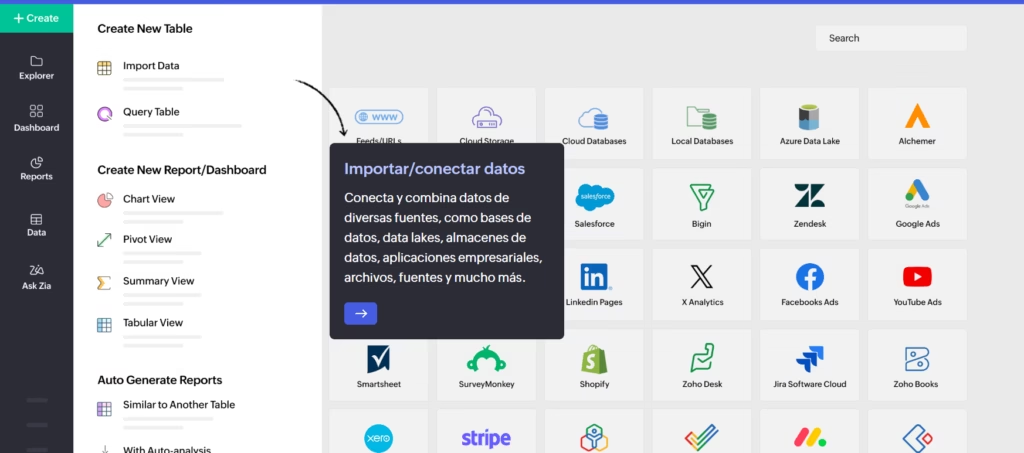
- Abundant Connectivity: Has over 500 native connectors with popular applications (Google Analytics, Shopify, QuickBooks, Salesforce) and deep connections with the Zoho ecosystem.
- Drag-and-Drop Interface: Facilitates creation of custom reports and dashboards without needing to write code or use complex query languages.
- Customizable Dashboards: Allows transforming metrics into clear and actionable visualizations, with the option to generate automatic reports.
- Interactive Filters and Queries: Users can segment data and easily drill down into dashboards to find the root of a problem or trend.
- Collaboration and Sharing: Facilitates secure sharing of reports and dashboards with internal and external users, with detailed access control.
- Custom Visualizations: Users can go beyond the built-in chart library and create their own visual elements using third-party JavaScript libraries or custom scripts, enabling industry-specific diagrams and specialized plots tailored to unique reporting needs.
- Drill Actions: Reports now support operational actions directly from the analytics environment. Users can open records, create new entries, update information, or trigger workflows without leaving their dashboards, bridging the gap between insight and action.
- Data Archiving: Older or less frequently used records can be moved out of active tables into secure storage. This optimizes query performance and dashboard loading times while keeping historical data accessible without affecting usage limits.
- Auto Analysis with Star Schema: Auto Analysis now supports multiple related tables through a star schema structure, allowing users to generate reports and dashboards that combine data from several connected sources automatically.
- Accessibility Settings: A dedicated accessibility section lets users customize links, cursor size, font size, and color contrast, and provides a full list of keyboard shortcuts for faster navigation.
AI Functions
Artificial Intelligence in Zoho Analytics materializes primarily through Zia, its integrated AI assistant, designed to democratize data analysis for non-technical users.
The AI-powered features that are truly "intelligent" are:
- Natural Language Analysis: Zia allows users to ask simple questions in natural language (in multiple languages), and the platform generates the corresponding report or chart immediately.
- Anomaly Detection: The AI automatically monitors data and identifies and notifies unexpected or atypical behaviors, helping SMEs detect problems or fraud in time.
- Automatic Insight Generation: Zia can generate automatic narratives and explanations about data in reports, facilitating insight interpretation.
- Basic Predictions: Offers predictive models to anticipate future trends, such as product demand or sales projections, without needing advanced statistical knowledge.
- Zoho LLM Integration: Zoho Analytics now integrates its own large language model (Zoho LLM), which enables users to export, share, and schedule reports using natural language commands. GenAI embedding support is available in the US, EU, and India data centers without requiring external OpenAI credentials.
- Customizable Zia Insights: Users can tailor the insights Zia generates by selecting specific metrics, dimension columns, and insight types, including contribution analysis, time series insights (trends, seasonality, anomalies, and forecasts), and comparison between dimensions. Insights can be displayed as a floating overlay, embedded within a report, or shown as the primary view replacing the report entirely.
- Expanded Diagnostic Insights: Diagnostic insights now extend beyond recent time period analysis to cover anomalies and outliers, largest incline and decline, period-over-period changes, and start versus end period analysis, revealing the reasons behind data movements.
- Enhanced AutoML: AutoML now runs on high-power 128 GB servers in the US data center, enabling faster model training on larger datasets. New APIs allow users to create, run, and manage AutoML analyses and deployments programmatically, including what-if analysis capabilities.
- GenAI Activity Logs: Organizations can now track and review all GenAI-related activities through dedicated logs, providing greater visibility and control over AI usage within the platform.
Integrations
Zoho Analytics' wide range of integrations is one of its biggest strengths and focuses on all-in-one functionality for SMEs.
Over 500 native integrations are available, covering all business areas, including:
- CRM Systems: Zoho CRM (native and deep integration), Salesforce.
- Finance and Accounting: QuickBooks, Xero.
- E-commerce: Shopify, eBay.
- Marketing: Google Analytics, Mailchimp.
- Databases: SQL connectors, PostgreSQL, etc.
The connection with Zoho CRM is especially deep and allows SMEs to cross sales and support metrics with customer analysis. There's a well-documented API that allows SMEs to easily connect custom data sources or internal systems. It doesn't focus on specific local tools, but on the breadth of business connectors.
Since 2026, Zoho Analytics has significantly expanded its connector library with new native integrations across multiple business categories: TallyPrime, Insightly, and Constant Contact; Zoho ERP, Zoho Spend, PayPal, and Odoo Online; Zoho FSM and Adobe Commerce/Magento; FreshBooks, Zoho Voice, and Zoho Shifts; and Qntrl, Asana, and Zoho Community Spaces. New modules were also added for Zoho Finance and Zoho Inventory. Live Connect now supports Databricks and ClickHouse for real-time querying.
On the infrastructure side, a Remote MCP Server allows organizations to host a single, centrally managed instance and share it across all users over HTTPS, eliminating the need for individual Docker installations. The MCP Server can also be installed via NPM for simpler deployment. Additionally, Databridge instances can now be shared across users within an organization, enabling concurrent data imports from the same server without separate installations.
Security and Data Compliance
Zoho Analytics implements robust security standards, consistent with an enterprise-level data platform, providing peace of mind to SMEs.
- Data Ownership: The client (the SME) retains exclusive ownership of data loaded and analyzed. Zoho acts as the data processor.
- Data Use and Retention for AI: Customer data is used for the client's internal analysis and not to train Zoho's AI models (like Zia) without explicit user consent. The data retention policy is transparent and data is deletable.
- Encryption Protocols: Uses industry-standard encryption protocols (like TLS) for data in transit and advanced encryption methods for data at rest in its secure data centers.
- Regulations and Certifications: Zoho Analytics complies with relevant data protection regulations such as GDPR, CCPA, and international compliance frameworks. Zoho possesses security certifications (e.g., ISO 27001), which cover the infrastructure.
- Authentication and Access: Security is reinforced with multi-factor authentication (MFA), Single Sign-On (SSO), and granular access control at report and dashboard level.
Code Studio now includes a Domain Allowed List that lets organizations define which external APIs and web services their Python scripts can access, preventing unauthorized data transfers and ensuring precise control over external connectivity.
On the auditing side, dedicated GenAI activity logs allow administrators to track and review all AI-related operations within the platform, strengthening oversight and compliance. Regarding white label security, portals now support multi-factor authentication (MFA) enforcement for non-SSO users, along with configurable session policies covering concurrent session limits, idle timeouts, and session validity; in addition, administrative actions in white label consoles are also tracked through audit logs.
Language - Customer Support
Zoho Analytics focuses on localization for its global user base.
The interface, official documentation, and help center are fully available in multiple languages. This is a key factor for adoption in non-English speaking markets. Technical support is available online, and while direct support and dedicated onboarding depend on the plan, self-help resources in multiple languages are extensive.
AI Language - The Tool Itself
The software interface is available in multiple languages.
Regarding AI features: the Zia assistant is optimized to respond to natural language questions in multiple languages including English. This is a great benefit for international SMEs that need to use AI without depending on English. While it may not match the precision of an ultra-specialized NLP engine, its functionality is more than sufficient for day-to-day business reporting queries.
With the integration of Zoho's own LLM, the platform's natural language capabilities have expanded further, allowing AI-driven actions such as exporting and scheduling reports through conversational commands.
Mobile Access (iOS, Android, Others)
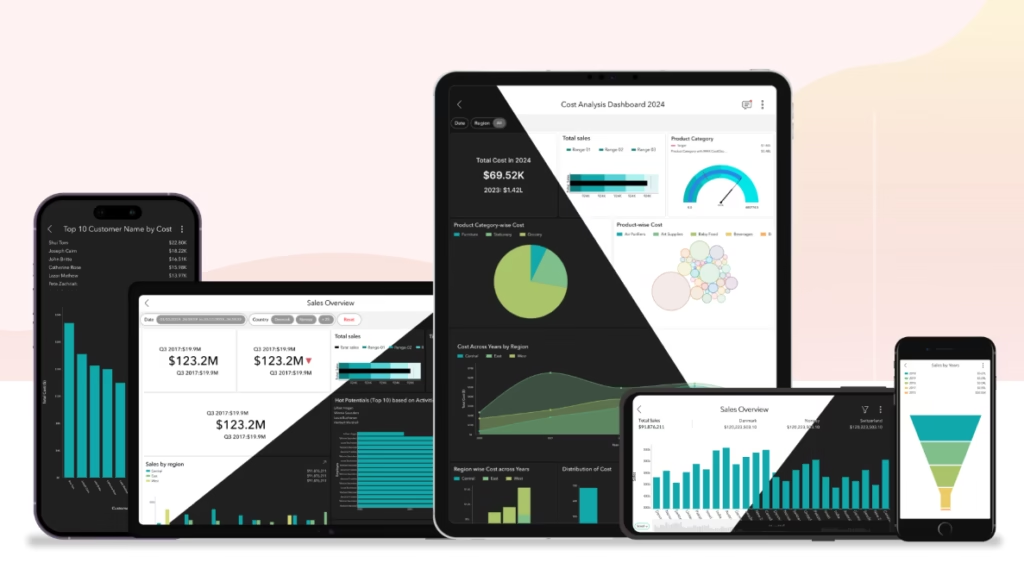
Zoho Analytics offers official mobile applications for iOS and Android devices.
The applications allow users to access reports, dashboards, and alerts in real-time. They're functional for visualization and mobile tracking, ensuring SME managers can make quick decisions regardless of where they are.
Support, Onboarding Process, and Account Management
Zoho Analytics support is scalable and depends on the contracted plan.
- Training/Onboarding Materials: Zoho offers complete documentation, webinars, tutorials, and an online support center. The vast community library and multilingual resources facilitate autonomous learning.
- Customer Success / Account Management: Direct support depends on the purchased plan. Higher plans include priority support and, in some cases, guided onboarding.
- Suitability for SMEs with Little Technical Experience: The drag-and-drop interface makes the learning curve much smoother than tools like Tableau or Cognos. It's one of the most SME-friendly solutions with little technical BI experience.
Ease of Use / UX
The interface quality is high, modern, and designed for productivity. The learning curve is low to medium.
Recent updates have also improved the experience for users with diverse accessibility needs. A dedicated accessibility section allows customization of link highlighting, cursor size, font size, and color contrast, alongside a complete list of keyboard shortcuts. Organizational features such as view tagging by team, department, or project help users navigate large workspaces more efficiently.
The use of drag-and-drop and automatic report generation allows an SME to quickly obtain value from it. A user without experience can start creating their first functional dashboards in less time than with leading visualization platforms. The design is clear and not overwhelming, despite the number of features.
Pricing and Plans
Zoho Analytics is one of the most affordable and transparent BI solutions on the market for SMEs.
- Free Version or Trial: Offers a 15-day free trial on paid plans.
- Subscription Plans: Paid plans are clear, scalable, and based on number of users and analyzed data rows. Prices are public, facilitating cost planning for SMEs.
- Paid Plans: Start from a base rate (e.g., USD 22/month for 2 users with annual billing) and scale for companies with higher data volume.
- Value for SMEs: Excellent value for money and licensing model flexibility make it a very attractive option. ROI is obtained quickly thanks to ease of integration and reporting automation.
Case Study
Churn Detection and Alert Automation in a B2B Services Consultancy
Context: A B2B services consultancy used Zoho CRM and needed a way to link clients' financial performance with feedback they gave through emails and calls. Their goal was to detect dissatisfied clients before they canceled contracts (churn).
Use of Zoho Analytics: The consultancy integrated Zoho Analytics with Zoho CRM to centralize all information.
- Data Integration: Billing and support metrics (open tickets) were combined in a single dashboard.
- Text Analysis with Zia: The system was configured to analyze support emails, detecting negative sentiment and critical themes.
- Anomaly Detection and Alerts: The system was configured so the Zia assistant would trigger an automatic alert if an important account had low billing volume and high number of negative interactions in the last month.
Result: Management could act quickly with clear reports combining customer voice with financial and operational metrics in a single dashboard. This allowed the customer success team to intervene proactively with at-risk accounts, reducing churn rate by 8% in the first quarter.
Zoho Analytics vs Alternatives
Zoho Analytics offers a great balance between ease of use, integration, and price. Below, we compare its strengths and weaknesses against its main alternatives, with focus on Tableau.
| Alternative | Main Emphasis | Alternative Pros | Alternative Cons |
| Tableau | Visualization / Deep Exploration | Leader in ad hoc visual exploration and graphic quality. AI-powered analytics through Tableau Agent (conversational assistant) and Einstein Discovery (predictive models; requires Salesforce org and specific licensing). | Much higher cost. Higher learning curve. Less all-in-one integration. |
| Power BI Microsoft | Ecosystem and Affordability | Excellent value for money. Best option if already heavily using Microsoft 365 ecosystem. | Strongest value is tied to the Microsoft 365 and Fabric ecosystem; less versatile outside it. Does not offer an integrated business suite like Zoho One. |
| IBM Cognos Analytics | Predictive / Governance | Superior in predictive analytics (advanced forecasting) and rigorous data modeling for financial purposes. | Greater complexity and initial investment. Natural language assistant only works in English. |
| Medallia | CX Suite / Sentiment Analysis | Leader in omnichannel text analysis (emotion detection in feedback). Complete Customer Experience platform. | Much more expensive and not a general-purpose BI tool like Zoho. |
Compare Zoho Analytics vs Tableau: Zoho Analytics is superior in ease of use, cost (much more affordable), and its value as an all-in-one BI solution integrated in a business ecosystem (Zoho). Tableau is superior in visualization power and large-scale interactive data exploration.
FAQs
Is Zoho Analytics good for SMEs?
Yes, Zoho Analytics is an ideal and highly recommended solution for SMEs thanks to its affordable price, drag-and-drop interface ease of use, and powerful integration with other Zoho business applications.
How good are Zoho Analytics' AI features in multiple languages?
Zoho's AI features (Zia) are good for everyday reporting tasks, as it responds to natural language questions in multiple languages and detects anomalies. It's robust enough for an SME's basic predictive analysis needs.
What are the best alternatives to Zoho Analytics?
The best alternatives depend on the main need: Power BI Microsoft (if seeking affordability and Microsoft ecosystem) and Tableau (if prioritizing visualization and large-scale data exploration).
Still weighing up Zoho Analytics?
See how it compares with the other tools we've reviewed in AI for Analytics.