

Granola Review
A polished, no-bot meeting notepad that enhances how teams capture and act on conversations.
The no-bot transcription is its most distinctive advantage, eliminating the friction of meeting bots while still producing high-quality, AI-enhanced notes. The workflow is intuitive: take rough notes during a meeting, and Granola combines them with the full transcript to generate structured output in seconds. The chat lets users ask questions within or across meetings, and Recipes provide reusable prompt templates that turn meeting content into emails, specs, briefs, and more.
Additionally, Granola lets external AI tools like Claude, ChatGPT, and Cursor access meeting notes directly, extending Granola's value well beyond its own interface. The free tier is functional enough for proper evaluation, and the Business plan is competitively priced for what it offers.
On the limitations side, speaker identification can be inconsistent in larger meetings, there is no audio or video recording, and the app interface is English-only. There is no web version, which is a blocker for users who cannot install desktop software. Support response times have been described by some users as slow for technical issues.
Our recommendation: an excellent choice for product teams, sales professionals, and anyone in meeting-heavy roles who wants to stay present in conversations without sacrificing documentation quality. Teams that need audio playback or a fully localized interface should evaluate these limitations before committing.
Averaged from the breakdown below
- Product teams and professionals in meeting-heavy roles who need structured notes without the distraction of manual documentation.
- Sales teams that want to capture call details, analyze conversations for patterns, and generate follow-up content directly from meetings.
- Startup teams juggling investor calls, customer discovery, hiring interviews, and internal syncs where losing context is costly.
- Teams already using AI tools like Claude, ChatGPT, or Cursor that want meeting context to flow into their existing workflows via MCP.
- Teams that require audio or video recordings of meetings for compliance or playback purposes.
- Organizations that need precise speaker attribution in large multi-participant meetings.
- Users who cannot install desktop software on their work devices and need a web-based solution.
Key Features
- AI-enhanced meeting notes: combines the user's rough notes with the full meeting transcript to produce structured summaries with key points, decisions, and action items.
- No-bot transcription: captures audio directly from the computer's system audio rather than joining the call as a bot, making it invisible to other participants.
- Granola Chat: an AI chat layer for asking questions about a single meeting, a folder of meetings, or across all meetings. Also generates documents such as follow-up emails, product specs, Slack messages, proposals, and briefs.
- Recipes: reusable prompt templates that automate common post-meeting tasks. Users can create their own, share them with their team, or browse a public library of community and expert-contributed recipes.
- Customizable note templates: pre-built and custom templates for different meeting types such as customer discovery calls, user interviews, or one-on-ones.
- Custom vocabulary: users can load company-specific terms, brand names, and jargon to improve transcription accuracy for words the default model might misrecognize.
- Shared folders: collaborative spaces where teams can organize and access meeting notes together.
- One-click sharing: notes can be shared directly to platforms the team already uses.
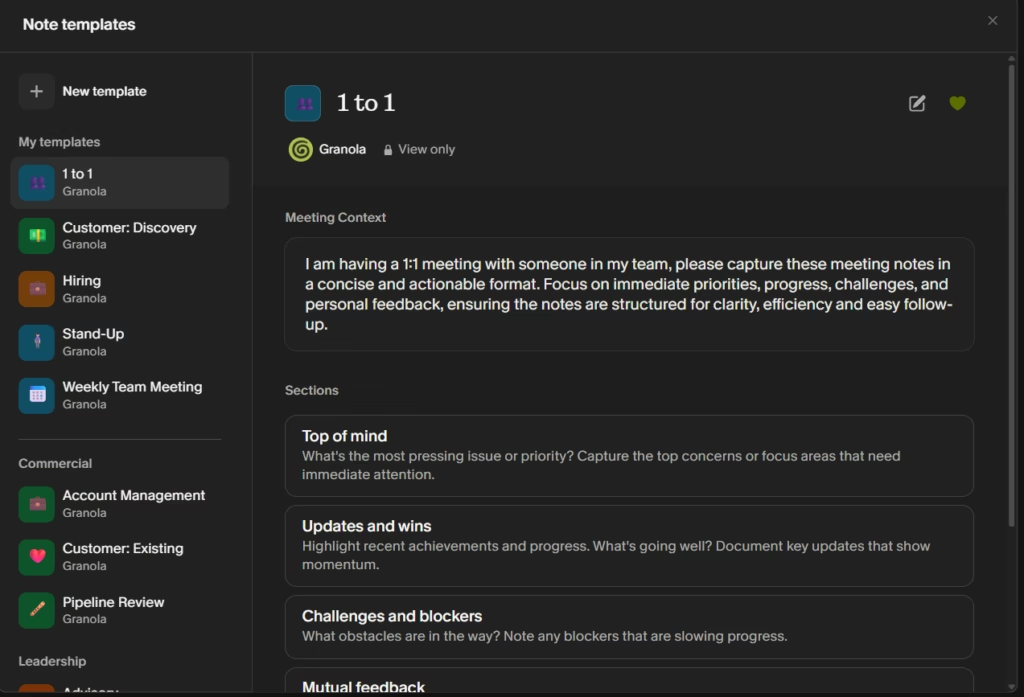
These features allow an SME to transform meetings from unstructured conversations into documented, actionable records. A team that runs dozens of client calls, internal syncs, and stakeholder reviews per week can use Granola to ensure nothing falls through the cracks without changing how they run their meetings.
AI Functions
- Note enhancement: after a meeting ends, the AI processes the transcript alongside the user's raw notes to generate a clean, structured summary organized into decisions, action items, and key discussion points.
- Contextual chat: Granola Chat uses the meeting transcript and notes as grounding context to answer questions, generate documents, and extract insights. It can operate within a single meeting or search across the user's entire meeting history.
- Recipe execution: Recipes leverage AI models (standard or thinking models for complex analysis) to run user-defined prompts against meeting content, enabling automated feedback extraction, coaching analysis, assessment generation, and more.
- AI model selection: Granola uses providers such as OpenAI and Anthropic for summarization and chat. Business and Enterprise plans include access to advanced thinking models. Users cannot bring their own models at this time.
- Multi-language AI: summaries can be generated in the same language as the meeting transcript (Auto mode) or always in English, regardless of the transcription language.
The key to Granola's AI approach is the combination of user notes and transcript. The AI anchors its output to what the user found important enough to note down, producing summaries that are more relevant and actionable than transcript-only tools.
Integrations
Granola offers direct integrations with a focused set of tools commonly used by SMEs:
- CRM: HubSpot, Attio, Affinity.
- Collaboration: Slack, Notion.
- Automation: Zapier (enabling connections to a broader ecosystem of tools).
- AI tools via MCP: Claude, ChatGPT, Cursor, Claude Code, and any other MCP-compatible client.
The MCP integration is particularly noteworthy. By exposing meeting notes through the Model Context Protocol, Granola allows users to reference their meeting context from within external AI tools without copy-pasting. A developer working in Cursor can pull from a sprint planning discussion; a product manager in Claude can draft a spec grounded in a discovery call — all without leaving their current environment.
The available information does not mention a public API for developers on the free tier. Business plans include personal API access, and Enterprise plans offer enterprise API access.
Data Security and Compliance
- SOC 2 Type 2 compliant (achieved July 2025). GDPR compliant with a Data Processing Agreement available upon request. Penetration testing completed in 2025.
- Audio is not stored. On the desktop, transcription occurs in real time. On the iPhone, temporarily cached audio is used for transcription and then discarded. Only transcripts and notes are retained.
- Notes are private by default. Users control sharing and can delete individual notes or request deletion of all their data at any time. Account deletion removes all data within 30 days.
- Third-party AI providers (OpenAI, Anthropic) are not permitted to use customer data for model training. Granola trains on anonymized user data to improve the product, but individual users can opt out in Settings. Enterprise plans have this disabled by default.
- SSO is supported across a wide range of providers, including Okta, Entra ID (Azure AD), Google Workspace SAML, JumpCloud, Oracle, Auth0, and others. Available for enterprise workspaces with 50 or more users.
Additionally, all data is stored in a US-hosted AWS Virtual Private Cloud, encrypted at rest and in transit, and backed up daily.
Language – Customer Support and Interface
Granola's customer support channels are not detailed extensively in the available information, but users can reach the team directly, and Enterprise plans include priority support. The in-app help chat offers multilingual support, including Spanish and other languages, which provides an accessible channel for non-English-speaking users. Some user reviews note that support response times can be slow or generic, particularly for technical issues like audio configuration or OS conflicts.
The app interface — menus, buttons, and settings — is available in English only. All documentation and help center content are also in English.
AI Language
Granola supports multi-language transcription on desktop (macOS and Windows) in English, French, German, Spanish, and others. On the app, additional languages are supported.
On desktop, the multi-language transcription setting allows switching between supported languages within the same meeting, and Granola will transcribe all of them. On iPhone, the app analyzes the audio and selects a single language for the entire meeting, so it works best when participants stick to one language.
AI-generated summaries can be configured to always output in English or to automatically match the majority language of the transcript. Users can also ask the chat to generate translations of specific quotes from the transcript.
Multi-language transcription does not yet support internal jargon, so company names and industry-specific terms may not be transcribed accurately when using this mode. For meetings primarily in English, the standard English transcription mode offers the best quality.
Mobile Access (iOS)
Granola has a dedicated iPhone app designed for in-person meetings. The desktop app covers virtual meetings across all platforms (Zoom, Meet, Teams, and others).
The available information does not mention an Android app, a web app, or iPad support. The absence of a web version has been flagged by users as a notable limitation, particularly for those who cannot install software on managed work devices.
Support, Onboarding, and Account Management
- Installation is straightforward on both desktop and iPhone. After downloading, Granola connects via Google Workspace or Microsoft login and integrates with the user's calendar.
- An onboarding questionnaire collects basic context about the user's role, company type, and how they discovered the tool, and an interactive chat walks you through all the basic functions.
- The user must manually start Granola for each meeting — it does not auto-join or auto-record. This is a deliberate design choice that keeps the user in control.
- Enterprise plans include centralized user management, org-wide auto-deletion periods, admin controls for sharing and API access, and the ability to enforce model training opt-out across the entire team.
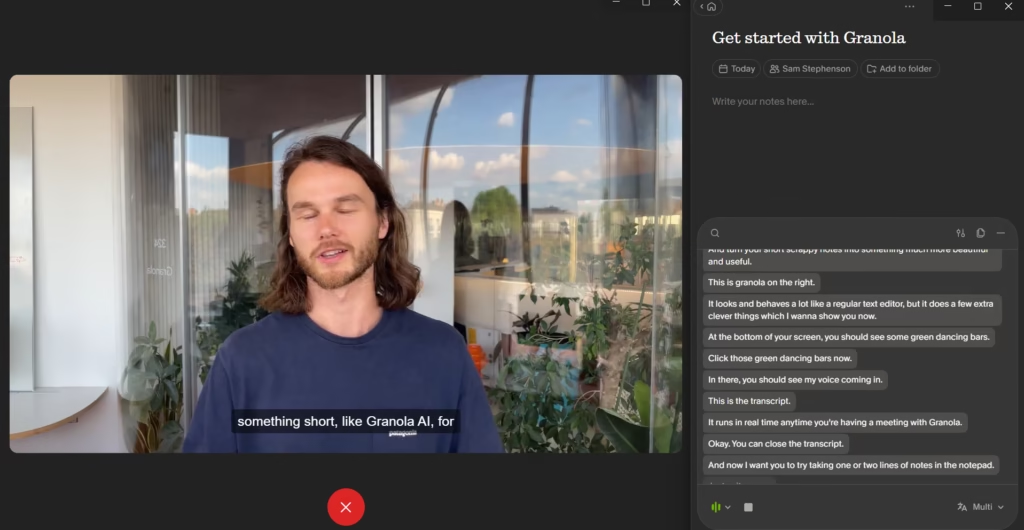
User reviews consistently describe initial setup as fast and uncomplicated, with several noting it took under 10 minutes.
Ease of Use / UX
The experience feels similar to familiar tools like Apple Notes or Notion: you simply write in a clean editor, and the AI quietly enhances your notes in the background, without any complex dashboards or configuration screens getting in the way.
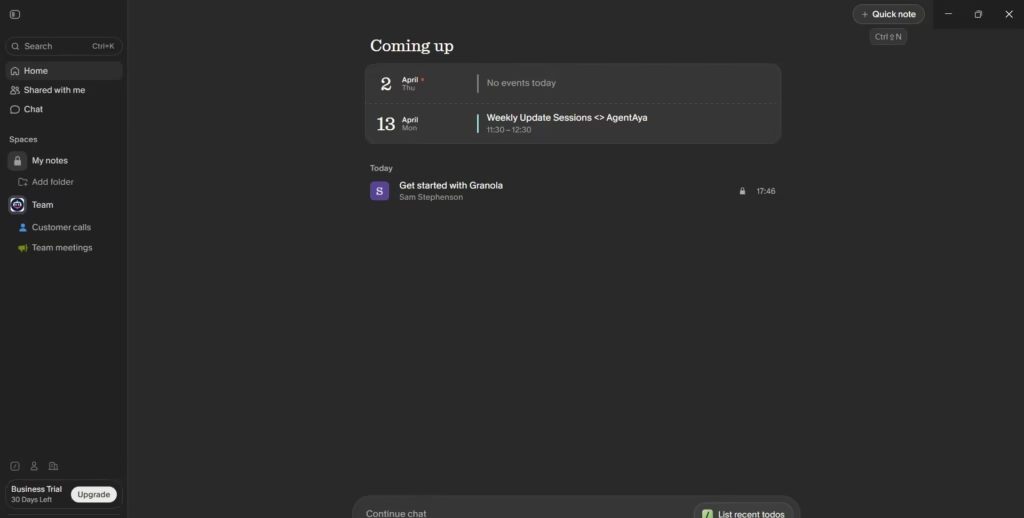
The core workflow requires minimal learning: start Granola, join a meeting, take rough notes, and let the AI enhance them when the meeting ends. More advanced features like Recipes, custom vocabulary, and Chat across meetings require some exploration but are well-integrated into the main interface.
Automated consent messaging (currently macOS only, for Zoom and Google Meet) lets users notify meeting participants that Granola is active, though the feature requires a system permission to control window focus. This option is found under Settings > Labs.
An SME could realistically deploy Granola across a small team and see results from the first day, with virtually no training required.
Prices and Plans
Granola offers three tiers:
- The Basic plan (free) includes AI meeting notes, limited meeting history, AI chat within and across meetings, shared folders, customizable templates, multi-language support, and the ability to opt out of model training.
- The Business plan is priced per user per month. It adds unlimited meeting notes and history, access to advanced AI thinking models, integrations with Attio, Notion, Slack, HubSpot, Affinity, and Zapier, centralized billing and user management, MCP integration, and personal API access.
- The Enterprise plan is priced per user per month (higher tier). It includes everything in Business, plus enterprise-grade security and admin controls, SSO, priority support and usage analytics, enterprise API access, org-wide auto-deletion periods, admin controls for sharing and API access, org-wide model training opt-out, and an org-wide notification feature (pilot) that alerts meeting participants when Granola is being used.
Granola also offers a startup program (one year free of Business for startups with fewer than 30 employees at pre-seed or seed stage) and a student program (12 months free). The company contributes 1.5% of subscription revenue to CO₂ removal through Stripe Climate.
Case Study
A small B2B software company with a growing sales team was struggling to keep its CRM up to date and its task board organized after meetings. Sales reps would finish client calls and then spend time manually logging summaries into Attio, copying action items into Linear, and sending follow-up notes to the team on Slack. Details were often missed, CRM records lagged actual conversations, and tasks from meetings would slip through the cracks.
After adopting Granola with its Zapier integration, the team set up two automated workflows. The first analyzed meeting notes shared from Granola, extracted tasks, and automatically created issues in Linear with detailed descriptions based on what was discussed — so every team member knew exactly what to act on without chasing context. The second used a folder-based trigger: every time a note was added to a client folder in Granola, Zapier sent a structured summary of that meeting directly to the corresponding record in Attio, keeping the CRM current without any manual data entry.
The team used Granola's pre-built Zap templates to get started quickly and later built custom workflows for their hiring pipeline and product feedback loops. Within weeks, the post-meeting routine that used to take each rep significant time every day was almost entirely automated. The CRM reflected what was discussed, the task board stayed current, and the team could focus on selling rather than documenting.
Granola vs. Alternatives
It is worth noting that Granola and Wispr Flow solve fundamentally different problems, even though both involve AI and text generation. Granola is a meeting notepad that transcribes conversations and enhances notes after a meeting ends. Wispr Flow is a real-time voice dictation tool that converts speech into formatted text inside any application. An SME could use both tools in a complementary way: Granola to capture and process meeting content, and Wispr Flow to dictate the follow-up emails, documents, and messages that come out of those meetings.
| Feature | Granola | Wispr Flow |
|---|---|---|
| Core use case | Capturing, structuring, and acting on meeting content | Writing faster by speaking instead of typing |
| AI enhancement | Combines user notes with transcript to produce structured summaries | Edits dictation in real time (removes filler words, formats lists, adjusts tone) |
| Bot-free operation | Yes (captures system audio, no bot joins the call) | Not applicable (not a meeting tool) |
| Chat / Q&A | Yes (ask questions within or across meetings) | No |
| Reusable prompts | Yes (Recipes) | Yes (Snippets for frequently used text) |
| Custom vocabulary | Yes (boost recognition of jargon and names) | Yes (personal dictionary with auto-learning) |
| Integrations | HubSpot, Attio, Affinity, Slack, Notion, Zapier, MCP | Universal (works in any text field via OS-level layer) |
| Transcription languages | 10 on desktop, 17+ on iPhone | 100+ (7 at advanced level) |
| Mobile app | iPhone | iPhone and Android |
| Security certifications | SOC 2 Type 2, GDPR | SOC 2 Type II, ISO 27001, HIPAA |
| Free tier | Yes (limited meeting history) | Yes (weekly word limit) |
Granola is the better choice for teams that need to capture, organize, and act on meeting content — turning conversations into structured notes, searchable records, and follow-up documents. Wispr Flow is the better choice for individuals who need to write faster across all their applications, from email and messaging to code editors and documentation tools.
FAQs
Does Granola add a bot to my meetings?
No. Granola transcribes by capturing the computer's system audio directly, without adding a bot or any visible participant to the call. Other meeting participants will not know Granola is being used unless the user enables the automated consent messaging feature or notifies them separately.
Is Granola free?
Granola offers a free Basic plan that includes AI meeting notes, limited meeting history, chat, shared folders, templates, and multi-language support. Business and Enterprise plans are available for teams that need unlimited history, advanced integrations, and additional controls.
Does Granola work with Zoom, Google Meet, and Microsoft Teams?
Yes. The desktop app works with any meeting platform, as it captures audio at the system level rather than integrating with specific platforms.
Does Granola store my meeting audio?
No. Audio is not stored. On desktop, transcription happens in real time. On iPhone, temporarily cached audio is used for transcription and then discarded. Only the transcript and notes are retained.
Can I use Granola on Android or in a web browser?
The available information does not mention an Android app or a web version. Granola currently offers a desktop app (macOS and Windows) and an iPhone app.
Is Granola secure for sensitive business meetings?
Granola is SOC 2 Type 2 compliant, GDPR compliant, and stores all data in encrypted infrastructure within a US-hosted AWS environment. Third-party AI providers are not allowed to train on user data. Users can opt out of Granola's own anonymized model training, and Enterprise plans have this disabled by default.
Still weighing up Granola AI?
See how it compares with the other tools we've reviewed in AI for Transcripts.