
Navari Review
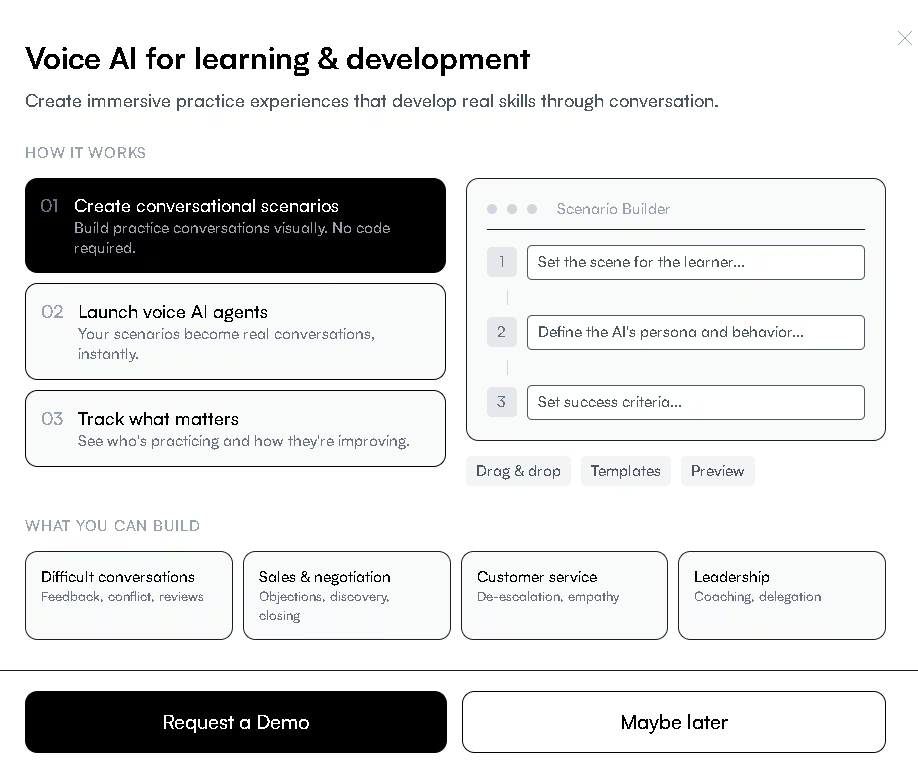
Navari turns professional communication into spoken practice, letting people rehearse pitches and difficult conversations out loud with an AI coach that gives feedback.
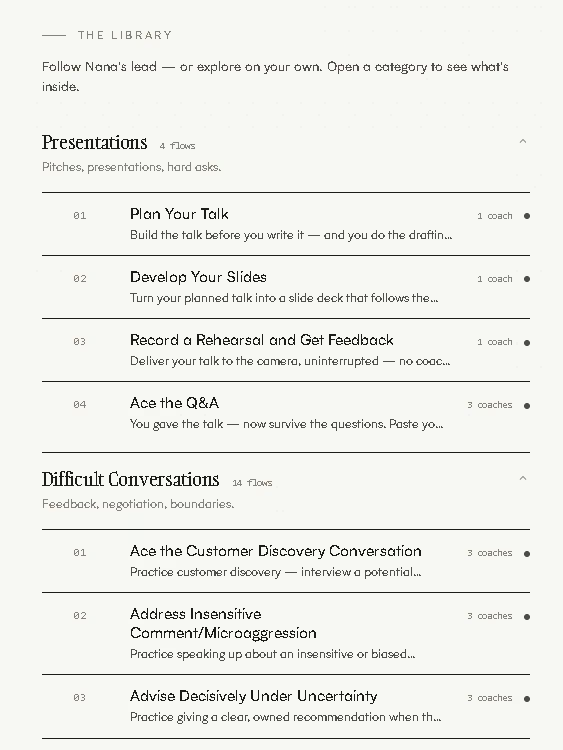
This platform tackles a problem almost no one deliberately trains for: speaking well under pressure. Its library covers presentations, negotiations, difficult conversations, interviews, and short one-minute exercises, all practiced out loud with feedback across specific dimensions. The backing of a communication expert from NYU Stern shows in the quality and design of the lessons.
That said, this is a very recent tool. It has no help center yet, its terms of use pages are unavailable, and it does not publish pricing. The good news is that the demo is free and requires no credit card, so you can browse the lessons, watch the videos, and see how well the voice agent understands you before deciding. AgentAya's recommendation is straightforward: it is well worth trying, especially if you want to sharpen your spoken communication, with the understanding that this is a young product worth watching as it matures.
Averaged from the breakdown below
- Founders and SME teams that need to present, negotiate, or sell to international clients, suppliers, or investors.
- Highly skilled technical professionals (engineering, cooking, data analysis, specialized trades) who struggle to communicate in interviews or with their team, their bosses, or their partners.
- Native English speakers who want to lift their professional communication to a clearer, more persuasive level.
- Anyone looking to learn English from scratch: the platform trains spoken communication; it does not teach grammar or basic vocabulary.
- Teams that need deep integrations with their CRM, calendar, or internal systems.
- Anyone who needs public rates to make a decision without contacting the vendor first.
Key Features
- A practice library organized into five categories: presentations, difficult conversations, interview preparation, quick exercises, and a weekly retro or planning session.
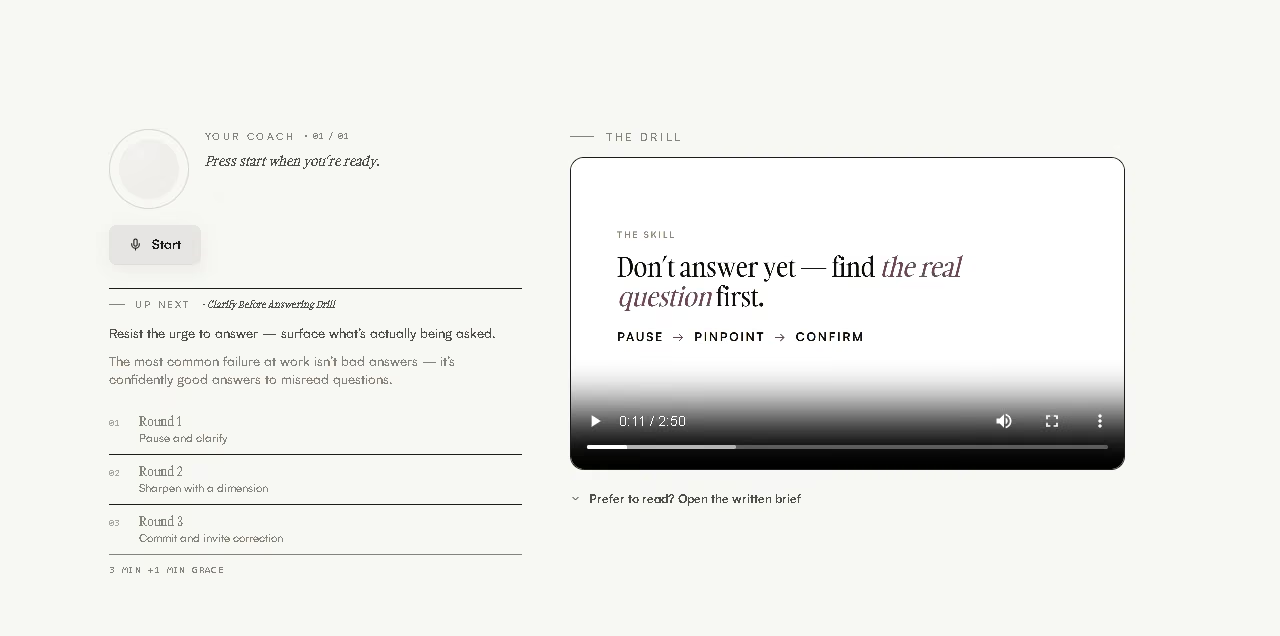
- Spoken simulations with counterparts playing real roles, from a skeptical executive to an upset customer.
- On-camera rehearsal recording, evaluated against the audience and message you specify, with the video deleted once you finish.
- A progress dashboard with scores, trends, and notes from each session.
- A personal profile the system consults before each practice, covering details such as time zone, pronouns, and topics you prefer to avoid.
- Export of a planned talk to an editable PowerPoint file, with your script in the speaker notes.
For an SME, this feature set saves something more valuable than money: it prevents failed conversations. Rehearsing an investor presentation, a supplier negotiation, or a difficult client call before it happens reduces the risk of losing an opportunity over a communication problem rather than a product problem. Bringing planning, rehearsal, and evaluation together in one place also cuts down the time currently scattered across several tools.
AI Features
- AI agents that respond in real time and adjust their attitude based on how you speak: they soften if you handle the situation well and harden if you escalate the conflict.
- A voice engine that, in the articulation exercise, evaluates pronunciation at the level of individual sounds and pinpoints exactly what to fix.
- Structured evaluation that scores specific dimensions depending on the type of practice: message clarity, listening and reframing, objection handling, or composure, among others.
- Personalization based on the context and goal you choose at the start, so the suggested lessons match your role and your objectives.
- An AI mentor, Nana, who remembers what you worked on between sessions and moves your development focus forward week by week.
The truly intelligent part is not that the tool talks, but that it reacts. A video or a script never contradicts you; this platform's counterpart does, and it shifts its tone based on your performance. That ability to adapt live, combined with sound-by-sound pronunciation analysis, is what sets it apart from a recorder or a conventional text assistant.
Integrations
- Export to a fully editable PowerPoint file, generated from the slide development flow.
- Import of that file into Canva to polish its design once the content is finished.
- No documented public API or connectors with CRMs, calendars, or payment systems.
The company lists "seamless integration" among its value propositions, but gives no details on connectors with widely used tools such as WhatsApp.
Data Security and Compliance
Users keep control of their conversations, and the platform states that the data belongs to them. Transcripts support three configurable retention policies: keep them indefinitely, archive them after a chosen period (the text transcript is discarded, but scores and progress are kept), or delete them completely and irreversibly once that period ends. Video rehearsals are deleted after evaluation unless you choose to save a copy, which you can later download or delete without a trace.
As you would expect from a recent product, formal documentation is still limited. At the time of this review, the terms and privacy policy pages are not accessible, and there is no information on encryption protocols in transit and at rest, policies on using data to train models, or security certifications.
Language: Customer Support and Interface
Both the interface and customer support operate exclusively in English, with no information confirming support in other languages. For users comfortable in English this creates little friction, but it can be a barrier for anyone starting from a basic level who expects menus, help, and communication in their own language.
AI Language: The Tool Itself
The AI works in English: you listen, respond, and receive your evaluation in that language. It is not a localized solution, and that is precisely the point. Those who get the most out of it are professionals who need to communicate in English in real business settings and want to rehearse in a safe environment before doing it in front of a client or an investor.
Because it is built for live speech, with an engine that evaluates pronunciation down to the individual sound, it is especially useful for non-native English speakers whose priority is, above all, being clearly understood. The stated goal is not just to get you speaking more English, but to get you communicating more clearly, which is valuable even for native speakers.
Mobile Access
Practice happens inside the application, which requires an active microphone and, depending on the browser, may prompt you to enable the corresponding permission in your settings. Recording rehearsals also requires a camera, with up to five minutes recorded in the app or an uploaded clip of up to six minutes.
Support, Onboarding, and Account Management
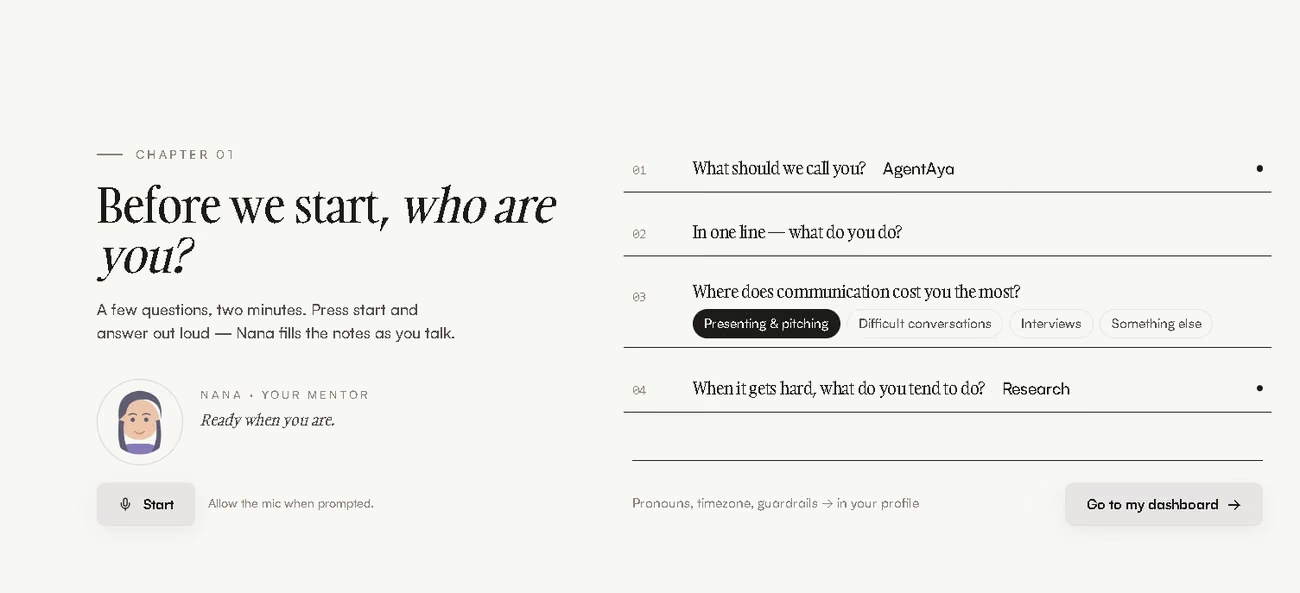
Onboarding is conversational and happens by voice: in the first step, the mentor Nana asks a few questions (what to call you, what you do, where communication is hardest for you, and what you usually do when things get tense) and takes notes while you speak, all in about two minutes. Those answers feed your profile and shape the lessons you see afterward. Account management revolves around that profile and a dashboard that tracks completed sessions, finished flows, and last activity.
Because it is a new tool, it does not yet offer a help center or extensive training materials, and the only documented support channel is email (hello@navari.ai). Even so, its simplicity works in favor of SMEs with little technical experience: there is almost nothing to configure before you start practicing.
Ease of Use / UX
The experience is built for a fast start. The interface is simple and direct, the mentor guides the way when you would rather have someone suggest where to begin, and each flow tells you up front how long it takes, how many rounds it has, and what gets evaluated. Despite being a recent product without a help center, it is very intuitive, so no usability issues come up: the only real technical requirement is an active microphone.
Speaking out loud can feel intimidating at first, and that is exactly the point of this tool. The controlled discomfort of practicing in front of an AI is far milder than the discomfort of stumbling in front of a real investor. An SME can get value from the very first session.
Pricing and Plans
At the time of this review, no pricing or plans are published, and the legal pages are not accessible. Based on the available information, everything points to a pricing model customized by team size, number of users, and the scope of the training program, which is common among enterprise-oriented L&D platforms. The practical way to find out the cost is to request a demo or write to the contact email.
That trial access works in the user's favor. The demo is free and asks for no card details: it lets you browse all the lessons and even watch the videos, though not run the live practices. That is more than enough to judge the quality of the content and decide whether to move forward.
Case Study
As a new tool, Navari has no documented cases yet. To show how it works in practice, picture a professional who is an expert in their field but not in communication, and who needs to close that gap to take the next step. Take a technical lead at a small data analysis company: they know their subject inside out, but a recent promotion to team leader now means presenting results to management and giving feedback without creating friction. Over a few weeks they work through the feedback and objection handling flows, plus the articulation exercise, so their pronunciation never gets in the way of their clarity. By the time the real meeting comes around, they have said those phrases out loud many times, and the payoff is not just smoother delivery but a leader their team and management understand and take seriously.
FAQs
Is Navari good for SMEs?
Yes, especially for SMEs that need to communicate confidently with clients, suppliers, or investors. It lets you rehearse presentations, negotiations, and difficult conversations out loud and receive structured feedback, which is very valuable for small teams without access to expensive training.
Is it useful if I have a strong accent in English?
It is built for live speech, and its articulation exercise evaluates pronunciation at the level of individual sounds to show you what to adjust. The goal is not to erase your accent, but to help you be understood more easily.
How much does it cost and how do I try it?
There is no public pricing; the most likely arrangement is a customized model based on team size and scope, available through a demo or by email. The demo is free and asks for no card: it lets you see the lessons and the videos, though not run the live practices.
What are the best alternatives to Navari?
Yoodli, if you want an already established voice practice platform with public pricing and enterprise deployment. Sider, if your real need is not practicing public speaking, but researching, writing, and automating tasks in the browser with source backing.
Still weighing up Navari?
See how it compares with the other tools we've reviewed in AI for Training.