

VideoWeb AI Review
VideoWeb AI is a browser studio that turns prompts into video, images and royalty-free music, running on a credit system with a free daily allowance.
Above all, this tool speeds up creative production. Variety is its greatest strength: it packs a huge number of video, image and music models into an intuitive interface, ideal for exploring ideas, spinning up short social videos and creating images for presentations with no technical background. A marketing team will use it for quick drafts to refine later; a professional, a student or a small business owner will cover their own needs without leaning on anyone else.
Among its free tools is an image generator that works well but keeps you waiting. The main platform runs on credits, and it helps to know how the spending breaks down: images use a moderate amount and go a long way, while video costs far more. The gap runs so wide that the free plan simply cannot sustain video production. The tool also will not replace a professional editor when you need fine-grained consistency or frame-by-frame control, and paid plans hold back watermark removal and private generations. Our recommendation: an outstanding option for concepts, drafts and low-cost social content, and a weaker fit if you need it to connect with your other business tools, want guaranteed privacy on the free tier or expect agency-level polish.
Averaged from the breakdown below
- Solo founders and freelancers who need social media content without a design team.
- Small marketing teams looking for quick drafts and several creative directions to choose from.
- Students, office workers and small business owners putting together presentations, slides or supporting images.
- Anyone who wants to try many AI models in one place before settling on one.
- Teams that need in-depth editing control, character consistency or frame-by-frame adjustment.
- High-volume video production on a tight budget (credit consumption skyrockets).
- Businesses that need integrations with CRM, calendars, messaging or an API of their own.
- Organizations with strict requirements for guaranteed privacy on the free tier or formal security certifications.
Key features
- An all-in-one studio in a single place: video, image, music and effects, with no switching between different platforms.
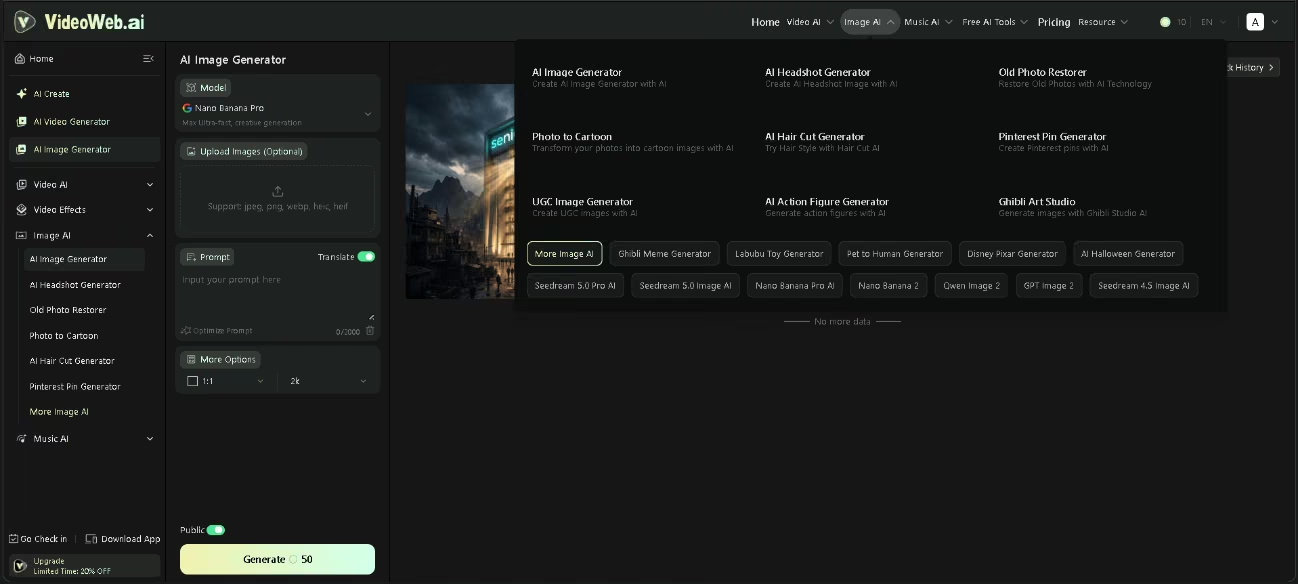
- Access to multiple models: a very broad catalogue of video models (Kling, Seedance, Veo, Sora, Runway, Luma, Hailuo, Pixverse, Vidu, Wan, Happy Horse, Mochi and Hedra, among others), image models (Nano Banana, Seedream, Qwen, GPT Image, Imagen and Flux) and music models (Suno), with the newest releases from each family added frequently and the option to switch models depending on the style or quality you are after.
- Video creation modes: text to video, image to video, photo to video, reference to video, video to video and a music video generator.
- Effects and template gallery: old photo animation, transformations, talking avatars, dance sequences and plenty of ready-to-use themed templates.
- Free supporting tools: an image generator at no cost, a prompt generator, a background remover, an image describer and format converters, among others.
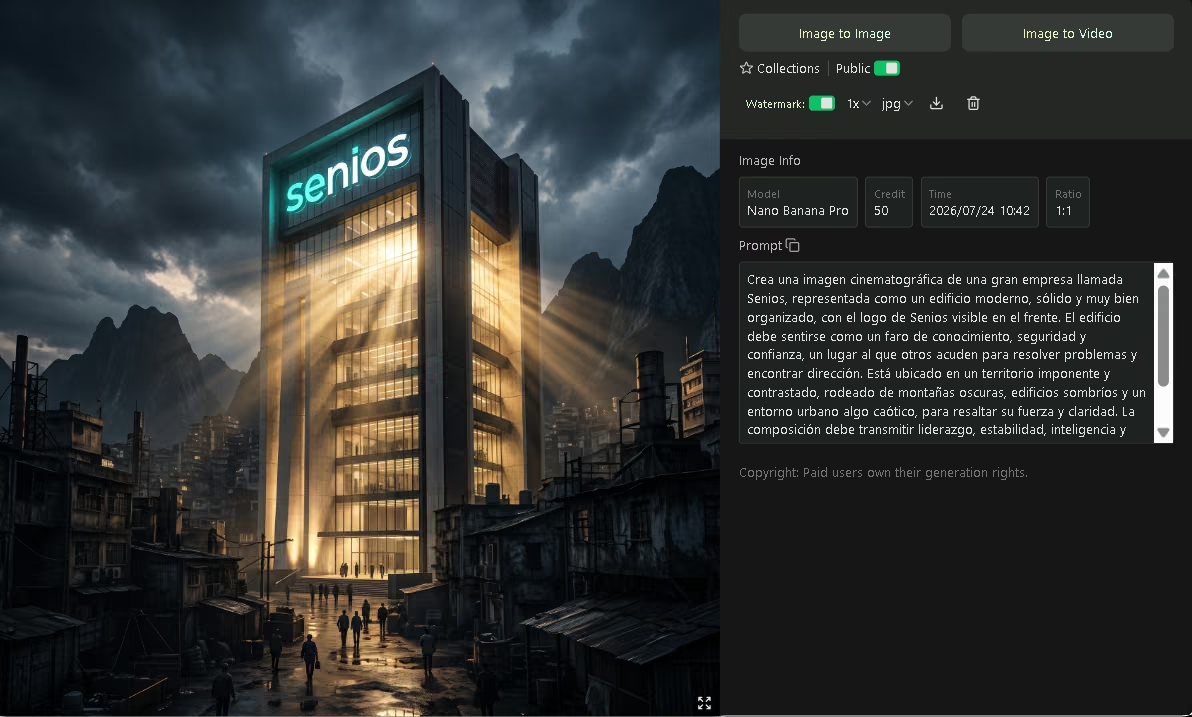
- Details for every generation: it shows the model used, the credits spent, the date, the aspect ratio and the prompt behind it (with the option to copy it), and it lets you reuse an image to create a video or a new image.
- Download in several formats: image export in JPG, WebP or PNG.
For an SME, having all of this in one place means real savings: instead of paying for several subscriptions and juggling separate tools, a small team explores, iterates and produces from a single dashboard, cutting both production time and licensing costs.
AI capabilities
- Generation from natural language: it turns a text description into images or video, reading scene, subject, movement and lighting.
- Image animation: it turns a still photo into a moving clip, with camera movement and dynamism (image to video).
- Style transfer and prompt-guided editing: it applies styles, changes backgrounds, adjusts colors or adds elements from written instructions.
- Original music generation: it creates custom tracks from a description of the feel, the instruments, the rhythm and how the song should develop.
- Prompt optimization: a feature that rewrites and fine-tunes your instruction to improve the result.
What is truly "intelligent" here is the generative interpretation: turning a sentence into a coherent scene with movement and sound. That result depends directly on the quality of the prompt, because without a detailed description the AI will not land on what you had in mind.
Integrations
- Third-party models: its main form of integration is the generative models it gathers (the video, image and music models already described), all reachable from a single account.
- API: VideoWeb does not offer an API of its own. The site links to the APIs of certain models, but those belong to an outside provider and come at a cost.
- Business connectors: there are no integrations with CRM, calendars, payment systems or messaging apps such as WhatsApp.
In practice, VideoWeb AI is a closed, self-contained environment for content creation, not a piece designed to slot into a broader business workflow.
Data security and compliance
Users keep ownership of the content they generate, and subscribers on a paid plan own the rights to their images. Even so, by submitting content the user grants a broad license (worldwide, non-exclusive, royalty-free and sublicensable) to operate, improve and promote the service. At the same time, the site states that it does not collect data from uploaded or created content, and VideoWeb encrypts data in transit. The company declares compliance with Brazil's LGPD, Mexico's LFPDPPP and the European Union's GDPR, and mentions Singapore and Hong Kong regulations, though it publishes no security certifications (such as ISO 27001) and documents no multi-factor authentication. Its terms expressly prohibit sexually explicit, violent and hateful content, fraudulent deepfakes, impersonation, unauthorized face swapping and any material involving minors, and they set a minimum age of 18 (or the local age of majority).
Language: customer support and interface
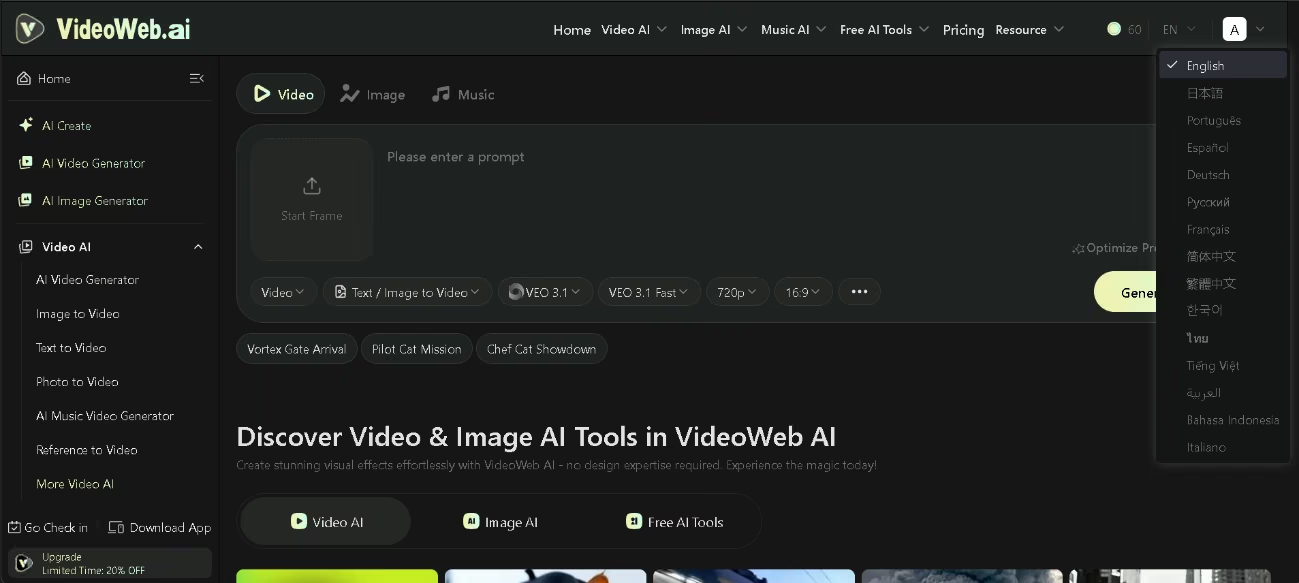
VideoWeb AI is a genuinely multilingual platform. Its interface is localized into fifteen languages, among them English, Portuguese, French, German, Italian and Japanese, so most international teams can work in the language they already use day to day. Support does not stretch to as many languages as some larger platforms offer, but it covers the main ones well.
AI language
The AI features are multilingual as well, handling English alongside a wide range of other languages. That lets users describe their scenes directly in their own language, with no need to translate their ideas first, which lowers the barrier to adoption for teams outside English-speaking markets.
Mobile access
VideoWeb AI has a dedicated mobile app, published as "Happy Video AI" and available for both Android (Google Play) and iOS (App Store). It works as a full creative studio on the phone: it generates video from text or images, creates images, applies effects and produces music, all aimed at individual creators and small teams. There is also a web version you can reach from the phone's browser. The free app carries advertising, and its most recent available update dates from May 2026. It sets out to cover everything from basic to advanced tasks straight from the phone, which makes it fully usable on the go.
Support, onboarding and account management
When you sign up, the platform does not offer a guided onboarding or step-by-step tutorials: you go straight into the tool. To make up for that, there is a blog of articles and news about AI tools, with very useful guides, model comparisons and tips for writing better prompts. Email is the only contact channel; there is no live chat, phone line or account manager. Account management is self-service from the site (billing and cancellation), and refunds are requested by email within the stated window. For an SME with little technical experience, the lack of proactive human support is offset by how intuitive the tool is and by how much reference material is available.
Ease of use / UX
The user experience is one of VideoWeb AI's real strengths. The browser-based interface is clear and approachable from the very first visit, and getting started takes almost no time at all.
The real learning here is not in handling the interface but in making the most of its biggest asset: the sheer variety of AI models it gathers. Before each generation you pick which one to work with, and that choice shapes much of the result, because every model has a different focus and performs better with certain kinds of content. Knowing that landscape is what separates a shot in the dark from an informed decision.
In video, the line-up covers very different goals. For cinematic scenes, with pronounced movement and strong prompt interpretation, Kling delivers high-fidelity results; in that same professional register, Sora (from OpenAI) stands out for its realism and natural movement, while Runway offers fast generation with controls built for professional creators. If you want photorealistic text to video with scene coherence and audio, Veo (from Google) is the benchmark. When visual quality and frame-to-frame consistency come first, Seedance (from ByteDance) and Vidu fit well, the latter with fluid, expressive movement. For realistic, dependable movement, Hailuo turns out consistent results; for short clips with sharp images and flexible styles, Pixverse is a good option; and for animation, video games or augmented reality, Luma points its generation at those uses.
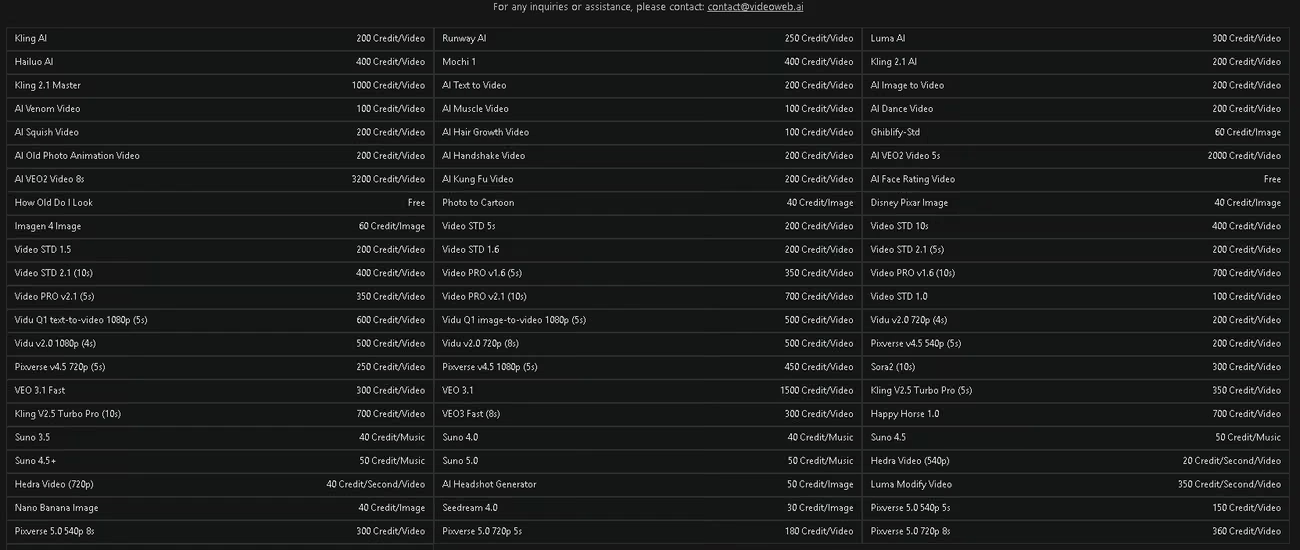
It is the same story with images. Nano Banana serves to generate images from text, edit photos and apply style transfer; Seedream leans toward precise editing, text inside the image and infographics; and GPT Image stands out for its semantic understanding and very accurate rendering. To make comparison easier, the tool shows the credit cost of each model, so you can weigh your options and pick the one that best suits your goal and your budget.
That is also where the main challenge shows up: the number of models and features can overwhelm a beginner, and the risk is less about running into something complex than about getting lost among so many possibilities.
Pricing and plans
VideoWeb AI's pricing is built around a credit system, with several ways in:
- Free plan: starting credits plus credits for daily check-in, basic image generation, a shared generation queue and a short-lived history. It leaves out video generation, video effects, private generations and commercial rights, and downloads come out with a watermark.
- Monthly subscription plans: several tiers with different credit allowances, all of them with unlimited premium features, high-quality generation and effects across video, image and music, a fast generation queue, extended history, private generations, commercial rights and cancellation at any time.
- Annual billing: available at a discount on the month-to-month price.
- One-time credit packages: several sizes with no automatic renewal, carrying the same premium features.
Premium access needs renewal to stay active: credits do not expire while the subscription is running, but they lapse a few months after it ends. Aside from the plans, the tool also offers a handful of free utilities. For a company or a professional, the key is to plan credit use around the type of content, since each model costs a different amount and video demands by far the most credits. It is also worth bearing in mind a restrictive refund policy: the window to ask for one is short, and refunds do not apply once you have used generation resources.
Case study
A family flower shop, handed down from one generation to the next, was competing on social media against large delivery chains with polished ads and budget to spare. Its bouquets had soul, but phone photos were not enough to stand out, and hiring an agency was beyond reach. The owner decided to try VideoWeb AI as an all-in-one studio, with no software to install and no advanced editing to learn.
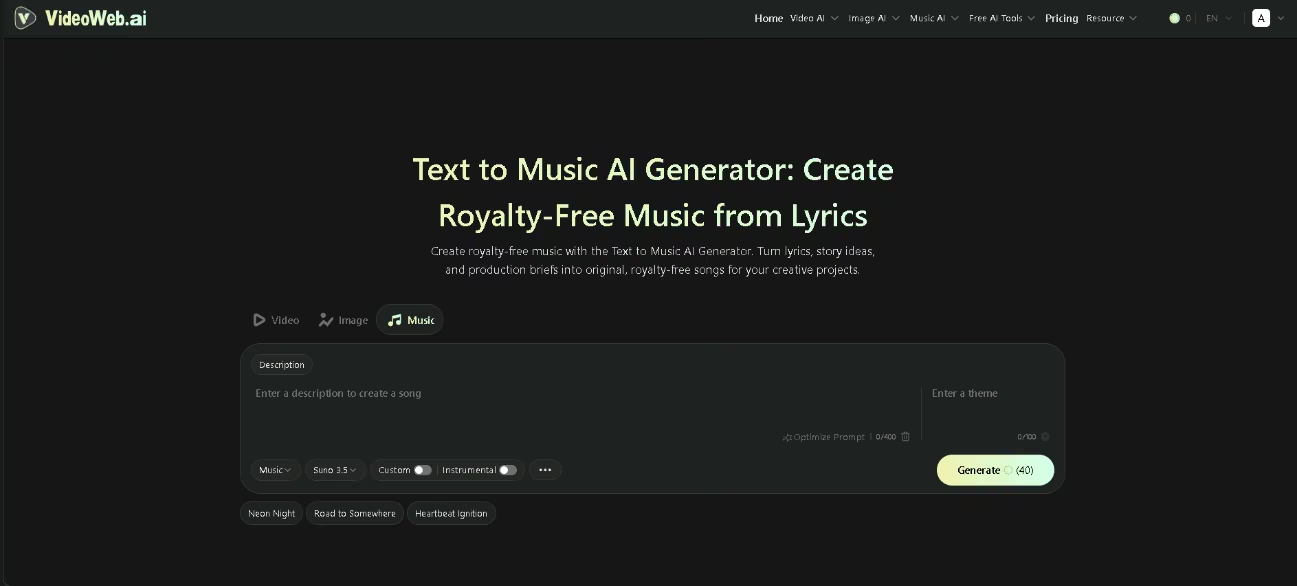
She began with the brand image, using the text to image generator. Rather than a vague instruction, she described the scene in detail: a light wood counter, a bouquet of eucalyptus and seasonal flowers, natural morning light, handmade paper labels and a warm, everyday feel. She tuned the description several times until it came close to what she had pictured, and she used the free generator first to experiment without spending credits. With her chosen image, she applied the image to video feature to add movement through a gentle camera pan, framed for vertical format. Here she planned her spending, knowing that video draws down more credits than images and that starting from her own photo makes generation more expensive. For the audio she turned to music generation with Suno, describing a soft acoustic track that would open calm and build toward a hopeful close; that gave her an original soundtrack made to fit the clip.
The result was a short ad with a coherent image, movement and music of its own, ready to publish. For clean commercial use she needed a paid subscription, which took off the watermark and gave her commercial rights and private generations. With a modest monthly outlay, far below the cost of an agency, she went from a one-off phone photo to content she could present on her social channels. It did not fully replace a professional editor, but for a flower shop that needed to look professional, the leap was enormous.
Videos
VideoWeb AI vs Alternatives
Set against other generative AI tools we have reviewed, VideoWeb AI stands out for gathering many video models in one dashboard and for how easy it is to get going.
| VideoWeb AI | Adobe Firefly | ComfyUI | |
|---|---|---|---|
| Focus | A studio that gathers video, image and music models | Generative AI built into the Adobe ecosystem | Open-source node canvas for orchestrating AI workflows |
| Ease of use | Very high | High, with a curve to master prompts | Low locally, medium in the cloud |
| Models and API | Broad catalogue of third-party models, no API of its own | Adobe's own and partner models, with an API | Multi-model at the user's choice, with an API |
| Commercial use and data | Commercial rights only on paid plans | Safe commercial use, does not train on user content | Users own their output, full privacy when run locally |
| Value for money | Genuinely free images, but video burns through credits fast | Generative credits, includes Adobe apps on higher plans | Free and open source |
| Main advantage | Model variety and a simple start | Commercial safety and an integrated professional workflow | Full control and zero cost when run locally |
| Main limitation | Credits that run out fast and no integrations | Tied to the Adobe ecosystem | Technical barrier and documentation in English |
The right choice comes down to your profile: VideoWeb AI to test many models quickly, Adobe Firefly for those who put commercial safety and the Adobe workflow first, and ComfyUI for technical teams after full control and open source.
FAQs
Is VideoWeb AI a good tool for SMEs?
Yes, especially for freelancers, small teams and businesses that need visual content for social media or presentations without hiring an agency. The intuitive interface, available in Spanish, lowers the barrier to entry. The main thing to watch is credit use on video, which calls for planning.
Is VideoWeb AI a multilingual tool?
Yes. The interface is localized into fifteen languages, including English, Spanish, Portuguese, French, German, Italian and Japanese, and its support covers the market's main languages. In our testing, the AI understands and generates the same quality from prompts in English and Spanish.
Can I use VideoWeb AI videos and images commercially?
Yes, provided you have a paid plan, which is what includes commercial rights, private generations and watermark-free downloads. On the free plan, downloads carry a watermark and generations are not private.
What are the best alternatives to VideoWeb AI?
It depends what you need: Adobe Firefly for safe commercial use and integration with the Adobe ecosystem, and ComfyUI for anyone after full control and open source. VideoWeb AI is still the simplest option for testing many video models in one place.
Still weighing up VideoWeb AI?
See how it compares with the other tools we've reviewed in AI for Videos.