
3 out of 4 AI Design Tools Have This Fatal Flaw (Including Microsoft)
5 min read
Creating visual content for social media no longer requires being a designer. AI design platforms promise to generate ready-to-publish posts in seconds. But do they actually work? Can they write correctly in Spanish?
I decided to put four AI-powered design tools to the test using exactly the same prompt. The goal was simple: see which one generates Instagram posts I could publish without editing. The results surprised me, and not always in a good way.
Methodology
To keep the comparison fair, I used the same prompt on every platform. I asked each one to create an Instagram post promoting a seasonal sale with these specifications:
Theme: "Descuentos de Primavera - 30% OFF"
Requirements:
- Vertical 1080x1350 design (Instagram format)
- Colours: Green #7CB342**, White** #FFFFFF**, Yellow** #FDD835
- Include the text: "Primavera en Descuento" (large headline)
- Include the text: "30% OFF en toda la tienda" (subheading)
- Include the text: "Válido hasta el 30 de abril" (small date line)
- Include spring floral elements
- Style: Fresh, cheerful, modern
- Space for a logo in the top right corner
The tools evaluated were: Canva AI, Microsoft Designer, Freepik and Simplified.
Evaluation criteria
I assessed each Instagram post generator against six core criteria:
- Spelling accuracy
- Compliance with the colour specifications
- Quality of the visual design
- Usability of the final result
- Typographic consistency
- Ease of use of the platform
Results by tool
Canva AI: the undisputed winner
Canva AI gave me four completely different options, and all of them are usable without editing. The spelling is perfect in all four images, and that alone puts it well ahead of the rest.
It didn't follow the colours I asked for exactly. Pink appeared instead of green in one, and different shades in others. But the final result is so professional that it doesn't matter. Every design has clear visual hierarchy, good use of space, and looks like something you would actually publish.
It's as if Canva understood the intent behind the prompt and offered me creative alternatives. Some designs invented extra information (opening hours, fake addresses) I never asked for, but those are editable details, since every image created opens directly in the Canva editor.
Freepik: good design, problematic spelling
Freepik takes second place, but with a critical problem.
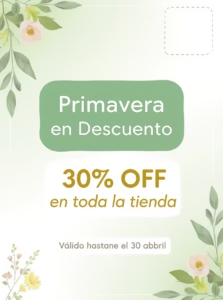
Visually, the design is clean and pleasant. The colours work well together, the flowers look natural, the composition is balanced. It met almost every requirement in the prompt.
But it has spelling errors that make it unusable: it reads "Válido hastane el 30 abbril", with "hastane" instead of "hasta" and "abbril" with a double b. This makes the result completely unusable without manual editing. If you published this as is, your brand would look unprofessional.
The design feels somewhat generic, it could be a template from any shop, nothing memorable. The experience of using it was smooth and fast.
Microsoft Designer: spectacular artwork, destroyed text
The most frustrating of them all.
Visually, they are spectacular. The level of design is very high, with creative flat lay compositions, 3D paper craft, phone mockups, and perfect knolling. All four designs have a visual quality that beats everyone else. The flowers look incredible, the lighting is professional, the colours are right.
If this were a contest of pure visual design, Microsoft Designer would win.
But the text is a mess. I found errors like: "DIESNINS DJINCCNAINS", "SPNNGI ON DSCONINT", "3%0 OF", "VALIAD UNTIL APPRILL 330", "SPRENING ON DILSCOUANKI". It's as if its text AI were completely broken while its design AI performed at a professional level.
The text is so integrated into the design that I can't simply edit it. I would have to rebuild entire elements in Photoshop.
Simplified: too many steps, poor result
This was the tool that took the most effort to test. Problems from the start: I had to set up a brand, colours, fonts, and connect an Instagram Business account. A pile of steps before I could even begin.
And after all that work, the result falls short of expectations:
- It repeated "30% OFF" twice in a row
- The text reads "Primaveraa Diescuento" (with a double "a" and misspelled)
- It says "Válido hasta el al 30 de abril" (with a nonsensical "el al")
- It invented a generic logo that says "Lorgchd" when I only asked for space for my own logo
- It left cut-off text reading "plified" in the corner
- The composition is completely unbalanced
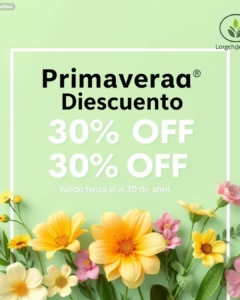
The flowers are realistic, but that doesn't make up for all the other problems. It has more text errors than Freepik, and on top of that, the design doesn't work.
Final comparison: which AI design tool to choose
By goal
- Canva AI: For creating complete, ready-to-publish content. It gives you creative options that work.
- Freepik: For creating the base image. It helps turn a visual idea into reality, but you will have to edit it.
- Microsoft Designer: For visual impact, but not for direct use. Beautiful artwork, unusable text.
- Simplified: It tries to be an all-in-one, but fails at the basics. Neither the design nor the workflow works well.
By user experience
- Canva AI: Fast, intuitive, gives you four options and you're done.
- Freepik: Smooth, visual, it feels like playing.
- Microsoft Designer: Generates beautiful designs that you can't use without extra work.
- Simplified: Structured, bureaucratic, it makes you configure a lot of things before you can start.
By final result
- Canva AI: You get four posts ready to upload, with correct text and professional design.
- Freepik: You get a nice image, but the text has to be corrected manually.
- Microsoft Designer: You get spectacular artwork that you need to rebuild completely in another program.
- Simplified: You get a result that has to be fixed in many ways before you can upload it.
Conclusion
Canva AI was the best AI design tool for social media of the four evaluated. It's the only one that delivered immediately publishable results, with no editing required.
Although it didn't follow the instructions to the letter (it strayed from the specified colours), it showed creative intelligence by offering four professional alternatives with perfect spelling.
By comparison, the other Instagram post generators show critical failures: Freepik has decent design but serious spelling errors, Microsoft Designer has spectacular design but completely illegible text, and Simplified fails on user experience, design and spelling alike.
Ease of use also made a difference. Canva got straight to the point, Freepik was fast and visual, Microsoft Designer produced complex but useless results, and Simplified made me waste time on setup only to deliver a result that doesn't meet the brief.
If you want to create social media content with AI and need results you can publish without editing, Canva AI is currently the most reliable option.