
Firebase for SMEs: Everything You Need to Know Before Choosing Your Development Platform
Firebase is a Google-backed application development platform designed to support the entire app lifecycle: from initial prototyping through publishing, monitoring, and ongoing optimization. It falls under the category of cloud infrastructure platforms (Backend as a Service), offering an ecosystem of over 20 products covering databases, user authentication, web hosting, cloud functions, messaging, analytics, testing, and generative AI tools.
For an SME with a development team, having all these services under one roof makes a significant difference: fewer vendors to manage, less technical complexity, and more time to focus on building the product.
AgentAya Verdict
This is a comprehensive platform for development teams that need to build mobile or web applications with Google-managed infrastructure. Its greatest strength is the breadth of its ecosystem: from real-time databases to generative AI tools powered by Gemini, everything is integrated and backed by Google Cloud infrastructure.
For SMEs with at least one developer or someone with a technical background, Firebase offers a free plan, documentation, and a learning curve that, while steep at first, is offset by the wealth of training resources available. That said, Firebase is not a tool for non-technical users. Software development experience is required to unlock its full potential. Additionally, the dependency on Google’s ecosystem may be a limitation for those who prefer open-source solutions.
Our recommendation: if your SME has a development team (or a solo developer) and needs a platform that scales with your business without having to manage your own servers, Firebase is one of the best options available. If you don’t have anyone with a technical background on your team, consider alternatives with a gentler learning curve.
Score Breakdown
| Category | Score | Description |
| Features & capabilities | 5.0 ⭐⭐⭐⭐⭐ | Exceptionally comprehensive ecosystem covering the entire app lifecycle |
| Integrations | 4.0 ⭐⭐⭐⭐ | Over 100 extensions available plus connections to tools like BigQuery, Slack, and Stripe |
| Language & support | 4.6 ⭐⭐⭐⭐ | Full English support across the console and documentation; Firebase Studio in English only (currently in preview) |
| Ease of use | 3.0 ⭐⭐⭐ | Powerful but with a steep learning curve; requires technical knowledge |
| Value for money | 4.0 ⭐⭐⭐⭐ | Generous free tier, pay-as-you-go pricing, and starter credits to get going |
AgentAya Overall Score: 4.1 / 5 ⭐⭐⭐⭐
A top-tier development platform for technically capable SMEs looking for a complete ecosystem.
Ideal for:
- SMEs with a development team (or a solo developer) that need to build mobile, web, or full-stack applications.
- Independent developers looking to prototype and launch apps quickly using the free plan.
- Indie game studios that need real-time databases, authentication, and storage.
- Teams already using other Google products (Google Analytics, Google Ads, BigQuery) seeking a natural integration.
Not ideal for:
- SMEs without technical staff looking for ready-to-use, no-code tools.
- Businesses that require full control over their infrastructure or prefer open-source solutions with self-hosting capabilities.
- Companies that need to work exclusively with traditional relational databases (although Firebase now offers Data Connect with PostgreSQL, its ecosystem remains centered on NoSQL databases).
Key Features
- Cloud Firestore: cloud-based NoSQL database with real-time sync, advanced queries, and offline support.
- Realtime Database: NoSQL database with real-time sync, optimized for low latency.
- Data Connect: managed relational database service built on PostgreSQL.
- Firebase Authentication: authentication system supporting email, phone, anonymous sign-in, and social providers (Google, Facebook, GitHub, Twitter, and more).
- Cloud Storage: file storage (images, audio, video) with built-in security.
- Cloud Functions: server-side code execution in response to events, with no need to provision or manage servers.
- App Hosting: deployment of modern full-stack web apps with server-side rendering.
- Hosting: deployment of static and single-page web apps on a global CDN.
- Crashlytics: real-time error and crash tracking with contextual insights.
- Remote Config: change your app’s behavior and appearance without publishing an update.
- A/B Testing: variant testing to make data-driven decisions.
- Cloud Messaging (FCM): send notifications and messages to users on Android, iOS, and the web.
- Google Analytics: user behavior analysis within the app.
- Firebase Security Rules: granular server-defined security rules to protect databases and storage.
- App Check: backend protection against unauthorized access and abuse.
- Emulator Suite: local testing environment that simulates Firebase services without affecting live data.
- Extensions: over 100 ready-to-install extensions to automate common tasks (payments with Stripe, search with Algolia, email delivery, and more).
This ecosystem allows an SME to build, test, and launch a complete application without hiring multiple vendors or dealing with infrastructure management.

AI Features
- Firebase AI Logic: client SDK that provides direct access to Gemini and Imagen models from your app, with no additional infrastructure to manage.
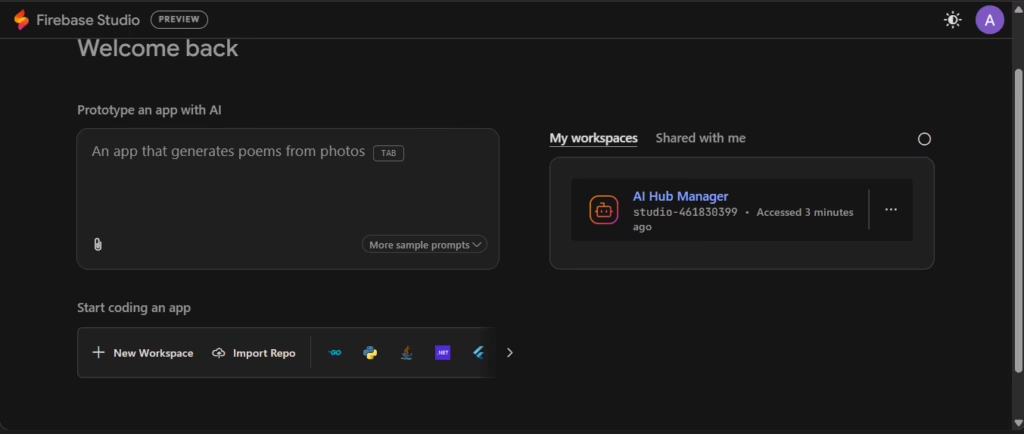
- Firebase Studio: cloud-based development environment with a prototyping agent that generates complete applications (frontend, backend, and server logic) from natural language instructions, images, or sketches.
- Gemini in Firebase: AI assistant built into the console that suggests products, helps with configuration, and guides developers based on their project description.
- Genkit: open-source framework for building server-side AI workflows with broader deployment options and multi-model support.
- ML Kit: on-device machine learning kit that includes language identification and translation without requiring a server connection.
- MCP Server and Gemini CLI: agent tools for accessing Firebase from development environments.
These features fall into two distinct categories. On one hand, tools that assist developers during app creation (Firebase Studio, Gemini in the console). On the other, tools that let you integrate AI capabilities directly into the end-user application (Firebase AI Logic, Genkit, ML Kit). This distinction matters because not all AI features are user-facing — several are designed to accelerate the development team’s workflow.
Integrations
- BigQuery: real-time data streaming from Firestore for advanced analytics (the most popular extension with over 91,000 installs).
- Stripe: one-time and recurring payment processing with authentication sync.
- Algolia, Typesense, Meilisearch, and Elastic: full-text search extensions for Firestore collections.
- Twilio and MessageBird: SMS messaging and notifications.
- Mailchimp: user data sync with audiences for email marketing campaigns.
- SendGrid: contact sync and reminder emails (e.g., abandoned carts).
- RevenueCat: in-app purchase and subscription management.
- Google Ads, AdMob, and Google Marketing Platform: monetization and ad campaigns.
- Slack and Jira: integrations for development team workflows.
- WhatsApp: there is no native extension in the Firebase Extensions Hub. User communication can be routed through third-party integrations such as Twilio or MSG91.
The platform features an extensions hub with over 100 options built by both Google and third-party developers. Additionally, Cloud Functions enables custom integrations with virtually any external service through code. REST APIs and Admin SDKs are also available for advanced server-side integrations.
Data Security & Compliance
Regarding the use of data to train AI models, it depends on the service. Vertex AI in Firebase does not use customer data to train base models; Google only caches inputs and outputs to speed up subsequent responses. Firebase Studio, however, does use submitted content to improve Google products and machine learning technologies, as stated in its Privacy Policy.
The platform complies with the GDPR, CCPA, and CPRA. Google adheres to the Data Privacy Frameworks covering the EU, Switzerland, the UK, and the United States. An important note: Authentication operates exclusively from data centers in the United States. Other services run on Google’s global infrastructure, though some like Cloud Firestore and Cloud Storage allow you to choose a specific data location.
In terms of certifications, all services (except App Indexing and Firebase Studio) hold ISO 27001, SOC 1, SOC 2, and SOC 3. Key services such as Cloud Firestore, Cloud Functions, Cloud Storage, Authentication, and Test Lab also carry ISO 27017 and ISO 27018 certifications.
Google restricts access to personal data to employees with a specific business need, logs every access event, and requires two-factor authentication. For developers, the platform offers Authentication with multiple providers, Security Rules for granular access control, App Check to protect server resources, and the WebAuthn extension for biometric authentication.
Language: Customer Support & Interface
The console (the project administration panel) is available in English. The interface language adjusts automatically based on the user’s Google account language settings. Firebase Studio, the cloud-based development environment, is currently available in English only, as it is still in preview.
The documentation is available in English. Support channels include Stack Overflow, Reddit, Google Groups, and GitHub, where the community interacts in multiple languages.
AI Language Support
The AI features that rely on natural language work across multiple languages. Firebase AI Logic uses Google’s Gemini models, which understand and generate text in numerous languages. The Gemini assistant built into the console responds in the user’s configured language, as confirmed during hands-on testing.
Using ML Kit, you can identify over 100 languages and translate between more than 50. However, it’s worth noting that ML Kit’s translation models are trained to translate to and from English. When translating between two non-English languages (for example, French to Portuguese), English is used as an intermediate language, which may affect output quality. For higher-quality translations, Firebase recommends using the Google Cloud Translation API.
Firebase Studio’s prototyping agent can generate code and respond to instructions in multiple languages, as it uses Gemini as its underlying engine.
Mobile Access
There is no dedicated mobile app for managing projects. While the platform is accessible from mobile browsers, the experience is optimized for desktop. Firebase Studio, as a full browser-based development environment, is primarily designed for use on desktop or laptop computers.
As for the apps built with the platform, native SDKs are available for iOS (Swift and Objective-C), Android (Kotlin and Java), Flutter, Unity, and C++. This means that while administration is done from desktop, the applications you create can be fully mobile and cross-platform.
Support, Onboarding & Account Management
The platform provides a range of training resources: step-by-step guides, hands-on coding tutorials for iOS, Android, and web, formal reference documentation for all SDKs and APIs, and quickstart guides with ready-to-run code. The console includes a Gemini-powered onboarding assistant that guides developers based on their project description, suggesting products and next steps.
The community is spread across Stack Overflow for technical questions, Reddit for informal discussion, Google Groups for sharing projects, GitHub for source code access and bug reporting, and Google Developer Groups for in-person networking with other developers.
Ease of Use / UX
The dashboard is organized by product, with a clear sidebar navigation. The integrated Gemini assistant makes getting started easier by suggesting products and configurations based on the project description. Firebase Studio, built on Code OSS (the open-source project behind Visual Studio Code), feels familiar to developers already using VS Code.
The sheer number of features can feel overwhelming at first; however, an SME could see results quickly by starting with basic features like authentication and database. Taking full advantage of the platform requires time and ideally at least one person with a technical background on the team.
Pricing & Plans
The platform offers two main plans:
- The Spark plan is completely free and requires no payment method. It includes products available at no cost such as A/B Testing, Analytics, App Check, App Distribution, Cloud Messaging, Crashlytics, and more. It also offers free usage quotas for products like Cloud Firestore, Realtime Database (100 simultaneous connections, 1 GB storage, 10 GB monthly downloads), Cloud Storage, Authentication, and Hosting.
- The Blaze plan is a pay-as-you-go plan that includes everything in the Spark plan plus higher usage tiers and access to additional Google Cloud services. Free usage quotas still apply for many products, and you’re only charged for resources consumed beyond those quotas. If eligible, activating the Google Cloud free trial provides promotional credits (e.g., $300 USD over 90 days) that are applied first to cover Firebase and Google Cloud usage.
For Hosting and Realtime Database, an SLA is offered with a 99.95% monthly uptime commitment.
Case Study
Valentina owns three clothing stores and was struggling with inventory control: she didn’t know what items were in each location, supplier purchases were made without clear data, and losses were constant. Her team consisted of a freelance developer and herself.
The developer built an inventory management app using FlutterFlow, a visual tool that integrates directly with Firebase. For real-time sync across stores, they used Realtime Database, so that when an item sold at one location, inventory updated instantly across the others. Cloud Functions automated weekly sales reports and restocking alerts. Authentication ensured each employee could only access their own store’s data, while Valentina had a consolidated view. Crashlytics helped them catch errors without relying on manual reports.
Within six months, she reduced losses caused by poor inventory management, optimized her purchasing, and opened a fourth store with synced data from day one. Costs stayed within the free tier during the first months, and after scaling to the Blaze plan, she only paid for the resources she actually used.
Firebase vs Supabase
These two cloud infrastructure platforms are among the most popular for building applications, but they take distinctly different technical approaches. Supabase positions itself as an open-source alternative, built on PostgreSQL rather than a proprietary database.
| Aspect | Firebase | Supabase |
| Primary database | NoSQL (Firestore, Realtime Database) | PostgreSQL relational, full SQL |
| Open source | No (Google proprietary products) | Yes (can be self-hosted with Docker or CLI at no cost) |
| Free plan | Full access to products like Analytics, Crashlytics, and FCM; free quotas on Firestore, Storage, and Authentication (1 GB storage, tens of thousands of daily operations) | 50,000 monthly active users, 500 MB database, unlimited API requests, two active projects |
| Pricing model | Pay-as-you-go (reads, writes, downloads), no flat fee. Costs can be hard to predict | Fixed monthly subscription plus overages, with a configurable spending cap enabled by default |
| Cloud functions | Cloud Functions (event-driven) | Edge Functions (TypeScript/JavaScript, global deployment, DDoS protection) |
| Certifications | ISO 27001, SOC 1, SOC 2, SOC 3 (some services with ISO 27017 and ISO 27018) | SOC 2 Type II, HIPAA (as an add-on), GDPR |
| Platform language | Full English support across console, Studio, and documentation | Documentation, interface, and support in English only; AI assistant responds in multiple languages |
- Firebase stands out for the breadth of its products and deep integration with other Google services (Analytics, Ads, AdMob, BigQuery). It offers tools that go well beyond the backend: A/B testing, performance monitoring, app distribution, messaging, and monetization.
- Supabase differentiates itself through its open-source nature, the ability to self-host the platform at no cost, full data portability, and PostgreSQL as its primary database. For AI projects, its native vector database (pgvector) enables semantic search and embeddings without additional services.
For an SME that values control over its data, prefers a relational database with full SQL, and seeks cost predictability, Supabase may be the better choice. For an SME that needs a broader ecosystem and works across multiple platforms, Firebase is the more complete solution.
Outils similaires
| Outil | |
|---|---|
 |
|
 |
|
 |
|
 |
|
 |
FAQs
Is Firebase a good choice for SMEs?
Yes, especially for SMEs with a development team or a solo developer. Its free plan allows you to get started with no upfront investment, and the pay-as-you-go model avoids locking in large budgets.
What are the best alternatives to Firebase?
The most direct alternative is Supabase, which offers an open-source solution built on PostgreSQL with the option to self-host.
Is Firebase secure?
The platform runs on Google Cloud infrastructure and offers security tools such as Authentication, Security Rules, and more. For specific security requirements, consult the latest official documentation.