

Voicewave
VoiceWave génère des voix par IA avec un paiement unique. Notre avis couvre les fonctions, les langues, les tarifs et l'intérêt réel de l'outil pour les PME.
Cette plateforme se démarque par sa capacité à générer des voix avec un contrôle des émotions: on peut faire sonner une voix joyeuse, triste ou enthousiaste selon le contexte du contenu. L'éditeur multipiste est l'autre atout de taille, puisqu'il permet de construire des projets à plusieurs voix et de choisir à quel moment chacune intervient.
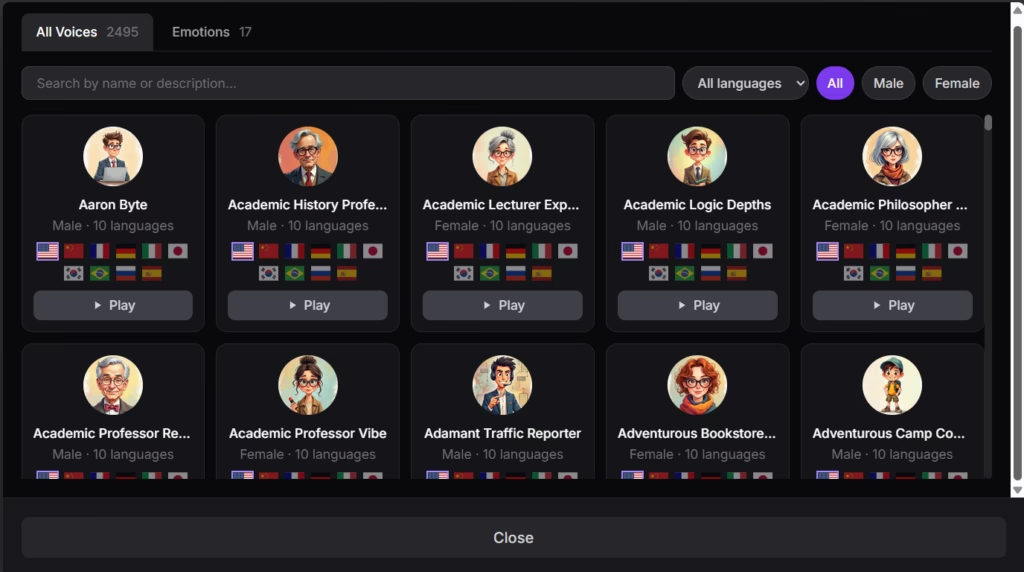
Précision importante: la formule d'entrée de gamme (Starter) ne propose que des voix anglaises, au nombre de 20. Pour produire du contenu dans d'autres langues, les formules Pro ou Unlimited débloquent plus de deux mille voix professionnelles dans 38 langues différentes, dont le français, le portugais, l'allemand, l'italien et bien d'autres.
Notre recommandation: idéal pour les créateurs de contenu en anglais avec la formule Starter, ou pour les agences et PME multilingues capables d'investir et de produire régulièrement du matériel audiovisuel, sans avoir besoin de générer dans l'urgence aux heures de pointe.
Moyenne du détail ci-dessous
- Les créateurs de contenu qui produisent des vidéos régulièrement et ont besoin de voix off professionnelles ou de génériques cohérents
- Les petites agences qui créent du contenu pour plusieurs clients et ont besoin de personnaliser les voix
- Les producteurs de livres audio indépendants ou les petites maisons d'édition
- Les équipes marketing qui développent des supports publicitaires audio
- Les grandes entreprises qui exigent une production instantanée à tout moment
- Les secteurs aux exigences audio très techniques ou spécialisées (comme le doublage de cinéma professionnel)
- Les équipes qui ont besoin d'une intégration poussée à des flux de travail d'entreprise complexes
Fonctionnalités clés
- Plus de deux mille voix professionnelles: accès à une vaste bibliothèque de voix, dans différents accents et styles, adaptée à des contenus variés (disponible sur les formules Pro et Unlimited)
- Prise en charge multilingue étendue: 38 langues disponibles et 683 combinaisons de voix au total, dont l'anglais, l'espagnol, le portugais, le français, l'allemand, l'italien, l'arabe, le chinois, le japonais, le coréen, le russe, le turc et bien d'autres. Idéal pour les entreprises présentes sur plusieurs marchés
- Accès depuis n'importe quel navigateur: VoiceWave fonctionne depuis tout navigateur web (Chrome, Safari, Edge, Firefox, Opera, Brave), sur ordinateur comme sur mobile, sans installation de logiciel
- Éditeur multipiste: créez des projets complexes à plusieurs voix, en choisissant par glisser-déposer le moment où chaque segment intervient
- Contrôle de la vitesse: ajustez la vitesse de n'importe quelle piste d'un simple clic, pour adapter la narration au rythme voulu
- Export en plusieurs formats: export en WAV (toutes formules) et en MP3 (formules Pro et Unlimited), pour s'adapter à différents usages
- Usage commercial inclus: toutes les formules autorisent l'utilisation des voix générées dans des projets commerciaux, sans mention obligatoire
- Clonage de voix: disponible sur les formules Pro (jusqu'à 10 voix) et Unlimited (illimité); créez des voix sur mesure pour préserver la cohérence de votre marque
- Conception de voix par description: en langage naturel, il est possible de générer une voix entièrement inédite, sans clonage ni sélection dans un catalogue. Il suffit de décrire le personnage voulu (âge, timbre, accent, débit, personnalité) et l'IA le crée instantanément
Ces fonctions dispensent les PME de recruter un comédien voix pour chaque projet, ce qui réduit à la fois les coûts et les délais de production. Une vidéo qui exigeait auparavant de se coordonner avec un comédien, d'enregistrer, de relire et parfois de réenregistrer se boucle désormais en quelques minutes.
Fonctionnalités IA
- Contrôle émotionnel contextuel: l'IA analyse le contexte du texte pour déterminer automatiquement l'émotion appropriée (joie, tristesse, enthousiasme), tout en laissant la possibilité d'un contrôle manuel
- Génération de synthèse vocale: convertit un texte écrit en audio aux voix naturelles, en traitant la langue pour appliquer l'intonation et les pauses justes
- Clonage de voix par IA: possibilité de créer des répliques numériques de voix précises, pour rester cohérent sur des projets au long cours
- Traitement multilingue: l'IA gère la prononciation correcte dans 38 langues, en s'adaptant aux règles phonétiques propres à chacune
- Génération de voix à partir d'une description en langage naturel: au-delà du catalogue existant et du clonage, VoiceWave permet de concevoir des voix entièrement nouvelles à partir d'une simple description écrite
Ce qui est réellement « intelligent », c'est sa capacité à interpréter le contexte émotionnel du texte et à appliquer automatiquement l'intonation correspondante. On dépasse là la synthèse vocale basique, où chaque mot est prononcé sur le même ton plat.
Intégrations
VoiceWave ne documente aucune intégration native avec d'autres plateformes et ne propose pas d'API dans ses informations publiques.
Sécurité et conformité des données
Selon sa politique de confidentialité, VoiceWave AI traite des données personnelles telles que les coordonnées, les données d'usage et les contenus générés par l'utilisateur. Les utilisateurs conservent la propriété des contenus qu'ils créent.
Les données des utilisateurs sont conservées aussi longtemps que nécessaire à la fourniture du service. Google Analytics conserve les données 14 mois avant de les anonymiser. Le site recourt au chiffrement SSL pour protéger la transmission des données sensibles. La politique fait état de mesures techniques et organisationnelles appropriées au sens de l'article 32 du RGPD. VoiceWave respecte le Règlement général sur la protection des données de l'Union européenne (RGPD).
Langue – support client et interface
Le support client et l'interface sont principalement en anglais.
Langue de l'IA
VoiceWave AI propose la génération de voix dans 38 langues, mais cette capacité varie selon la formule.
Les langues prises en charge sur les formules Pro et Unlimited comprennent: l'anglais (avec plusieurs variantes d'accent), le portugais (dont le brésilien), le français, l'allemand, l'italien, le malais, l'espagnol, le tagalog, le chinois, l'arabe, le russe, le turc, le néerlandais, l'ukrainien, le vietnamien, l'indonésien, le japonais, le coréen, le thaï, le polonais, le roumain, le grec, le tchèque, le finnois, l'hindi, le bulgare, le danois, l'hébreu, le slovaque, le suédois, le croate, le hongrois, le norvégien, le slovène, le catalan et l'afrikaans.
Le fonctionnement de l'outil ne dépend pas exclusivement du langage naturel, au sens où il n'exige pas de commandes complexes: l'utilisateur colle son texte dans la langue voulue, choisit une voix dans cette langue, et l'IA se charge du traitement.
Accès mobile
Cet outil fonctionne intégralement depuis le navigateur web, ce qui le rend accessible depuis n'importe quel appareil doté d'un navigateur, y compris les smartphones et les tablettes. La plateforme est compatible avec les principaux navigateurs — Chrome, Safari, Edge, Firefox, Opera et Brave — dans leurs versions bureau comme mobile.
Il n'existe pas d'application mobile native dédiée pour iOS ou Android. Mais comme l'outil s'utilise dans le navigateur, il reste directement accessible depuis n'importe quel appareil mobile.
Support, prise en main et gestion de compte
L'outil garantit un accès immédiat après l'achat, les identifiants de connexion étant envoyés par e-mail en quelques secondes.
La structure du support varie selon la formule: la formule Starter comprend un support standard, tandis que les formules Pro et Unlimited offrent un support prioritaire, le niveau le plus élevé donnant droit à un « support prioritaire plus » et à un « accès direct au fondateur ». Cette dernière particularité peut avoir une vraie valeur pour les petites entreprises qui apprécient le contact direct avec les décideurs.
L'éditeur propose en outre des vidéos de démonstration ainsi qu'une démo accessible sur son site, pour tester l'outil avant de s'engager à l'achat.
Facilité d'utilisation / UX
La génération d'une voix se résume à trois étapes bien définies: coller le texte, choisir une voix dans le catalogue et générer l'audio. Cette simplicité constitue un avantage réel pour les petites équipes sans expérience technique en production audio.
L'éditeur multipiste s'appuie sur le glisser-déposer, pour une interface intuitive. On visualise plusieurs pistes vocales et on ajuste le moment où chaque segment intervient, ce qui facilite la création de contenus complexes sans logiciel de montage supplémentaire.
La courbe d'apprentissage est minime. Une PME peut générer son premier contenu vocal en quelques minutes, là où des solutions complexes demandent des jours d'apprentissage. Pour un indépendant ou un entrepreneur qui mène plusieurs chantiers de front, cette rapidité est décisive.
Tarifs et formules
VoiceWave applique un modèle économique peu courant dans le secteur: un paiement unique pour un accès à vie, plutôt qu'un abonnement récurrent. L'outil propose une démo sur son site pour essayer avant d'acheter. Il inclut également une garantie de remboursement de 7 jours. Pour y prétendre, l'utilisateur doit avoir généré moins de 10 minutes d'audio.
Formules disponibles:
- La formule Starter est l'entrée de gamme et comprend 20 voix essentielles, en anglais uniquement. Elle offre 60 minutes de génération par mois, l'éditeur multipiste, l'export au format WAV, l'usage commercial complet et un support standard.
- La formule Pro marque un vrai saut de capacité: elle débloque l'intégralité du catalogue de voix professionnelles dans 38 langues, relève la limite à 240 minutes de génération par mois, ajoute le clonage de voix pour un maximum de 10 voix sur mesure, propose l'export en WAV et en MP3, et passe au support prioritaire.
- La formule Unlimited supprime totalement les limites mensuelles de génération, autorise le clonage de voix sans limite, conserve toutes les fonctions précédentes et ajoute un support prioritaire plus, avec accès direct au fondateur de l'entreprise.
Toutes les formules reposent sur un paiement unique donnant un accès à vie. L'offre actuelle ne comporte aucune option mensuelle ou annuelle récurrente. Ce modèle dispense de se soucier des dépenses de fonctionnement récurrentes.
Étude de cas
Une petite agence de marketing digital de trois collaborateurs. Son équipe produit entre 8 et 12 vidéos courtes par mois pour les réseaux sociaux de ses cinq principaux clients — toutes des PME locales du secteur alimentaire, qui ont besoin de contenus en espagnol et en anglais pour toucher les touristes.
Avec VoiceWave, l'agence a ramené le temps de production d'environ 45 minutes à 10 minutes par vidéo. Elle peut désormais générer plusieurs versions, avec des émotions et des tons différents, en quelques minutes, ce qui permet à ses clients de choisir ce qui colle le mieux à leur marque. La fonction de clonage de voix lui a permis de créer des voix sur mesure pour deux de ses plus gros clients, avec une cohérence maintenue sur tous leurs supports, dans plusieurs langues.
L'économie a été immédiate. En trois mois seulement, l'agence a intégralement amorti son investissement initial par rapport à ce qu'elle aurait dépensé en comédiens voix. Mais au-delà de l'argent, elle a gagné en souplesse: elle peut retoucher les textes et régénérer l'audio jusqu'à la dernière minute, sans surcoût — impossible avec des comédiens humains, qui facturent les reprises.
L'outil face aux alternatives
VoiceWave occupe la niche précise de la génération de voix par IA, via la synthèse vocale. Nous le comparons ci-dessous à des outils dont l'orientation principale diffère, mais qui proposent également des capacités audio par IA.
VoiceWave face à Descript:
Descript est une suite complète de montage audio et vidéo qui inclut des capacités de synthèse vocale, mais avec une orientation plus large vers le montage multimédia par transcription.
Avantages de VoiceWave: contrôle automatique de l'émotion selon le contexte — l'IA lit le texte et applique le ton adéquat sans intervention, là où Descript exige des instructions explicites insérées dans le script. Le paiement unique, face à l'abonnement récurrent, représente une économie significative sur la durée; plus de deux mille voix professionnelles dans 38 langues, spécifiquement optimisées pour la narration; un éditeur multipiste conçu spécialement pour les projets vocaux; un processus plus simple et plus direct, entièrement centré sur la création audio.
Avantages de Descript: suite complète d'outils de montage audio et vidéo; fonction de montage par le texte, révolutionnaire pour les contenus déjà enregistrés; Studio Sound pour améliorer la qualité d'un enregistrement existant; transcription automatique très précise; meilleur pour les équipes qui veulent une solution tout-en-un; collaboration en temps réel; outils avancés comme la suppression des mots parasites dans un contenu enregistré; Overdub pour cloner sa propre voix et corriger; écosystème d'outils intégrés plus vaste; idéal si vous enregistrez déjà vos propres contenus et devez les monter.
VoiceWave face à D-ID:
D-ID se consacre à l'animation d'images fixes pour créer des avatars parlants — une catégorie différente de génération de contenus par IA.
Avantages de VoiceWave: orientation spécialisée sur la qualité vocale et la variété d'options professionnelles; contrôle émotionnel avancé que D-ID n'offre pas sur ses voix; modèle à paiement unique, plus prévisible; meilleur pour les projets où l'audio est le protagoniste; export de fichiers purement audio (WAV, MP3), réutilisables dans n'importe quel projet; éditeur multipiste pour construire des conversations complexes; ne demande ni image ni avatar, juste du texte.
Avantages de D-ID: génère un contenu visuel complet (vidéo) avec des avatars parlants; permet d'animer des photos existantes de personnes réelles (le PDG de votre entreprise, par exemple); idéal pour créer des présentateurs virtuels destinés aux réseaux sociaux; intégration à Canva, PowerPoint, Google Slides et d'autres via des extensions; meilleur pour les contenus où il faut un visage qui parle, et pas seulement une voix; synchronisation labiale automatique avec n'importe quelle image chargée.
Questions fréquentes
VoiceWave AI est-il une bonne option pour les PME?
Oui, VoiceWave convient particulièrement aux petites et moyennes entreprises grâce à son modèle de paiement unique, qui supprime les dépenses récurrentes.
VoiceWave prend-il en charge plusieurs langues?
Oui, VoiceWave propose des voix dans 38 langues, mais uniquement sur les formules Pro et Unlimited. La formule Starter est en anglais seulement.
Que signifie le mode « relaxed » de VoiceWave?
Le mode « relaxed » est un type de formule qui offre les mêmes fonctions à prix réduit. La différence: aux heures de pointe, la génération peut être 1,3 à 1,5 fois plus lente selon la charge des serveurs. C'est l'idéal si vous pouvez planifier votre production et n'avez pas besoin d'une génération instantanée à tout moment.
Puis-je utiliser VoiceWave pour des projets commerciaux?
Oui, toutes les formules VoiceWave incluent des droits d'usage commercial complets, sans mention obligatoire. Vous pouvez utiliser les voix générées dans des vidéos YouTube, des podcasts, des cours en ligne, de la publicité, des livres audio ou tout autre projet générant des revenus, sans coût supplémentaire ni restriction de licence.
Vous hésitez encore sur Voicewave ?
Comparez-le aux autres outils que nous avons analysés dans IA pour les vidéos.