
Acuity Scheduling: Complete Guide for SMEs
Acuity Scheduling is a customizable platform for appointment management. Designed for service businesses needing a branded booking experience, intake forms and payment options, for both individual appointments and group classes or workshops, with support for video conferencing and different sectors.
Since 2019 it’s part of Squarespace, allowing integration with its web ecosystem and, if logging in with a Squarespace account, using its artificial intelligence to generate and optimize texts, business names and marketing content.
For SMEs, efficient calendar management makes the difference between smooth operations and an excess of emails to coordinate appointments. With Acuity, clients can book directly, receive automatic reminders and keep calendars synchronized across multiple platforms.
Acuity Scheduling: AgentAya Verdict
Acuity Scheduling is ideal for service businesses like coaches, therapists, consultants or SMEs depending on appointments. Its greatest strength is in flexibility and customization: booking pages with brand identity, intake forms, integrated payments and multiple calendar management.
For international SMEs, multilingual availability is a plus, as interface and client communications can be configured locally. However, it may be complex for users seeking quick configuration or who don’t have time/experience with custom flows.
Recommendation: It’s one of the best calendar tools to reduce administrative load and offer a professional and personalized booking experience.
Score Breakdown
| Category | Estimated Score | Detail Based on Documentation and User Reviews |
| Features & Functionality | ⭐️⭐️⭐️⭐️ (4.0) | Offers comprehensive booking and payment management with reminders, forms, classes, availability control and business features |
| Integrations | ⭐️⭐️⭐️⭐️½ (4.5) | Integrates with calendars, video calls, payment platforms, marketing platforms and CRMs through connectors like Zapier |
| Language & Support | ⭐️⭐️⭐️⭐️ (4.0) | Interface and booking pages are multilingual and support is provided by email and chat |
| Ease of Use | ⭐️⭐️⭐️⭐️ (4.0) | Reviews highlight its ease of use and configuration, though advanced features require some practice |
| Value for Money | ⭐️⭐️⭐️ (3.5) | The tiered plan structure adapts to different business sizes; users consider the balance between price and features reasonable, although some small businesses perceive the cost as somewhat high. |
AgentAya Overall Score: ⭐️⭐️⭐️⭐️ 4 / 5
Reliable for expanding small and medium enterprises. However, some integrations and automations may require additional technical knowledge. Excellent option for Squarespace users.
Ideal for:
- Coaches, therapists and consultants needing forms and payments
- Service providers valuing control and customization
- SMEs wanting integrations with payments, video calls and reminders
Not ideal for:
- Users seeking quick and simple configuration
- People without time or experience to customize flows
- Companies requiring an exclusively mobile app or calendar tool with native artificial intelligence
Main Features of Acuity Scheduling
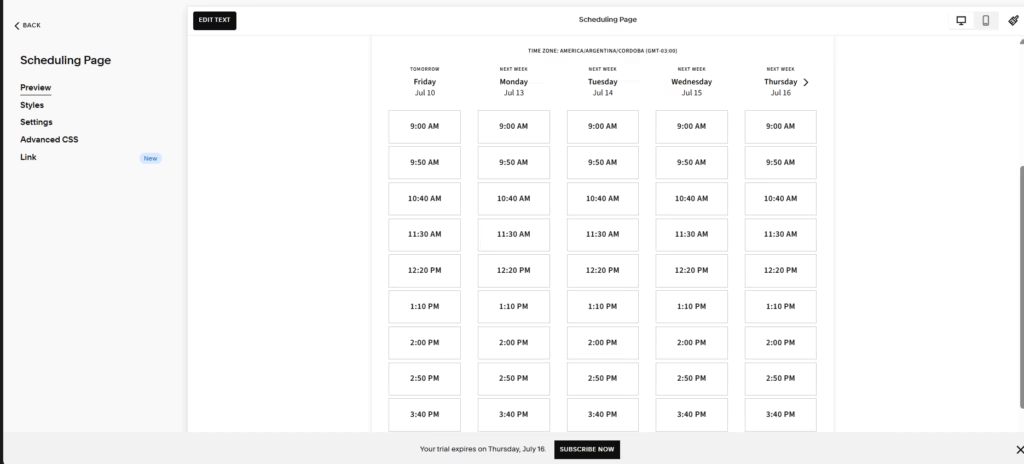
Acuity is a flexible appointment booking and management software for businesses of any size or sector, from solo entrepreneurs to large companies with multiple locations. You can customize the booking page (logo, text, colors, and form fields), set schedules and rules by service type, configure start intervals and buffers, and limit slots per class or resource. It automates the operations tied to appointment scheduling, with custom forms, packages, memberships, and gift cards, plus online and in-person payments.
Key features include:
- Branded custom booking pages
- Multi-user calendar management
- Automatic email and SMS reminders
- Subscriptions for recurring services (facials, massages, training sessions), plus packages, memberships, gift cards, coupons, and discount codes to encourage repeat clients, and relevant add-ons highlighted during online booking to increase each appointment’s value.
- Automatic receipts sent after each payment, color-coded appointments for faster calendar navigation, a “Show as busy” feature that selectively hides availability, and advanced reports on appointments, no-shows, and business performance.
- Enterprise edition for multi-location organizations, with dedicated onboarding and account management, single sign-on (Okta and MedPlum), an API for custom booking, and multiple instances under a single dashboard.
This tool also includes a waitlist that fills openings left by cancellations without manual outreach. From the booking page, clients sign up for a specific time or a broader window and agree to receive text alerts. When a matching slot opens up, the system automatically notifies interested clients, and the first to book gets the appointment. The business sets how far in advance it accepts waitlist bookings, receives alerts when someone joins, and can review pending, expired, and booked requests. It’s available for one-on-one appointments on the Standard and Premium plans, with text messages enabled.

AI Functions
Although Acuity has multiple automations for calendar management and no-show reduction, it doesn’t have native artificial intelligence. However, its large quantity of integrations with external tools expands its capabilities. For example, Squarespace integration allows using its artificial intelligence to generate text drafts and SEO-optimized descriptions within the booking site. Through Zapier it’s possible to connect Acuity with “AI by Zapier,” which adds AI models to automated workflows.
Integrations
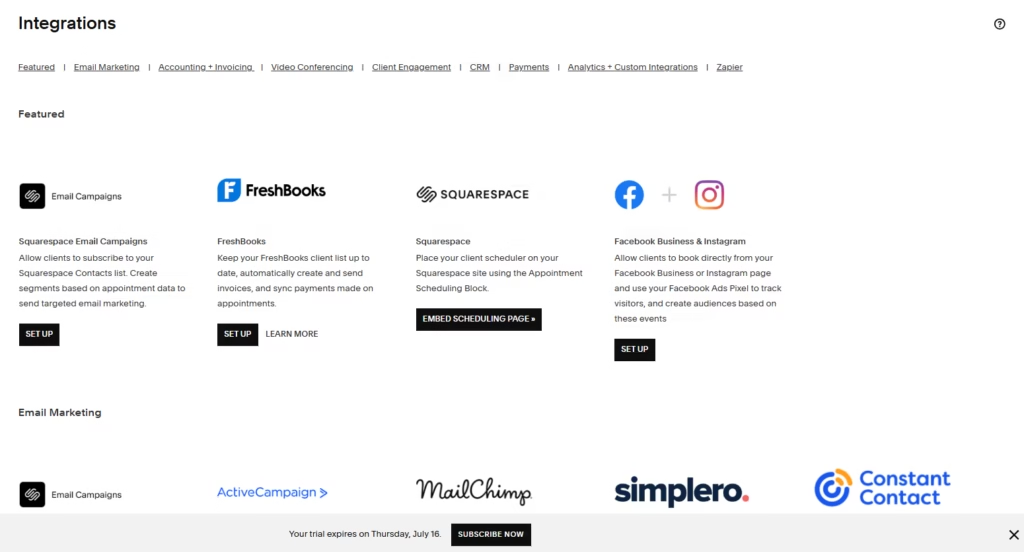
Acuity offers more than 100 integrations designed to optimize appointment management and client relationships. Some have their own dashboard within the platform; others are managed by third-party developers, so technical inquiries should be directed to them.
- Payments: Stripe, Square, and PayPal, to accept payments online or in person.
- Calendars: automatic synchronization with Google Calendar, iCloud, and Outlook and Microsoft 365 through the calendar.
- Video conferencing: Zoom, Google Meet, and JoinMe.
- Accounting and invoicing: QuickBooks and FreshBooks.
- Email marketing: Mailchimp, Constant Contact, ActiveCampaign, Drip, and ConvertKit.
- CRM and client management: Zoho (via Zoho Flow), ActiveCampaign, and Daylite through external connectors.
- Referrals and reviews: ReferralCandy and ReviewRail.
- Analytics and tracking: Google Analytics, to measure web traffic and conversions.
- Social media: direct bookings from Instagram and Facebook.
- Discovery: Airbnb, so local businesses such as tour guides, instructors, or experience providers can be found by travelers within the platform.
- Automation: Zapier and Zoho Flow to create custom workflows, plus webhooks to trigger events to other applications.
- Development: a documented REST API that allows developers to create appointments, check availability, and block off times.
Among the featured partners is Squarespace Email Marketing, which allows clients to subscribe to the contact list and lets you create segments based on appointment data to send personalized campaigns.
Security and Data Compliance
Acuity Scheduling offers enterprise-level security, client privacy, and availability. Teams access the platform with configurable permissions and login capabilities, allowing for secure internal control. On the Premium plan, the platform complies with HIPAA provisions through the signing of a BAA, ensuring that sensitive medical information remains private and protected throughout the entire booking process. At the Enterprise level, single sign-on through Okta and MedPlum is added, with OAuth 2.0 and SAML, industry-standard protocols for provisioning and authentication. Squarespace also ensures compliance with the GDPR and other international data regulations, with clear policies on privacy, storage, and cookie management. The infrastructure offers 99.9% uptime, keeping calendar and booking pages available at all times for clients and administrators.
Language – Customer Support and Interface
Account administration controls can appear in multiple languages including English, Spanish, Portuguese, French, German and Italian. Most of the website is translated into multiple languages and both Acuity Scheduling’s help center and Squarespace’s have documentation in English and other languages.
AI Language – The Tool Itself
The platform allows configuring the booking page for clients in multiple languages including Spanish, Brazilian Portuguese, English, French, among others.
Mobile Access
Acuity Scheduling offers a dedicated mobile application for iOS and Android devices, complementing a mobile-optimized web interface. All plans include access to this app, even during the free trial period. Through the application, users can manage their calendar in real-time, filter which calendars are displayed to manage multiple staff members or locations, schedule new appointments, easily reschedule appointments through drag-and-drop, edit or cancel bookings, create and edit appointment types, group classes, add-ons and coupons, manage their client list, send direct booking links, adjust their availability and receive push notifications about bookings, cancellations or last-minute changes.
It’s also possible to accept in-person payments, send secure payment links, record cash payments, issue and manage invoices, apply cancellation policies with automatic charges and allow tips. Although the mobile version is quite complete, certain advanced options may be better represented in desktop version.
Support, Onboarding Process and Account Management
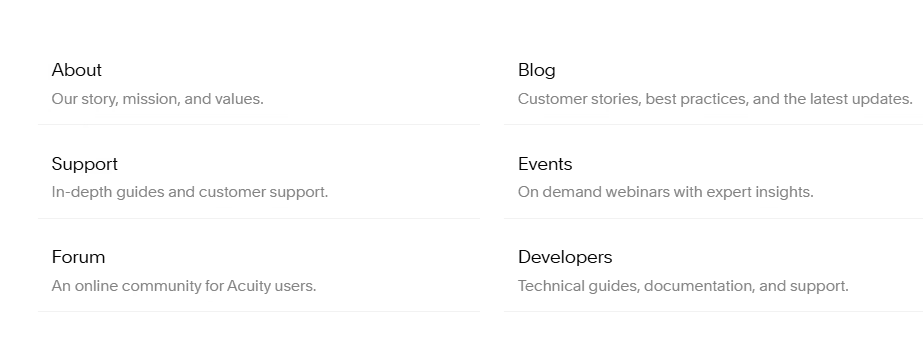
The initial setup process is guided, with detailed documentation, tutorials, and FAQs. Acuity’s support team is global and assists clients on all plans, with availability 24 hours a day, 7 days a week. Help is provided through live chat and email in the client’s language of choice. The platform also offers live and on-demand webinars, along with resources, tips, and success stories on its official blog. Users also have a community forum to share experiences and resolve questions with one another. Enterprise-level accounts receive dedicated onboarding and account management.
Ease of Use / UX
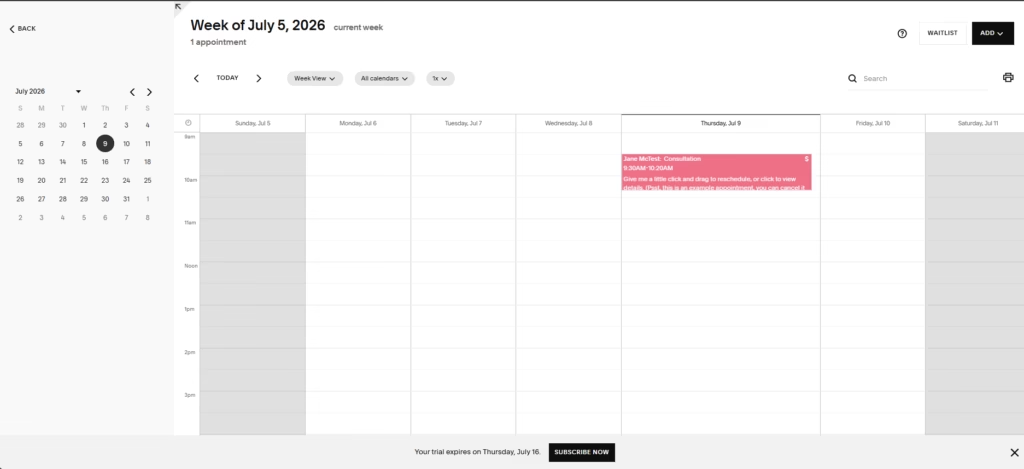
Acuity offers a professional interface. Due to its wide range of available customizations, it may have a steeper learning curve than simpler alternatives like Calendly, though setup follows a clear, orderly path. After logging in, you first see your calendar, where you review and edit appointments, book slots, or block off time; you then create appointment types (one-time, recurring, or group classes) and set your availability, with a regular weekly schedule, day-by-day exceptions, per-service hours, and limits on when clients can book, edit, or cancel.
Pricing and Plans
Acuity offers a free trial and has four plans designed to adapt to different sizes and business needs. The first three are self-service with published pricing (Starter, Standard, and Premium), while the fourth, Enterprise, is custom and quoted by contacting the sales team.
The Enterprise plan is aimed at organizations with multiple locations. Features also grow by tier: text message reminders and the sale of memberships, packages, and gift cards start with the Standard plan; HIPAA compliance with a signed BAA, multiple time zones for staff and locations, and custom API and CSS options. Aditionally, this tier adds personalized onboarding with a dedicated account manager, ongoing support with follow-up meetings, combined appointment data to track booking volume and spot trends, and the ability to host multiple instances under a single dashboard to manage several locations.
One of the most notable aspects is the transparency of its terms: there are no hidden charges, and no fees for setup, cancellation, or customer support. It also notes that published prices do not include any taxes that may apply depending on the user’s country. Full specifications for each plan are available on its official page.
Case Study
Jennifer Crank is a renowned competitor and dog agility trainer, and the owner of IncrediPAWS, one of the leading facilities in central Ohio. Her career combines top-level competition with teaching other owners who want to advance in the sport, which involves coordinating group classes, private lessons, and space rentals. As a longtime Acuity Scheduling customer, she uses the platform to manage all those moving parts from a single place and thus focus on what drew her to the profession: training and supporting each owner-and-dog team.
For Jennifer, operational organization is part of the experience her clients perceive. Just as a good agility team relies on preparation and clear communication, a solid business depends on simple booking processes, confirmations that arrive when expected, and expectations defined from the very first contact. By managing bookings, one-on-one sessions, group offerings, and space rentals in a single tool, she reduces the time spent on logistics and frees up energy for the work with the animals and their owners. Acuity Scheduling is also the Official Scheduling Partner of the Westminster Kennel Club, and it supports trainers and facilities like Jennifer and IncrediPAWS.
You can read the full case study here.
Acuity vs Alternatives
Compared with SimplyBookMe, Acuity stands out for its integrations ecosystem, offering HIPAA compliance and its brand customization capacity. SimplyBookMe, on the other hand, is more attractive for specific niches requiring a high level of customization in customer experience, like certain leisure or education sectors.
Versus YouCanBookMe, Acuity offers more payment processors (Stripe, Square, PayPal), invoicing and point of sale, a native mobile app, and broader business management features; YouCanBook.me is lighter, charges only through Stripe, has no native app (responsive web experience), and stands out for its multilingual booking pages with quick setup.
Related Tools
| Tool | |
|---|---|
 | |
 | |
 | |
 |
Frequently Asked Questions
How does Acuity compare with Calendly regarding bookings?
Acuity offers a wider range of features for businesses depending on bookings as main revenue source, including integrated payments, invoicing, HIPAA compliance and booking pages with custom branding. Calendly is simpler and faster to configure, suitable for internal meeting coordination and basic schedule management.
How many bookings are included and can I buy additional bookings?
Although memberships vary in the number of functionalities they include, all Acuity plans include unlimited bookings, so it’s not necessary to acquire credits or pay for additional slots.
What payment methods and point-of-sale options are supported?
Acuity integrates with Stripe, Square and PayPal. Allows charging full or partial payments at booking time, accepting deposits, managing tips and processing in-person transactions with POS tools, including tap-to-pay and mobile payment links. Also supports quick payment options like Google Pay and Apple Pay.
Can I customize the booking site with my own brand and use a custom domain?
Yes. The booking page can be configured with company’s brand identity, embedded on an existing website or linked to a custom domain. Thanks to Squarespace integration, it’s possible to generate and optimize texts with Squarespace AI to reinforce branding and SEO visibility of booking site.