
StackAI: No-Code Enterprise Automation with AI
StackAI is a no-code platform for creating and deploying artificial intelligence agents in business flows, from support and back-office to document automation. It belongs to the category of tools for building chatbots and AI agents (autonomous agent builders). For SMEs, this type of tool reduces response times, standardizes processes and allows launching quick pilots without depending on engineering teams.
AgentAya Verdict
This tool stands out for offering an intuitive visual environment and its ready-to-use templates that simplify the creation of intelligent agents. Additionally, it complies with international data security and information protection standards. It’s ideal for SMEs handling sensitive documents or operating in regulated sectors. Its main limitation is that the interface and support are available primarily in English, which may require additional support for non-English speaking users. Overall, StackAI is an excellent option for SMEs seeking a reliable, secure and easy-to-implement solution.
Score Breakdown
| Category | Score | Description |
| Features and Functionality | 4.5 ⭐⭐⭐⭐ | No-programming platform, templates, text analysis and document processing |
| Integrations | 4.0 ⭐⭐⭐⭐ | Connectors with enterprise systems and growing applications |
| Language and Support | 3.5 ⭐⭐⭐ | Interface and support mainly in English |
| Ease of Use | 4.5 ⭐⭐⭐⭐ | Clear visual environment and easy to learn |
| Value for Money | 4.0 ⭐⭐⭐⭐ | Good option for SMEs valuing security and implementation speed |
AgentAya Overall Score: ⭐⭐⭐⭐ 4.3 / 5
A solid and accessible tool for SMEs seeking to automate tasks securely and without technical knowledge.
Ideal for
- SMEs with regulated processes or subject to compliance
- Support, operations and finance teams handling documents and tickets
- Mid-sized companies in defence, healthcare or financial services that need an enterprise-grade platform with on-premise or private cloud deployment
Not ideal for
- Companies requiring technical support or documentation in non-English languages
- Very small businesses with simple or low-volume processes
- Teams wanting to develop agents through advanced programming
Main Features of StackAI
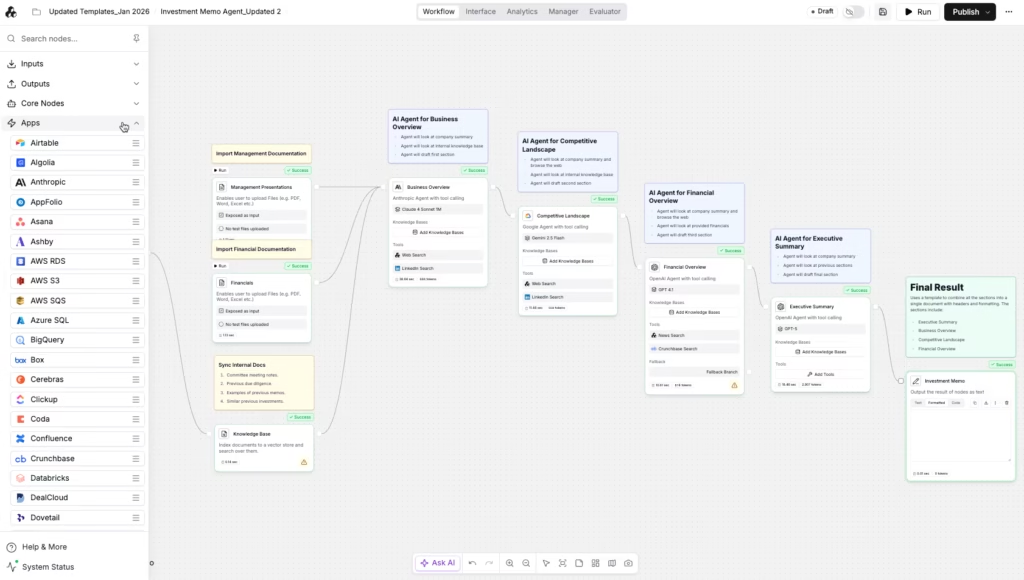
The workflow builder offers a visual canvas where teams assemble agents by dragging nodes from a side menu, connecting them and configuring each step without writing code. Nodes can be copied and pasted across projects, and the interface is designed to serve both non-technical users and developers. More advanced users can extend any workflow with a Code node (with support for Python and additional languages), a custom API node or their own tools to drive actions executed by language models.
Around this core builder, StackAI provides:
- A built-in workflow assistant, accessible directly from the editor, that answers questions about how the platform works, suggests improvements and points users to the relevant documentation.
- Prompt to Flow, a feature that turns a plain-language description of a process into a working multi-step workflow with the nodes, connections and configuration already in place.
- Built-in prompt refinement, which optimises the instructions given to language models with one click, applying best practices for clarity and consistency.
- A right-hand canvas panel inside the editor that works as a document workspace across conversation turns, with inline editing for CSV, slide generation, DOCX preview and HTML to PDF export.
- Generative UI, which lets agents render visual components such as charts, forms and cards directly inside the chat interface instead of returning plain text only.
- Per-node execution, so individual steps can be tested without running the entire workflow, plus a built-in terminal and the ability to install any Python package inside the Code node.
- Dark mode, available across the entire application.
The platform’s capabilities are anchored in three pillars: data extraction from unstructured sources such as PDFs, scans and forms (with built-in optical character recognition); knowledge retrieval, which uses retrieval-augmented generation to return cited answers from connected knowledge bases; and document generation, which produces stakeholder-ready files that can be saved directly to Google Docs and other destinations.
These functions help SMEs save time on routine work, improve customer service and make better use of internal information without relying on external developers.

AI Functions
The platform supports the most recent model families from OpenAI, Anthropic, Google, Mistral, Meta and others, so teams can choose the model that best fits each task in terms of accuracy, latency and cost. Among its most notable functions are:
- Text analysis with context understanding.
- Retrieval of relevant information through retrieval-augmented generation (RAG), including federated search that returns results from multiple connected sources such as SharePoint and OneDrive in a single query, with metadata indicating where each result came from.
- Text recognition in images or scanned files.
- Generation of automatic responses based on company data.
- Automatic classification of queries or requests by topic or priority.
Unlike a traditional assistant, StackAI can follow logical steps, consult documents and perform tasks autonomously according to user-defined rules.
Integrations
Direct connections with more than 100 platforms across the full enterprise stack. The catalogue groups roughly as follows:
- Enterprise files and content: SharePoint, OneDrive, Google Drive, Box, Dropbox, Egnyte, Azure Files, Confluence, Notion, Coda.
- Databases and data warehouses: Snowflake, BigQuery, Databricks, PostgreSQL, MySQL, MongoDB, ClickHouse, SQL Server, Azure SQL, Oracle, Pinecone, Weaviate.
- CRM and sales: Salesforce, HubSpot, Apollo, Outreach, Intercom, Lightfield CRM.
- Communication and collaboration: Slack, Microsoft Teams (with a full bidirectional bot), Gmail, Outlook, Zoom, Google Chat, Missive.
- Content, marketing and SEO: WordPress, Webflow, Sanity, Strapi, Contentstack, Ghost, Contentful, Semrush, Ahrefs, Profound, Google Analytics, Google Search Console.
- Productivity and project management: Asana, Jira, Linear, ClickUp, Smartsheet, Airtable, Google Sheets, Microsoft Excel, Miro.
- Industry-specific: Epic FHIR for healthcare, AppFolio and Termsheet for real estate, DealCloud and PitchBook for private markets, NetSuite and Workday for enterprise resource planning and human resources, SEC EDGAR and S&P Global for financial data, Veeva for life sciences.
- AI model providers: OpenAI, Anthropic, Google Vertex AI, AWS Bedrock, Azure OpenAI, Mistral, Cerebras, Groq, Together AI, Replicate.
- MCP servers: native support for the Model Context Protocol, including custom servers built by third parties.
- Programming interface (API): open access for teams that prefer to embed StackAI inside existing internal systems.
StackAI also offers multiple ways to deploy agents to end users without code: advanced forms with file uploads, password protection, SSO, domain restrictions and branded subdomains, with results exportable as PDF, Word or Excel; a ChatGPT-style chat assistant and a website chatbot, both customisable in name, logo, colours and domain; native deployments in Slack and Microsoft Teams, where agents can read messages, reply in-thread and trigger workflows from natural-language requests; a batch interface that processes multiple inputs from a CSV file in a single run; and a programming interface (API) for teams that want to embed StackAI directly into their own systems.
Security and Data Protection
StackAI complies with the most demanding international standards for information security and data protection: SOC 2 Type II, HIPAA, GDPR and ISO 27001. Its Information Security Management System has been audited and certified by an independent third party, and the platform undergoes regular external penetration testing, with audit reports available on request.
Customer data remains the property of the user, and is encrypted both in transit and at rest. The company has signed a Data Processing Addenda with its main AI model providers, including OpenAI and Anthropic, which formalises how data is handled when external models are used inside a workflow.
In higher-tier plans, StackAI offers three deployment models: a managed cloud version, a virtual private cloud (VPC) deployment for teams that need workload isolation, and a full on-premise option for organisations that must keep all data inside their own infrastructure, with access controls and single sign-on (SSO) for centralised user management. This flexibility is unusual in the no-code AI category and matters in particular for SMEs in healthcare, finance and the public sector, where regulation often dictates where information can be processed and stored.
Language – Customer Support and Interface
The interface and documentation are available in English. Direct support is oriented to enterprise clients, while free versions include self-learning resources and user forums. International SMEs can rely on automatic translators or on the implementation team assigned through the enterprise plan, which includes guided onboarding and dedicated support during the initial configuration.
AI Language – The Tool Itself
Agents can understand and generate text in multiple languages as long as compatible models are used, such as those from OpenAI or Anthropic. Response quality will depend on the selected model and type of information used. For better performance internationally, it’s recommended to adjust vocabulary and examples to local language use.
Mobile Access
There’s no specific mobile application, but the web version adapts to phones and tablets. Allows monitoring agents and testing from browsers, though advanced editing tasks are more comfortable from a computer.
Support, Onboarding and Account Management
StackAI includes learning material, tutorials and a training portal with practical examples. In the enterprise plan, technical accompaniment, implementation in secure environments and user administration are offered. It’s suitable for SMEs without technical experience, as guides and templates reduce configuration process complexity.
Ease of Use / UX
The interface is clear, organized and easy to learn. The learning curve is short, and results can be seen in a few days. Templates and visual components help companies create useful agents without needing programming or artificial intelligence knowledge.
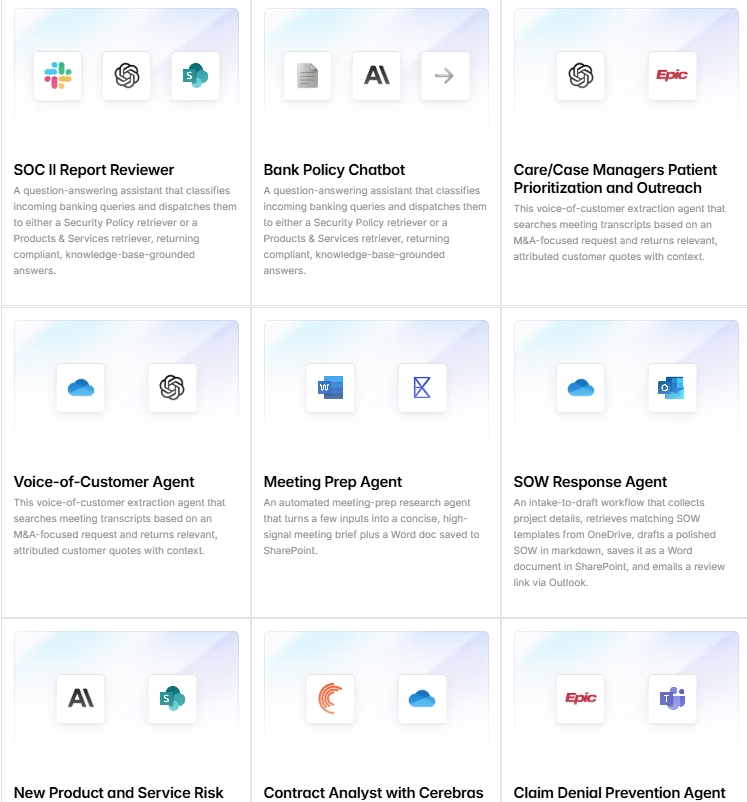
For users who prefer not to start from a blank canvas, StackAI offers a catalogue of pre-built templates organised by industry (finance, healthcare, legal, insurance, government, education) and by department (compliance, sales, HR, IT). Examples include contract analysts, KYC agents, RFP drafters, meeting preparation assistants and patient prioritisation workflows. Templates can be selected when creating a new project or when configuring an AI Agent node inside an existing workflow, which shortens the path from concept to working prototype. Teams can also save their own workflows as templates for internal reuse.
Pricing and Plans
StackAI offers two plans: a free trial plan and a custom enterprise plan. The free plan includes monthly run limits, two projects, one seat and community support, and is oriented to individual exploration. The enterprise plan includes private hosting, dedicated support, custom deployment options and advanced security features.
At the time of this review, the free plan is not available for new sign-ups. New workspace creation is currently invite-only and restricted to enterprise customers, who must contact the sales team to request access. The free plan remains listed on the official pricing page and continues to operate for users who already had access, but it is closed to new accounts. This access model may change in the future, so it is worth checking the official site for current conditions before planning an implementation.
StackAI does not publish enterprise prices, since rates are adjusted to each organisation’s size and needs. We recommend starting with a pilot project to estimate real usage, then scaling to the configuration that best matches the integrations, storage and number of seats required.
Case Study
A financial company used StackAI to create an internal support assistant that responded to queries about documents and verification processes. In less than a week, it managed to automate much of the usual responses and reduce service times. This case demonstrates its effectiveness for small teams in regulated sectors.
StackAI vs Alternatives
- Noem AI conversational agent platform for sales, support and content generation across web, WhatsApp, SMS, social media and voice channels, with built-in sentiment analysis. Best for SMEs that need a fast-to-deploy, customer-facing conversational layer.
- n8n fair-code automation platform that combines a visual editor with JavaScript and Python, with over 1,300 native integrations and a free self-hosted Community edition. Best for technical SMEs that want full data control and predictable scaling.
- StackAI: no-code enterprise platform for internal AI agents, with more than 100 integrations, managed cloud, VPC or on-premise deployment, and SOC 2 Type II, HIPAA, GDPR and ISO 27001 compliance. Best for organisations that need enterprise-grade automation with strict compliance.
Related Tools
| Tool | |
|---|---|
 | |
 | |
 | |
 | |
 |
FAQs (Frequently Asked Questions)
Does StackAI allow 24/7 support?
Yes. You can deploy agents that operate continuously on web or other channels for 24-hour automated service.
Can I customize conversations by topic or at scale?
Yes. Conversation routes can be configured according to user intent, use knowledge bases for information retrieval (RAG) and create custom workflows by team or area.
Are there contracts?
Yes. The platform offers a free plan governed by Terms of Service, although new sign-ups are currently invite-only and limited to enterprise customers. The enterprise version is governed by additional agreements that depend on the type of implementation and applicable security policies.
Can I upgrade or change plans later?
Yes. It’s possible to move from free plan to enterprise by coordinating with the sales team.