

Microsoft Power Pages Review
A very well-backed platform for external portals, with a clear dependency on the Microsoft ecosystem.
Power Pages shines when a company needs a secure external portal and already lives in the Microsoft world. Its biggest strength is the combination of enterprise-level security, automatic responsive rendering, and the Copilot assistant, which builds pages, forms, and themes from plain-language descriptions.
The trade-off is ecosystem dependency: your data lives in Dataverse, and much of the platform's value only shows up once you combine it with the rest of Power Platform. Basic site creation is accessible enough, but advanced configuration (web roles, permissions, environments) takes more expertise, and the per-site, per-user pricing model can strain a tight budget. Our recommendation: it's a solid choice for SMEs and organizations that already use Microsoft and want a governed, scalable portal for customers or partners; it's overkill if you just need a simple marketing site.
Averaged from the breakdown below
- SMEs and organizations already working with Microsoft Power Platform and Dataverse that want to extend that data to an external portal.
- Teams that need secure, customer-facing portals: self-service, FAQs, partner management, citizen services, or application processing.
- Low-code makers who collaborate with developers on fusion teams, along with users who want to showcase Power BI reports.
- Freelancers or microbusinesses that just need a simple marketing site, with no business data behind it.
- Anyone outside the Microsoft ecosystem who'd rather not depend on Dataverse.
- Projects on a very tight budget, where the per-site, per-user model can get expensive.
Key Features
- A low-code design studio with drag-and-drop editing and no-code components (text, images, videos, lists, and forms).
- Five task-based workspaces: Pages, Styling, Data, Setup, and Security.
- A data workspace built on Microsoft Dataverse, with tables, views, forms, and solutions for modeling the site's information.
- Brand customization with thirteen preset themes, color palettes, and more than thirty Google fonts.
- Power Fx (in preview), the Excel-style low-code expression language, for assigning dynamic values to components like text, images, buttons, and iframes.
- Bootstrap-based responsive rendering that automatically displays the site on desktop, tablet, and mobile.
- Built-in preview via desktop, QR code, or a link sent by email.
- A built-in go-live checklist in the setup area that walks you through pre-launch tasks step by step: running the site checker, assigning licenses, moving the site to production, enabling the content delivery network and web application firewall, and connecting a custom domain.
- A code editor with Visual Studio Code for the Web and Power Platform CLI for professional developers.
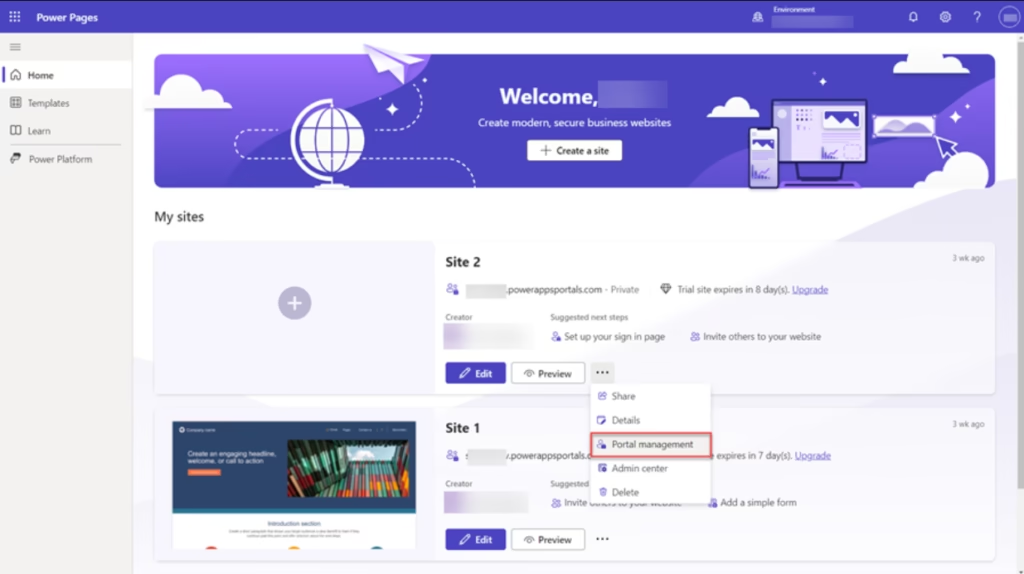
- A Portal Management app for advanced configuration, synced with the design studio.
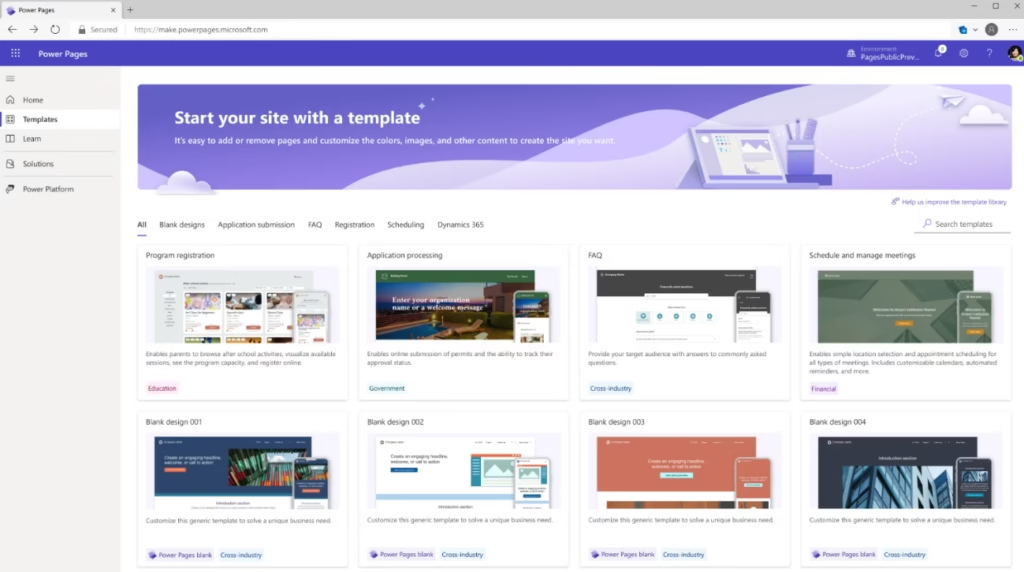
- A template hub with industry-specific designs, cross-industry templates, and a blank-page option.
These features help SMEs launch a portal faster, cut down on custom code, and lower maintenance costs, all while keeping data in one governed place.
AI Features
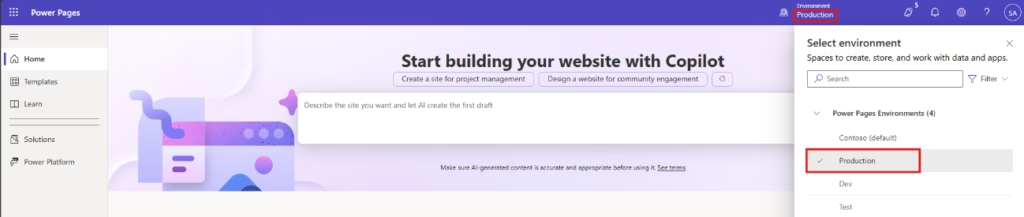
The Copilot assistant brings AI to two sides of the equation: the person building the site and the person visiting it.
For the site builder (Copilot in the design studio):
- Generate complete sites and pages from natural-language descriptions.
- Add forms, including multi-step forms (in preview).
- Generate page text and ask Copilot questions along the way.
- Create color themes with AI.
- For developers: add code with Copilot and use a data summarization API, both in preview.
For the site visitor:
- An AI-powered agent that responds conversationally instead of relying on traditional click-based navigation.
- A search component and generative-AI-powered search (in preview).
- AI-generated summaries within lists (in preview).
- AI-assisted form filling.
Copilot works on two levels: it turns a written instruction into working pages, forms, or themes for the builder, while visitor-facing AI turns the portal into something people can navigate by conversation rather than menus. The rest of the environment (drag-and-drop, templates, Dataverse modeling) brings together useful low-code capabilities, but these are standard platform features rather than anything AI-specific. Keep in mind that many of the visitor-facing AI features are still in preview, and administrators can turn generative AI on or off through governance controls.
Integrations
Third-party systems and services connect through server-side logic, which securely links to external REST APIs, Azure Functions, and other business systems under governance controls. On top of that, Power Pages includes DocuSign integration for e-signatures and a self-service template for SAP vendors. It also provides access to:
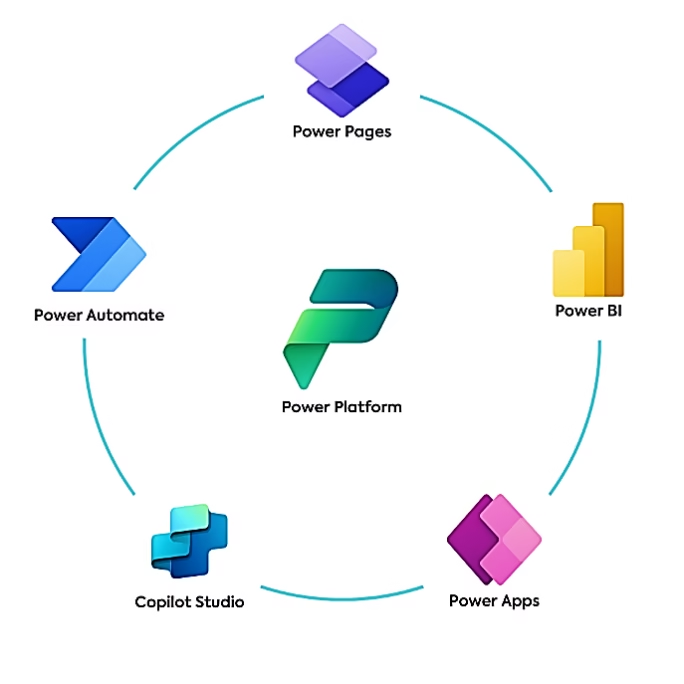
- The Power Platform ecosystem: Dataverse as the data store, plus Power Apps, Power Automate (with cloud flows configured on the site), Power BI (embedded reports, dashboards, and tiles), and Copilot Studio.
- Microsoft 365: SharePoint Online integration for document management, letting site users view, download, add, delete, and organize files in subfolders directly from a portal form.
- Authentication through Microsoft Entra and providers like Microsoft, LinkedIn, and Microsoft Entra External ID, plus Azure services (App Service, DDoS protection, content delivery network, and web application firewall via Azure Front Door).
- For external data, virtual tables that pull in outside sources without duplicating them, with providers such as Dynamics 365 Finance and Operations, Business Central, Power Platform virtual connectors (like SQL Server), and custom data providers.
- AI agents via the MCP server (Model Context Protocol): it exposes the portal's data, APIs, and logic through a standardized interface, so agents like Microsoft 365 Copilot can create, read, update, and delete Dataverse records through conversation, always respecting web roles, table permissions, and authentication. It's how the portal reaches native AI experiences without giving up control over security.
- The portals web API, which supports create, read, update, and delete operations on Dataverse tables using a REST-like pattern within the site itself. It serves to enrich the portal, not to integrate with third parties or other Power Pages sites; that's what virtual tables, server-side logic, and Power Automate connectors are for.
Power Pages adds professional development tools like Visual Studio Code for the Web, Power Platform CLI, the Liquid templating language, and code components. And while the platform revolves around the Microsoft ecosystem, its connections to external services remain broad (virtual tables, server-side logic, Power Automate connectors), so it's worth evaluating case by case.
Security and Data Compliance
Portal data lives in the organization's own Microsoft Dataverse environment, so the organization keeps full control over it. The security model rests on site visibility (private by default, public if the team chooses), authenticated users, web roles, and table- and page-level permissions that determine who can view and edit each piece of content. On top of that, a security scan (in preview) flags common threats, like cross-site scripting or the use of insecure libraries, and suggests fixes.
Power Pages supports modern TLS standards for data in transit, includes Azure DDoS protection, and lets you restrict traffic by dynamic IP. It runs on Azure App Service, which meets international standards like ISO, SOC, and PCI DSS. Web roles and permissions handle access control and multi-factor authentication, and at the platform level, Power Platform adds field-level security and customer-managed encryption keys. For more detail, check Microsoft's Trust Center.
Language: Customer Support and Interface
The design studio interface is available in Spanish, and Microsoft backs it up with hundreds of Spanish-language resources: official documentation, step-by-step tutorials, learning paths, modules, and videos on Microsoft Learn, plus an active community. For a Spanish-speaking SME, that means you can learn the platform, set up your site, and resolve your questions without relying on English. Direct support does vary by country, though.
AI Language: The Tool Itself
Copilot in Power Pages runs on natural-language instructions to create pages, forms, and themes, and to power the visitor experience. Microsoft's official availability report confirms Power Pages is available in Spanish alongside English, so the platform works smoothly for Spanish-speaking users. Just keep in mind that Copilot's individual features have their own regional and language availability; Microsoft publishes a product and feature availability report by geography and language where you can check exact coverage for your country before counting on the AI to work entirely in Spanish.
Beyond the AI, the site itself supports multiple languages within a single content structure. Power Pages includes more than forty languages by default, Spanish among them, and lets you add custom languages too. Visitors switch languages from a dropdown menu right on the page, which is handy for businesses serving audiences across Latin America and Spain. One thing to note: the creator adds the localized version of each page, so while the platform makes multilingual support possible, the business still has to supply the translated content.
Mobile Access (iOS, Android, and Others)
Sites built with Power Pages adapt automatically thanks to Bootstrap: they display on desktop, tablet, and mobile without extra tweaking, and the studio includes a viewport selector so you can check each format. To test the result on a phone, scan a QR code or email yourself a preview link. Building happens in the browser, but the finished portal works fully on mobile.
Support, Onboarding, and Account Management
- Step-by-step documentation, learning paths, and modules on Microsoft Learn, plus a video library.
- Free, instructor-led workshops (Power Pages in a Day) and an official blog with product updates.
- A Microsoft partner ecosystem for anyone who needs specialized support.
- Technical support plans: subscription support (included with the paid license, responding to the most critical cases within an hour), Pro Direct support (proactive guidance and incident escalation management), and Unified support (coverage across all Microsoft products).
For an SME with limited technical experience, the combination of templates, Copilot, workshops, and Spanish-language documentation makes those first steps a lot easier.
Ease of Use / UX
The low-code interface feels intuitive: you build the site by dragging and dropping components, the five workspaces follow a task-based layout, and Copilot speeds things up. Getting started is simple, especially from a template, and the built-in preview helps you iterate fast. The learning curve shows up once you hit advanced configuration: web roles, permissions, Dataverse modeling, and the Portal Management app. An SME can get a basic portal live quickly, but fine-tuning security and data takes more work.
Pricing and Plans
- 30-day free trial with access to premium features: start from a professional template, customize your brand with colors, fonts, and logos, add sections and components, and connect forms and data grids to Dataverse.
- Authenticated users plan: authenticated access, per site and per month, with content delivery network support and Dataverse storage, on annual billing.
- Anonymous users plan: anonymous portal browsing, per site and per month, with the same content delivery network and storage support.
- Support plans: included with the subscription, Pro Direct (per user, with a minimum user count, monthly or annual), and Unified (variable, contact for pricing).
Power Pages is a global product: pricing, plans, and even some services vary by country or region. Always check the official pricing page for your country to get up-to-date numbers and work out your return on investment. Keywords: Power Pages pricing, plans, and cost.
Case Study
Wipfli, a prominent U.S. consulting and accounting firm, adopted Power Platform to automate its processes and, within that ecosystem, chose Power Pages to build a more efficient client portal. The first phase focused on audit and tax clients, aiming to streamline communication and document exchange. Several thousand clients are already using the site, and the firm expects to top a hundred thousand visitors after the full rollout. According to Kelly Fisher, a partner at the firm, maintenance costs with Power Pages are much lower than with their previous custom-built site, and the team sees an easier path to adding AI capabilities, like an agent built with Copilot Studio.
Worth noting: Wipfli is a large firm, not an SME, but the case still offers a useful lesson for companies of any size: a low-code portal can cut maintenance costs significantly compared with custom development. You can read the full case study here.
Power Pages vs. Alternatives
A comparison between Power Pages, Power Apps (from the same ecosystem), and Hostinger (an independent alternative).
| Aspect | Power Pages | Power Apps | Hostinger |
|---|---|---|---|
| What it's for | External portals and websites, secure and connected to business data | Business applications, mainly for internal processes | An all-in-one online presence: hosting, domains, websites, and email |
| Ecosystem | Requires Power Platform and Dataverse (Microsoft) | Requires the Microsoft ecosystem (Dataverse, Microsoft 365) | Independent, no Microsoft ecosystem required |
| AI | Copilot for generating pages, forms, and themes, plus AI for visitors | Copilot and AI Builder for building apps and models | AI Website Builder, Hostinger Horizons, and the Kodee agent |
| Spanish-Language Support | Interface and documentation in Spanish | Interface, documentation, and Copilot in Spanish | Documentation in 32 languages and support in any language |
| Best for an SME that... | Already uses Microsoft and needs a secure portal for customers or partners | Already uses Microsoft and wants to digitize internal processes | Wants to launch and centralize its web presence simply and affordably |
FAQs
Is Power Pages a good option for SMEs?
Yes, especially if the company already works with Microsoft Power Platform and needs a secure external portal for customers or partners. For a simple marketing site, it can be overkill.
Does Power Pages support multiple languages?
Yes. Power Pages sites can include more than forty languages by default, and the design studio interface and official documentation are available in multiple languages too.
Which languages Copilot supports within Power Pages depends on the region, and the official material we reviewed doesn't spell out the full list.
Do I need to know how to code to use Power Pages?
Not to get started: you build the site with templates, drag-and-drop, and Copilot. Developers can go further with Visual Studio Code for the Web, Power Platform CLI, and server-side logic.
Is Power Pages free?
It offers a 30-day free trial with premium features. After that, you pay per site, per month (authenticated or anonymous users), with pricing that varies by country.
What are the best alternatives to Power Pages?
Within Microsoft, Power Apps for internal applications; outside the ecosystem, Hostinger as an independent, affordable platform for building and hosting websites.
Still weighing up Microsoft Power Pages?
See how it compares with the other tools we've reviewed in Low-code-No-code.