

Linear Review
Linear plans and tracks software work with AI agents that act inside the workflow, from triage routing to delegated implementation tied back to the code.
Linear is the strongest work management system we have tested for software teams, and one of the most divisive tools for everyone else. Speed, keyboard navigation, and clean structure earn near universal praise from engineers. That same opinionated design frustrates operations, marketing, and sales teams pushed into it. The genuine agent layer, the part that justifies the category, sits behind the Business plan and needs an active code repository to matter. Pick Linear if you build software. Look elsewhere if your whole company needs one tool.
Averaged from the breakdown below
- Software and product teams that ship continuously, where engineering, product, and design form the core of the organization
- Startups replacing a heavier tracker they never fully configured
- Engineering leads who want issues tied to code without manual status updates
- Teams already delegating implementation work to coding agents
- Companies wanting one platform for engineering, marketing, sales, and operations
- Teams without an active code repository, or non-technical departments as primary daily users
- Organizations needing custom fields, approval chains, compliance tracking, or regulatory audit trails
- Teams whose main problem is communication rather than issue tracking, and solo developers, for whom the structure may cost more than it returns
Key Features
Linear organizes the platform as a five stage pipeline: intake, plan, build, review, and monitor. The atomic unit throughout is the issue, carrying status, priority, labels, estimates, sub-issues, due dates, and relations to parent or related work. Every issue ties to a single team and assignee, which makes ownership explicit.
Capturing and sorting work
Incoming work lands in Triage, a shared team inbox where bug reports, feature requests, and other unplanned work get reviewed and prioritized before reaching the backlog. Around that inbox sit several controls:
- Rotating responsibility schedules that automatically assign or notify specific members, with service level agreements applying deadlines to time sensitive issues
- Automation rules that prioritize key customers or escalate critical bugs on arrival
- Customer Requests, capturing feedback from sales calls and support chats and linking it to the project or issue that would resolve it
- Linear Asks, handling internal requests from Slack, email, and forms for bug reports, feature ideas, and IT tickets
- Issue creation from anywhere, including CRM systems, monitoring tools, and email addresses assigned to a team or template
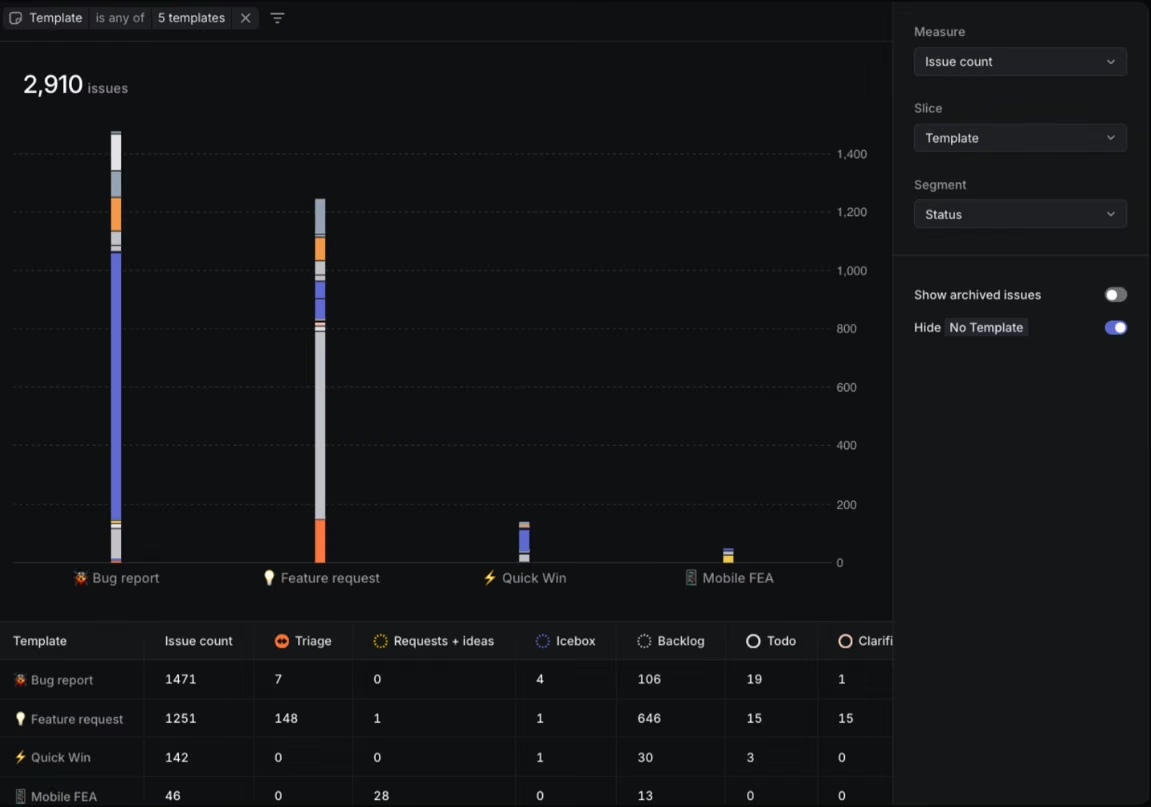
Standard templates preset issue properties, while form templates add text fields, dropdowns, checkboxes, date pickers, and instruction text, any of which can be required. They work from Slack, Asks, Intercom, Zendesk, email, and Zapier, and issues created by template stay filterable by template and by intake source, which turns a formatting convenience into a reporting tool.
Planning and structuring
Projects consolidate specs, documents, issues, customer feedback, and updates in one place, with milestones and dependencies mapping critical paths and progress visualization indicating likely completion. Updates publish to Slack with threads synced both ways, so people outside Linear stay informed. Documents add multiplayer specs edited in real time, with inline comments, change subscriptions, and commands that convert bullet lists into issues.
Visual planning covers quarterly planning, pipeline stages, timeline roadmaps, and staffing balance.
Cycles are time boxed periods created automatically once enabled, nudging teams toward putting work where it will appear on someone's list rather than disappearing into the backlog.
Building and reviewing
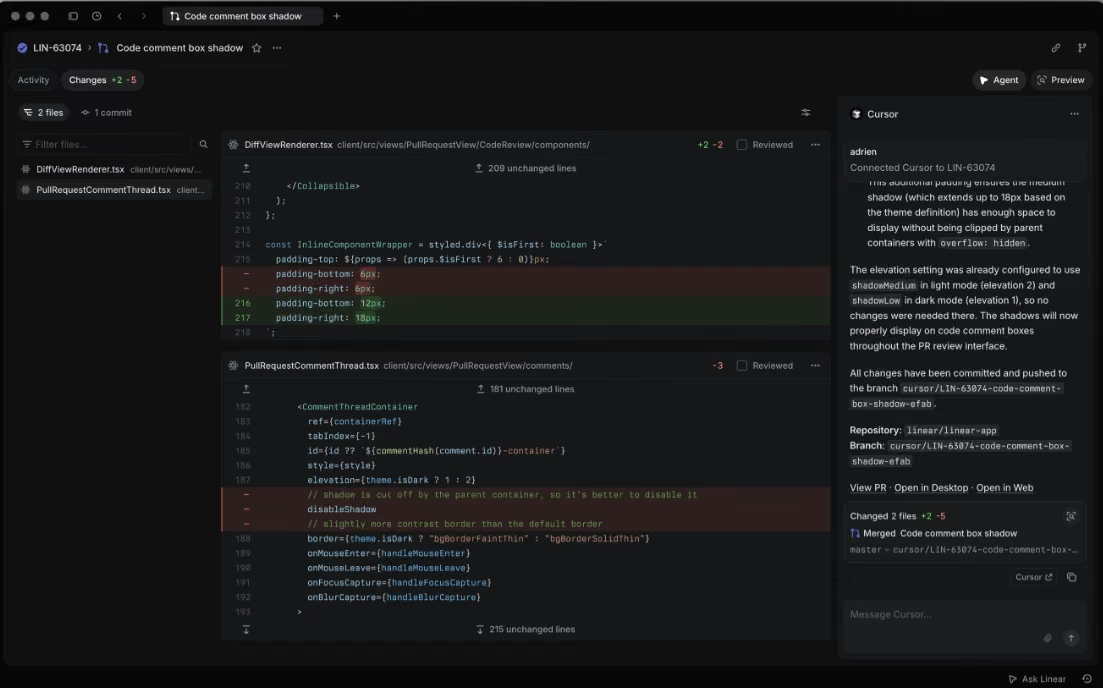
Diffs brings pull request review inside Linear, with each diff tied to the issue it resolves and synced bidirectionally with GitHub so comments, approvals, and status stay current. Supporting that review surface:
- A dedicated review inbox where everything needing attention appears in one place, with reviews assigned to GitHub teams surfacing in their own section
- Structural highlighting, stripping formatting-only edits so attention lands on real code changes
- Signed commits using SSH or GPG keys, which admins can require before anyone starts a coding session
- Git automations with GitHub and GitLab, moving an issue to started when someone copies its branch name, changing status from pull request activity, and applying rules by target branch
- CI/CD integration, tracking the deployment environment and status of every issue
Monitoring and moving data
Insights provides analytics for any stream of work with modular dashboards, including issue distribution across a team and templates by intake source. Getting data in is well served: importers cover Asana, Shortcut, GitHub, Jira, and Linear itself, plus an open source command line tool, though the GitHub importer brings across GitHub Issues rather than code.
Data export options include:
- CSV export covering issues, projects, initiatives, customer requests, and the member list, with workspace wide export reserved for admins, or owners on the top tier, arriving as an emailed link that expires after twelve hours
- View level export capped lower for members than admins, with guests unable to export at all and attachments excluded from the file
- PDF export of individual issues, converting relative timestamps to absolute ones where auditors require precise event times
- Markdown copy carrying an issue's title, description, comments, and customer requests into external AI tools
The platform also offers keyboard-first navigation, a command palette, quick issue creation, instant search, and multi-region hosting, with workspace data stored in either the European Union or the United States, as selected at creation.
For a small team, the value sits in what disappears. Status updates happen as a byproduct of the work rather than as a separate reporting task, and requests arrive structured through templates instead of as vague messages someone has to decode. Migration in and out stays open, so committing to Linear does not mean being trapped by it.
AI Features
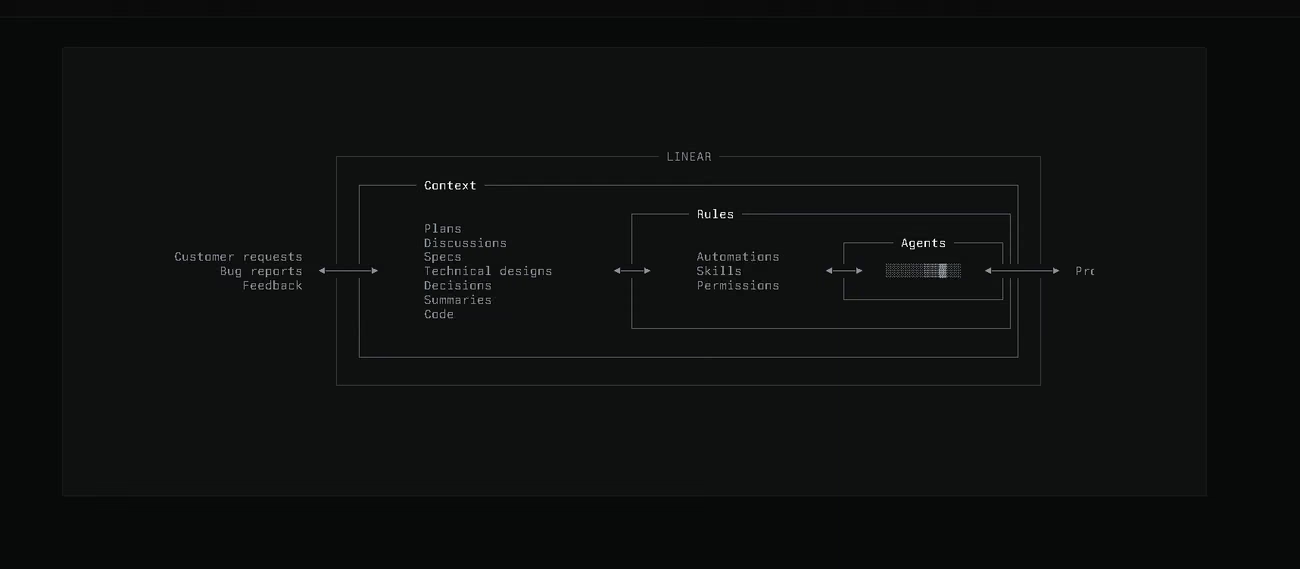
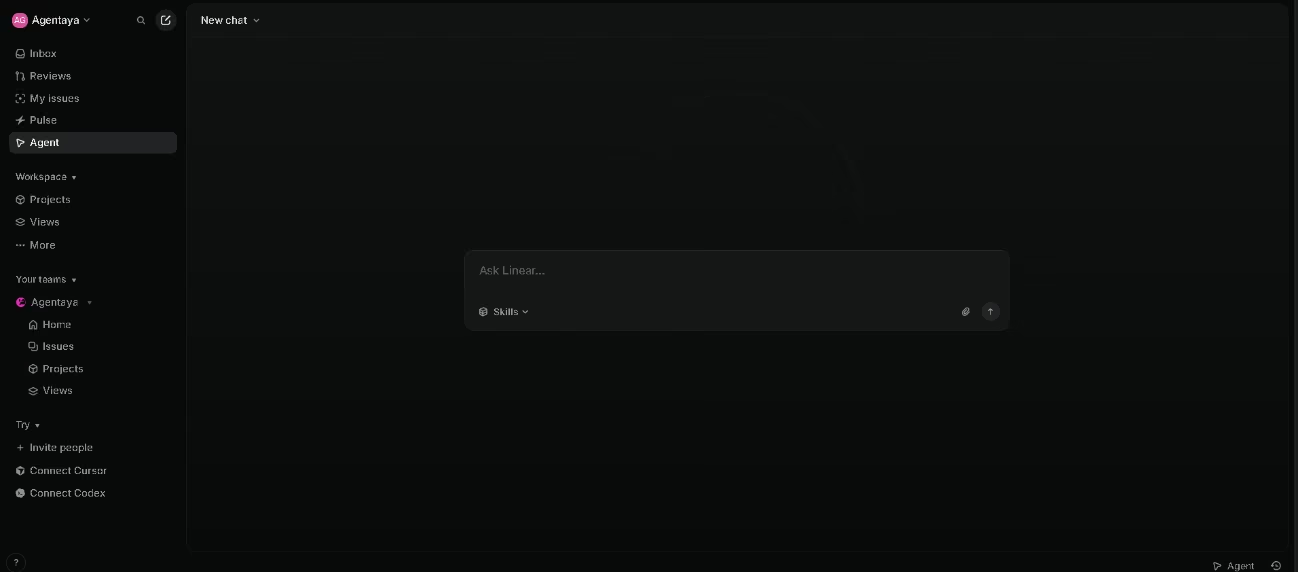
Linear Agent works like any other member of the team: you assign it issues, mention it in comment threads, and give it instructions that shape how it responds. You can also build skills, reusable instructions it picks up when relevant or that you trigger with slash commands.
Coding sessions turn that work into implementation. The agent reads the issue, investigates the codebase, writes the code, and opens a pull request in the cloud, using the context already attached. Sessions belong to the organization, not the person who starts them, so anyone can follow along, add context, redirect the agent, or take over. You can delegate multiple issues at once or open any issue in your own coding tool with its context already loaded.
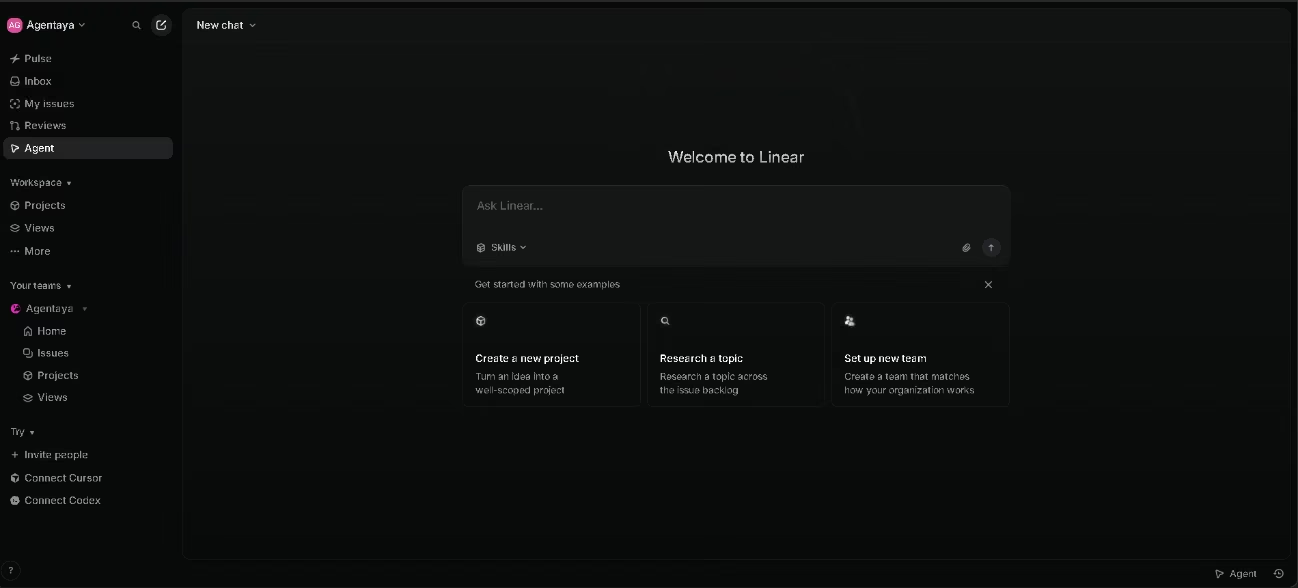
Around that core sit the features that let the loop start and finish without a person:
- Code Intelligence, letting the agent read repositories and answer questions from the source itself
- Guided Reviews, breaking large pull requests into focused sections in semantic order with explanations of what changed and why, while agents fix feedback straight from the diff, handling refactors, tests, and follow up edits
- Pulse, centralizing workspace updates and discussions into one personalized feed, narrowable into custom feeds, with AI summaries delivered as text or a short audio digest
- Agent assisted text editing, marking which passages a colleague wrote and which an automated job added, highlighting agent changes for review, and restoring any earlier checkpoint
- Automated triage, tagging the agent the moment an issue arrives so it investigates the codebase, discussions, and affected customers, connects to monitoring tools to triangulate the problem, and where confident opens a coding session, writes a fix, and tags an engineer for review
- Triage Intelligence, suggesting and applying assignees, teams, projects, and labels from the team's historical patterns, and linking similar issues so duplicates do not multiply
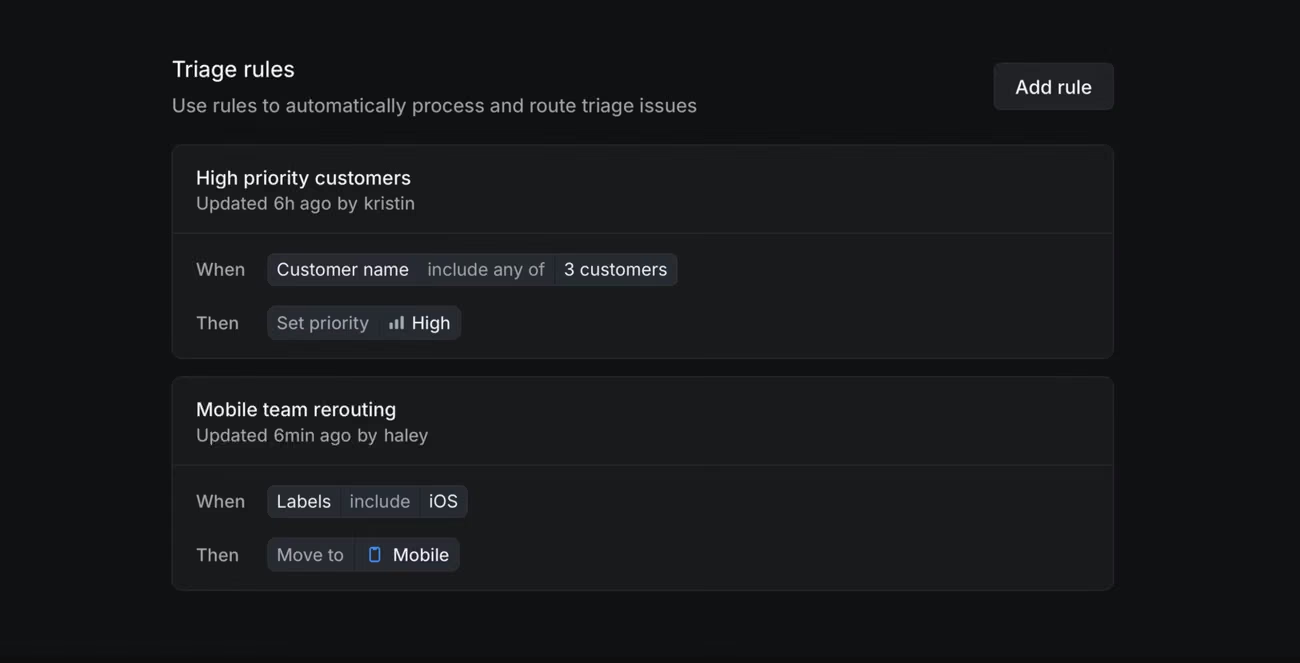
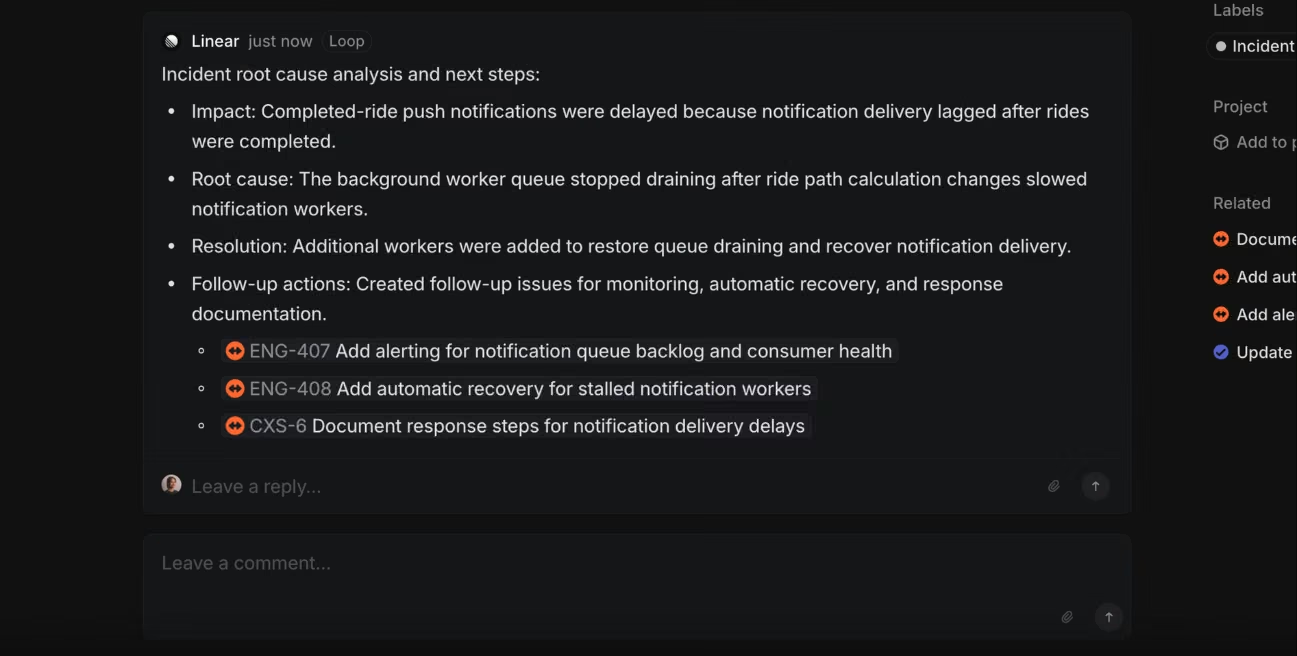
Loops extend all of this to recurring work. You describe the job in plain language and it runs on a schedule or when issues match conditions, drawing on workspace context and connected tools to decide what to do next. A loop might investigate a triage issue's root cause and open a coding session if it finds a fix, create follow-up issues after an incident closes, generate platform specific versions of incoming requests, or draft user facing messaging once work ships. You can build one by refining an agent conversation into a job, or configure it directly, and each keeps an auditable run history with restorable versions.
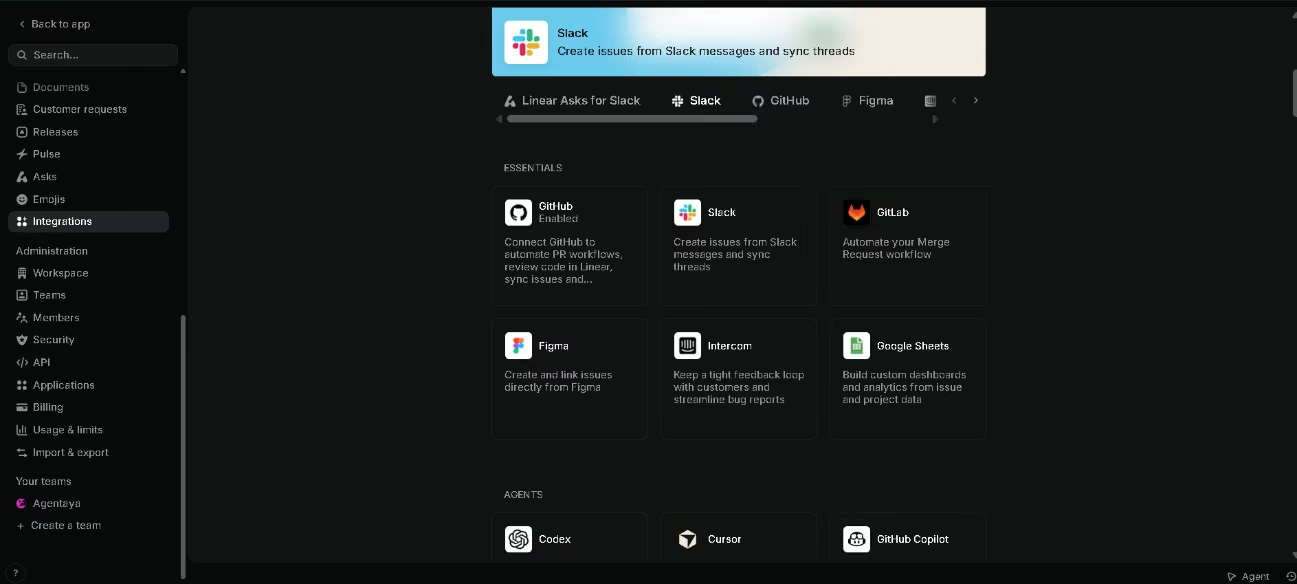
The agent layer stays open to outside tools. Backlog issues go to Codex, Cursor, GitHub Copilot, Factory, Devin, or Sentry, with model and branch settings you control and work steered through Linear comments. The MCP server runs both ways, letting external AI clients act on Linear data and letting Linear reach other tools mid-job
Plenty of tools call rule-based automation an AI feature. Linear's agent decides and acts within boundaries rather than along a script, producing work a person reviews afterwards.
Integrations
- Code hosting: GitHub and GitLab, automating pull and merge request workflows. Linear does not host code.
- Communication, support, and CRM: Slack, Microsoft Teams, Discord, Intercom, Zendesk, Front, Salesforce, Attio, Gong
- Design, media, monitoring, and incidents: Figma, Miro, Loom, Descript, YouTube, Sentry, Datadog, incident.io, plus bug reporting tools including Jam and Bird Eats Bug
- Coding agents and external AI clients: Codex, Cursor, GitHub Copilot, Factory, Devin, and Sentry take on issues directly, while Claude, ChatGPT deep research, Windsurf, Replit, and Vercel's v0 connect through the Linear MCP server
- Data, reporting, security, and compliance: Google Sheets, Airbyte, Fivetran, Retool, productivity analytics tools, Vanta, Drata, and others
- Automation and migration: Zapier, issue creation by email, Raycast, and a Jira transition path
- Public API and SDK: available alongside webhooks, with clean payloads that let teams map pull requests and deployments to issues and update statuses automatically
- Enterprise managed MCP authorization: on the top tier with an identity provider configured, employee access flows through existing company identity and permissions apply centrally
The catalogue covers the essentials, but stays smaller than long established competitors, so a niche tool your team depends on may not appear. Connecting integrations proved straightforward in our testing, including GitHub and Notion, and required no technical skills.
Data Security and Compliance
Linear holds SOC 2 Type II and ISO/IEC 27001:2022 certification, commits to GDPR, and offers agreements covering protected health information. Data encrypts in transit with TLS and at rest with AES 256, and each workspace picks European Union or United States hosting at creation. Access controls run deep: single sign-on, passkeys, SAML, SCIM, domain claiming, login and IP restrictions, third party app approvals, private teams, and limited guest accounts, though SAML and SCIM sit on the top tier.
Every automated job carries explicit permissions for team access, web access, code reading, coding sessions, external sources, and writing to synced threads, and by default runs only on issues created inside Linear, writing only to the issue that triggered it. Admins can restrict which external connectors a job may use. The documentation also warns plainly that web access can send workspace content outside Linear and that writing to synced threads could post to a public repository.
Language: Interface and Customer Support
Linear's interface exists in English only, as do the documentation, help center, and community forum. The YouTube videos carry subtitles, which helps for anyone following along in another language. Whether sales and support answer in other languages is not stated anywhere, so a team weighing a higher plan is worth asking directly, since that is where account management and priority support come in.
For engineering teams none of this blocks the adoption, since technical work commonly happens in English regardless of location.
AI Language: The Tool Itself
The AI itself handles languages beyond English comfortably. In our testing, Linear Agent accepted prompts in Spanish and responded naturally, without degraded quality or a drift back to English. The agent adapts its register to the surface it works in, staying more conversational in a chat channel than in an automated job, and it avoids opinions on sensitive subjects.
Mobile Access
Linear offers dedicated iOS and Android apps, both apps get good reviews overall, with some exceptions. The mobile experience is more than a stripped-down version of the desktop app: you open a diff, switch to the changes view to inspect code, comment on specific lines, and steer an active coding session by tapping a line to add it to your message. Delegated issues appear under assigned work showing the status of each session and a route back into active work.
Support, Onboarding, and Account Management
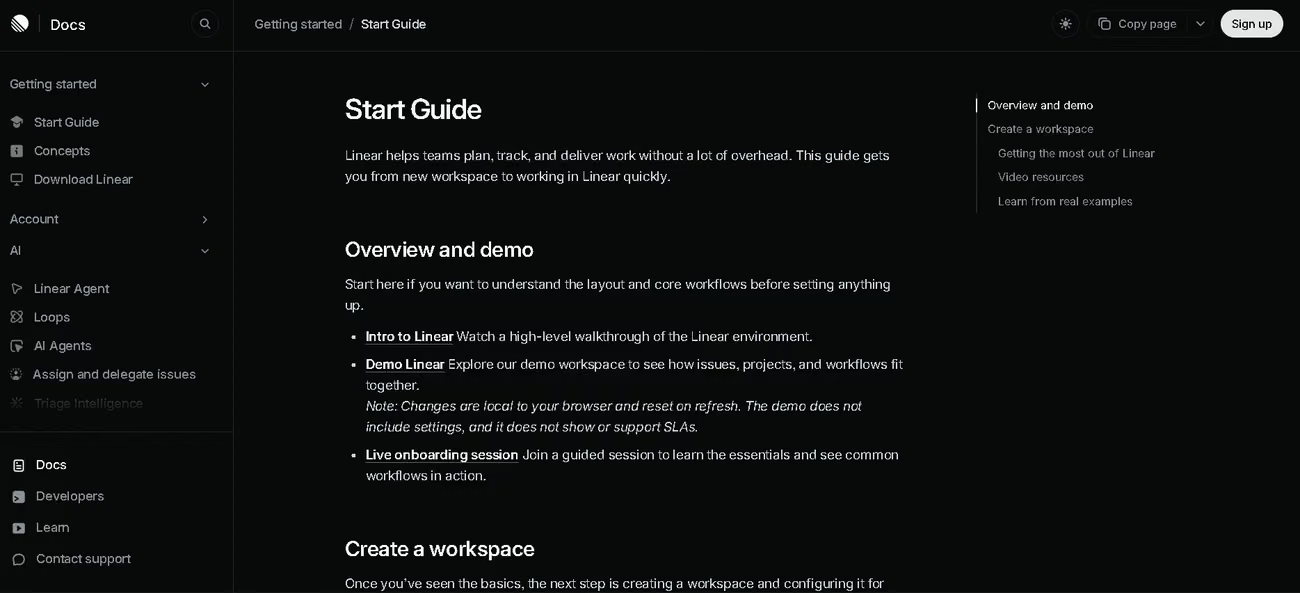
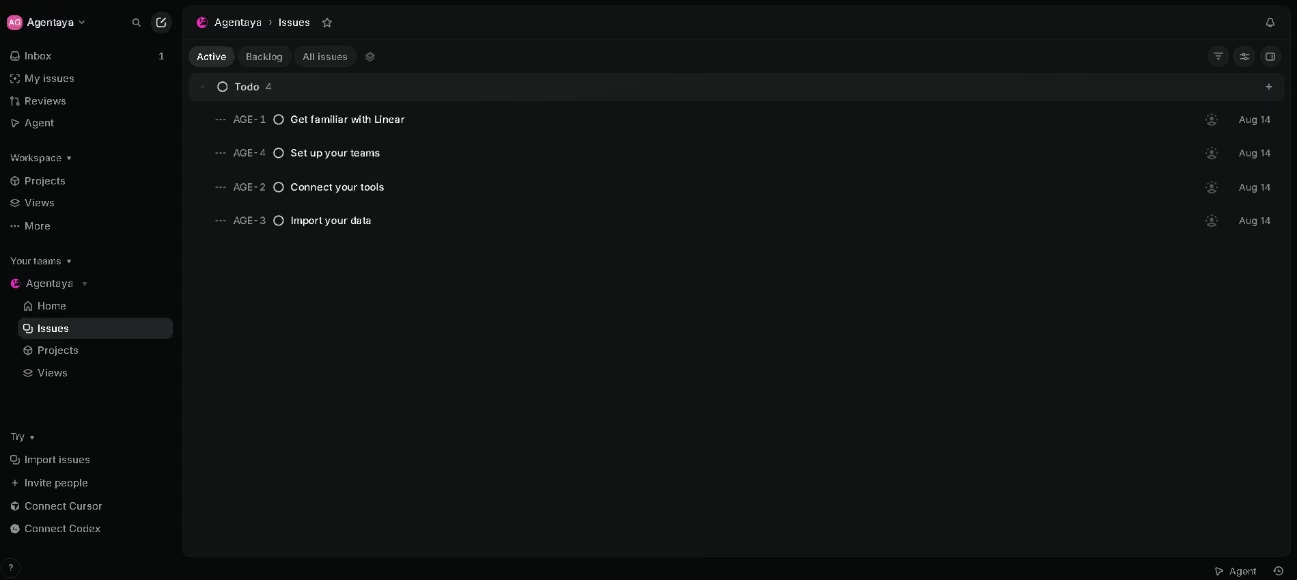
An introductory video lands in your inbox on first login, and the home screen offers a setup checklist covering the basics: getting familiar with Linear, connecting tools, setting up the team, and importing data. Beyond that sits a help center with written documentation and video guides, API and SDK documentation, migration tools with a written guide, and a public status page.
Direct help splits across a few channels:
- Sales for plans, pricing, contracts, and demo requests, with a separate support contact for product questions, problems, and feedback, and a general email channel for anything else
- A community forum on Slack for peer questions
- Priority support, dedicated account management, and hands-on migration assistance, all reserved for the top tier
- A startup program run through venture firms, accelerators, and partner communities, where eligible startups redeem through a partner link
Users describe support as present and useful when needed. The material is thorough enough for a team without technical staff to get running, but a smaller team migrating from another tracker does it unassisted.
Ease of Use and UX
Setup takes minutes. Linear asks whether the workspace should be hosted in the European Union or the United States, then offers a role question, a GitHub connection, and a Slack connection, all of which you can skip, followed by opt-in choices about changelog and onboarding emails. The home screen then presents a short checklist covering orientation, connecting tools, setting up the team, and importing data, and an introductory video arrives in the in-product inbox.
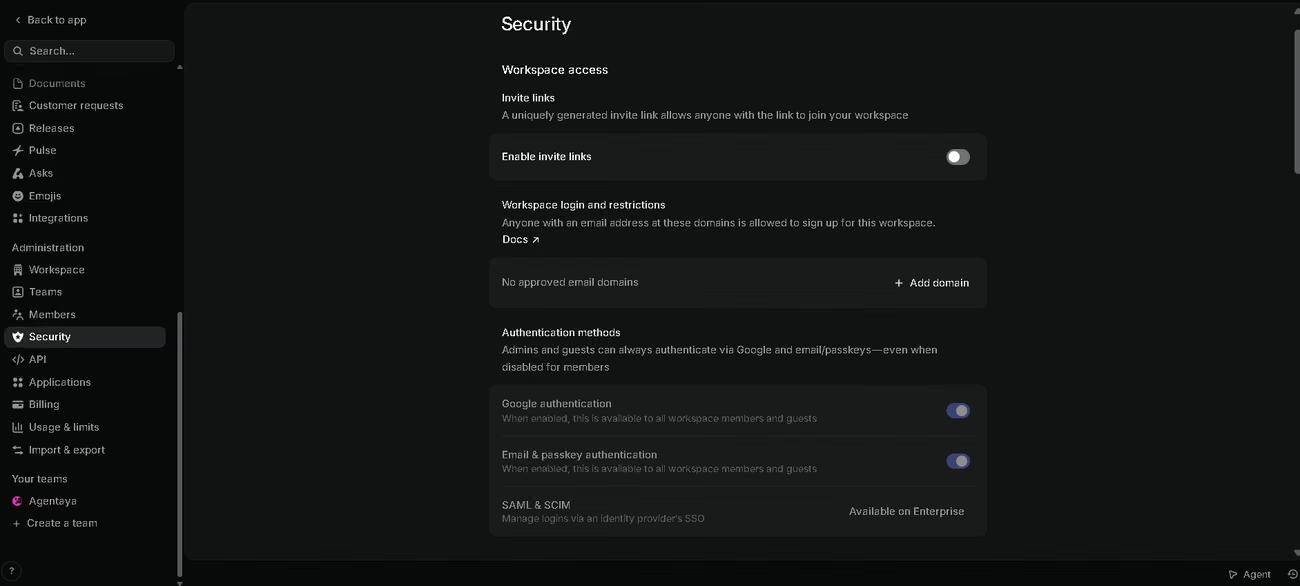
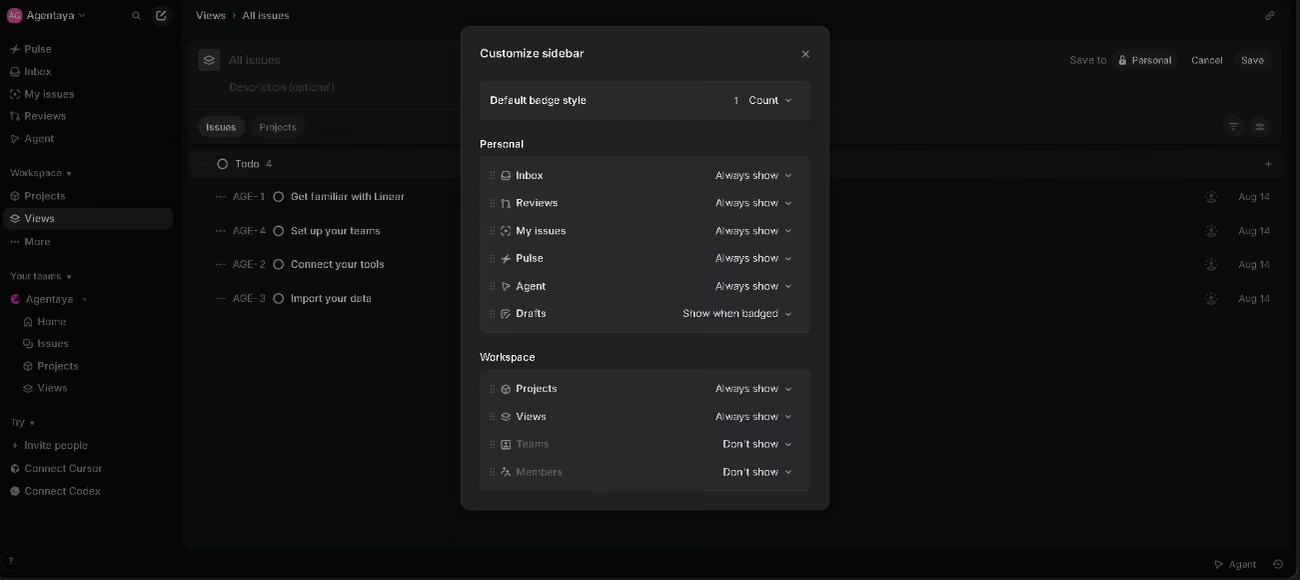
The interface itself is fast, the sidebar is configurable, and the security settings read clearly enough for someone without a security background to understand what they are enabling. Connecting integrations proved straightforward in our testing, as did creating a simple skill for the agent, which followed a process similar to other platforms.
Features that learn from historical patterns have nothing to learn from on a fresh workspace, which understates them in a short trial. Default navigation shows our own team's hierarchy with no clear path to others, permissions could be more granular for larger teams, and the product shows what work exists rather than how loaded each person is.
Linear is more capable than lightweight task lists and far less bloated than enterprise trackers. Views and filters let a team hide what does not matter yet, so engineers stay on assigned issues while a founder still checks whether projects are moving. It is opinionated by design, and teams that do not already work in cycles often find that structure more of a struggle than a help.
Technical users respond almost uniformly well. Non-technical users and mixed teams give far more divided verdicts, and for some the tool complicates work rather than simplifying it. A technical user reaches a useful result the same day. A mixed team takes considerably longer, and may never arrive.
Pricing and Plans
- Free: unlimited members, a small number of teams, a capped number of active issues, the agent platform, and Linear Agent
- Basic: more teams, unlimited issues, unlimited file uploads, and admin roles
- Business: unlimited teams, private teams and guests, Triage Intelligence, Loops, Code Intelligence in beta, Insights, Asks, and Zendesk and Intercom integrations
- Enterprise: SAML and SCIM, granular admin controls, enterprise grade security, advanced organization modeling, migration and onboarding support, priority support, account management, and invoice billing, on annual terms only
- AI credits: purchased and managed separately by workspace admins, consumed by Loops and coding sessions, pooled across the workspace, with automatic top ups optional.
Linear pricing is seat based and reasonable for what the entry tiers deliver. The complication for an SME budget is structural rather than numerical: the features that define Linear as an AI platform sit on the third tier, and the credits powering them cost extra on top of the seats. Usage stays visible inside the product and automated jobs pause when credits run out rather than billing you by surprise.
Case Study
Dandelion Chocolate makes single origin, bean to bar chocolate in San Francisco. Founded in 2010, the company switched to Linear in January 2025. What began with Todd Masonis and a few friends taking over a garage grew into a factory, cafes, and a warehouse operation, and with that growth came the complexity that follows more products, more people, and more dependencies, the kind of overhead that quietly pulls attention away from the craft itself. Linear gave engineering, product, and the chocolate makers a shared language, letting each group draw from the same underlying information while seeing it in ways that match how they work. The complexity now has somewhere to live other than in people's heads. As co-founder and CTO Amber Feng put it: "Linear is the kind of software I want to be using. It's incredibly ergonomic and beautiful. When you're doing work that requires craft and creativity, you want your tools to match that."
Here you can read the complete story, along with others worth a look such as Scale, a company building infrastructure for AI development.
Videos
Linear vs Alternatives
| Dimension | Linear | monday.com |
|---|---|---|
| Built for | Software and product teams | Every department, with monday dev for R&D and product teams |
| Customization | Deliberately limited | Fully customizable processes and workflows |
| Code work | Pull request review, coding sessions, coding agents | Commit syncing from your repository |
| Support | Documentation, video, community | Round-the-clock support, academy, and a directory of paid experts |
Choose Linear if engineering sits at the center of the company and code review belongs in the same place as the work behind it. Choose monday.com if marketing, sales, operations, and product all need one platform, if you want to shape the workflow rather than adopt one, or if a Spanish interface and live support are requirements rather than preferences.
FAQs
Is Linear good for small businesses?
Only if it builds software. For a product team of any size it works exceptionally well, but a business tracking operational work will find the vocabulary and structure poorly matched to what it actually does
Does Linear have a free plan?
Yes, with unlimited members and a cap on active issues. Although the features of intelligent triage, recurring automation, and code reading all require the Business plan.
Which languages does Linear support?
The interface and every piece of support material exist in English only. The AI agent itself works comfortably in other languages, including Spanish.
Can I move my data out of Linear later?
Yes. Linear exports issues, projects, initiatives, and customer requests as CSV files, and individual issues save as PDFs. Attachments do not travel with the export, and limits vary by role.
Still weighing up Linear?
See how it compares with the other tools we've reviewed in AI for Project Management.