
Tableau: Visual Data Analysis with AI and BI for SMEs
Tableau, a visual data analysis platform, has established itself as a global reference, combining the power of Business Intelligence (BI) with Artificial Intelligence (AI) capabilities to facilitate the interpretation of complex information. Its purpose is to transform large volumes of data into dashboards and interactive visualizations that, thanks to features like Explain Data and Einstein Discovery, offer predictive models and automatic explanations.
Within the analytics and data analysis category, Tableau allows small and medium-sized businesses to transform scattered information into faster strategic decisions. For an SME owner (often a solo founder or small team), this means moving away from static spreadsheets and starting to interact with data to find purchasing trends, anticipate demand, or identify key insights in seconds. If your goal is interactive visualization and automated explanations with AI, this Tableau review will show you why it’s considered a best-in-class AI tool for analytics and data analysis.
AgentAya Verdict: Tableau
Tableau is the Swiss Army knife of data visualization. Our verdict is highly favorable for SMEs that already generate considerable volumes of information and seek deep and fast visual analysis. Tableau combines advanced visualization and artificial intelligence capabilities to transform complex data into actionable information. It’s especially suitable for organizations that need to consolidate information from different branches, anticipate purchasing trends through predictive models, and distribute interactive dashboards to their teams on mobile devices for agile tracking.
The platform’s power to connect multiple sources and the quality of its graphics are unmatched. Its native integration with Salesforce (its parent company) allows unifying commercial and marketing metrics in the same analytical environment. However, the initial learning curve is notable for users without prior data analysis experience, and the cost for small teams can be high compared to alternatives like Power BI. Additionally, like many AI tools, its conversational Natural Language features (Tableau Agent) have historically offered stronger support in English, which may require caution for full AI compatibility in other languages.
Score Breakdown
Below, we present the breakdown of our Tableau evaluation, highlighting its strengths as a visual analysis platform.
| Category | Score | Description |
|---|---|---|
| Features and Functionality | 5/5 ⭐⭐⭐⭐⭐ | Leadership in data visualization, combining dashboards, predictive models, and explanatory AI. |
| Integrations | 4/5 ⭐⭐⭐⭐ | Compatible with multiple data sources (Excel, SQL, Salesforce, Google BigQuery, among others). |
| Language and Support | 5/5 ⭐⭐⭐⭐⭐ | Available in multiple languages in interface and official documentation; global support with resources in various languages. |
| Ease of Use | 3/5 ⭐⭐⭐ | The interface is visual and intuitive, but requires an initial learning curve for users without data analysis experience. |
| Value for Money | 3/5 ⭐⭐⭐ | Per-user subscriptions that can be expensive for small teams, but justified by the power. |
| AI Functions | 4/5 ⭐⭐⭐⭐ | Offers explanatory AI (Explain Data), conversational interaction, and predictive analysis (Einstein Discovery). |
| AI Languages (Natural Language) | 3/5 ⭐⭐⭐ | Tableau doesn’t specify language limitations, but advanced conversational AI features historically have had better support in English. |
| Support and Onboarding | 4/5 ⭐⭐⭐⭐ | Offers free learning resources, interactive guides, and an active community. Enterprise support requires additional plans. |
AgentAya Overall Score: ⭐⭐⭐⭐ 4 / 5
Ideal for:
- Companies looking to integrate data from multiple sources (Excel, SQL, CRMs, big data) in a single visual environment.
- Users who need quick predictions and explanations (Explain Data) without depending on specialized analysts.
- Teams requiring accessible and flexible visualizations on mobile devices for real-time tracking.
- SMEs with accelerated growth that value the scalability and power of an enterprise-level platform.
Not ideal for:
- Very small businesses seeking transparent and accessible pricing plans without commercial negotiation.
- Companies requiring full conversational AI compatibility in multiple languages without any limitations.
- Users without time to face the initial learning curve in data analysis and seeking an ultra-simple BI solution.
- SMEs whose main focus is text sentiment analysis (for this, there are more specialized tools).
Main Features
Tableau focuses on the speed of data exploration, enabling SMEs to save time by reducing manual reporting cycles and getting business answers instantly.
- Interactive Visual Analysis: Enables users to create and manipulate dashboards with superior agility, making data exploration intuitive and fast.
- Broad Data Connectivity: Compatible with multiple data sources (over 200), from spreadsheets and local databases to cloud services (AWS, Azure) and CRMs.
- Flexible Data Models: Allows users to build complex data models without coding, which is vital for consolidating information from different business areas (sales, inventory, marketing).
- Tableau Next: AI agents deliver personalized, contextualized information proactively, directly within the team’s everyday work tools. Built on a composable architecture with a unified data layer (Data 360), Tableau Next integrates Agentforce to provide preconfigured analytical skills that operate autonomously. This capability is available through the Tableau+ package, which combines Tableau Cloud with Tableau Next.
- AI-Powered Semantic Layer (Tableau Semantics): Tableau Semantics is an AI-enriched semantic layer that establishes standardized, contextualized definitions for business data. This layer accelerates the creation of semantic models with AI assistance and enables analytical agents to understand each organization’s specific vocabulary, resulting in more accurate and relevant responses for users.
- Global Community and Resources: Boasts one of the largest and most active BI user communities, facilitating problem-solving and the learning of new techniques.

AI Functions
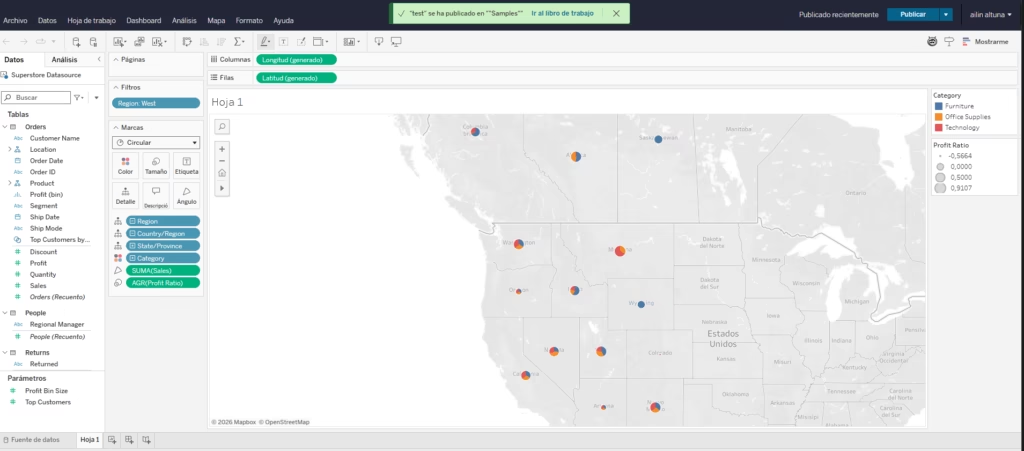
Tableau has integrated artificial intelligence into every stage of the analytics cycle, from data preparation through to decision-making. The platform has moved well beyond pure visualization into predictive, conversational, and agentic capabilities, though many of these features are still maturing.
Several generative AI features are turned off and must be manually enabled by an administrator in the site settings. For SMEs, this is an advantage: teams can roll out AI capabilities gradually, choosing exactly what to expose and minimizing unnecessary risk.
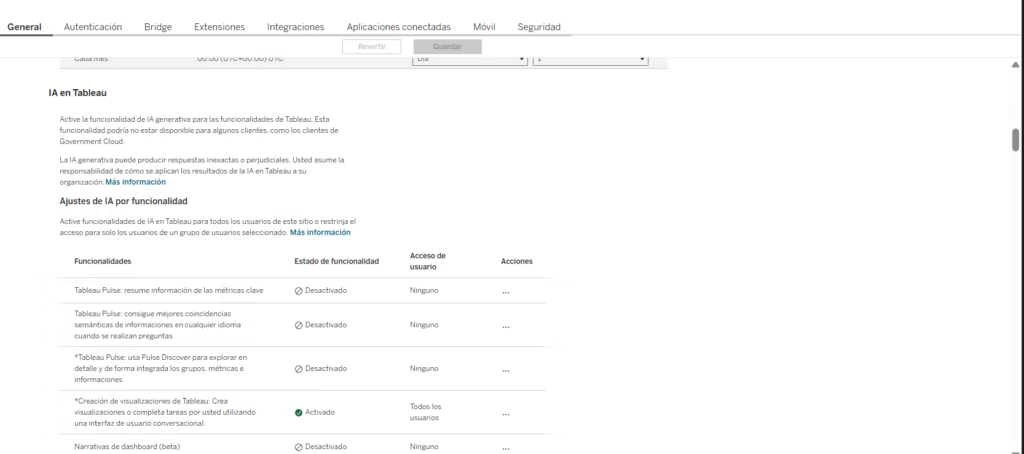
Note that some features may not be available to all customers (for example, those on Government Cloud). Tableau also cautions that generative AI can produce inaccurate responses and that each organization is responsible for how it applies the results. The most relevant AI capabilities for SMEs are:
Explain Data: Automatically analyzes why a data point or trend is unusual, scanning hundreds of patterns and presenting the most relevant factors in plain language.
Einstein Discovery: AI models inherited from Salesforce that allow users to generate predictions directly within dashboards. An SME can project sales or anticipate customer churn without writing code.
Tableau Agent (platform-wide AI assistant): A generative AI assistant built on the Agentforce Trust Layer that supports users across different stages of analytical work:
- In Tableau Prep, it helps clean and prepare data through natural language, generating calculations and step-by-step plans.
- In Tableau Catalog, it generates automatic descriptions of data sources and tables with a single click.
- In Web Authoring and Desktop, it converts written instructions into charts and calculations and suggests questions to kick off exploration.
- In dashboards, it produces contextual summaries of each visualization.
- It is also available on Tableau Server via an OpenAI API key.
Some of these features (such as assisted preparation in Prep and conversational exploration in Pulse) require Tableau+ and a Salesforce connection with Einstein generative AI configured.
Agentforce Tableau (agentic analytics): Available through Tableau Next, it includes three specialized skills:
- Concierge: Natural language queries with detailed responses, interactive visualizations, and the reasoning behind each result.
- Inspector: Proactive monitoring of key metrics with alerts when significant trend changes occur.
- Data Pro: Creation of complex calculated fields and semantic modeling from written instructions.
Tableau Pulse (AI-powered personalized insights): Delivers personalized metrics and contextualized information directly where the team works, Tableau Pulse is included in all editions of Tableau Cloud:
- Integrations with Slack, Microsoft Teams, and email.
- Automatic detection of trends, outliers, and causal factors, with natural language summaries.
- Enhanced Q&A (exclusive to Tableau+) for exploring multiple metrics at once with explanations and supporting citations.
- Full mobile access from Slack, Teams, or email notifications.
Pattern detection and clustering: Machine learning algorithms that automatically identify and group similar data points or dimensions, speeding up exploration.
Integrations
Tableau stands out for its broad compatibility, allowing SMEs to consolidate virtually any data source in their dashboards. This tool is compatible with hundreds of data sources, including:
- Databases: SQL Server, Oracle, MySQL, PostgreSQL, etc.
- Cloud Data Warehouses: Amazon Redshift, Google BigQuery, Snowflake, Azure Synapse.
- Files: Excel, CSV, JSON, and text files.
- Web Services: Salesforce (native integration), Google Analytics, Marketo, and others.
APIs and Exports: The system is flexible. Besides native connectors, there’s a robust API for data integration and for embedding Tableau visualizations in external applications. This makes it possible to enrich indicators with sentiment analysis from external solutions (like Sentiment.io or Lexalytics) through APIs or data exports.
Tableau Next MCP enables complex conversational analysis on data protected by the Agentforce Trust Layer, while Tableau MCP (available for Tableau Cloud and Server) provides access to published data sources, curated Pulse metrics, and Tableau metadata to enrich the interpretation of external AI models.
Security and Data Compliance
Tableau, as part of Salesforce, operates under a corporate-level security framework that provides a high degree of confidence to SMEs.
- Data Ownership: The client (the SME) retains exclusive ownership of the data used for analysis. Tableau acts as a data processor.
- Data Use and Retention for AI: The SME’s data is used solely for the client’s analysis. Information about specific data retention policies outside the Salesforce framework is not publicly available.
- Encryption Protocols: Tableau uses advanced encryption protocols to protect data in transit (TLS) and at rest (AES-256 in the cloud or according to server configuration).
- Regulations and Certifications: Tableau complies with relevant data protection regulations such as GDPR and international compliance frameworks. Salesforce possesses multiple high-level security certifications (such as ISO 27001), which cover Tableau Cloud’s underlying infrastructure.
- Authentication and Access: Security is managed through Salesforce infrastructure, enabling multi-factor authentication (MFA), Single Sign-On (SSO), and granular access control by license level and permission.
Interactions with Tableau Agent and other AI features are protected by the Agentforce Trust Layer (formerly known as the Einstein Trust Layer). Each customer has its own Data Cloud instance where queries and responses are securely stored for internal audit purposes. Organizational data is not used to train external models.
Language – Customer Support
Tableau offers excellent localization support for international SMEs.
The interface and official documentation are fully available in multiple languages. This is a great benefit for adoption and team training in international markets. Support is global and resources, guides, and learning materials are offered in various languages. The level of direct technical support depends on the contracted enterprise plan, but Tableau’s community, with abundant multilingual content, fulfills many initial needs.
Language – The Tool Itself
The software interface is available in multiple languages.
Regarding AI features: the Explain Data function and Tableau Agent (natural language) are available in multiple languages. However, as mentioned, Tableau doesn’t specify that all conversational AI features are 100% optimized for languages other than English. Therefore, some SMEs with very regional or technical vocabulary might notice slight inaccuracies in more advanced interactions. Even so, the use of these features in multiple languages is fully possible and functional, marking a difference from other tools that limit conversational AI only to English.
Mobile Access (iOS, Android, Others)
Tableau offers official mobile applications for iOS and Android devices.
These applications are one of its strong points, as they allow visualization and interaction with dashboards in real-time. SME managers and owners can access interactive dashboards, receive alerts, and perform data drill-downs while away from the office, ensuring that strategic decisions aren’t delayed.
Support, Onboarding Process, and Account Management
Tableau, given its complexity, offers a wide range of training resources.
- Training/Onboarding Materials: Offers free learning resources, interactive guides, detailed official documentation, and the Tableau Community, which is very active and offers thousands of online examples and tutorials.
- Customer Success / Account Management: High-level enterprise support and dedicated account management require additional plans or Premium licenses. For more basic plans, support is self-service, complemented with the community.
- Suitability for SMEs with Little Technical Experience: Although the interface is visual, the learning curve is steeper than in other simpler BI tools. SMEs without data analysis experience will need to invest time and effort in initial training to fully leverage its advanced features.
Ease of Use / UX
The interface quality is among the best in the industry, focused on visual exploration. Its design allows users to create complex visualizations faster than most competitors, making it a favorite among analysts.
That said, as noted, the learning curve is a factor to consider. An SME can derive value quickly by using straightforward visualizations, but mastering data modeling, expression programming (Tableau Prep), or level-of-detail calculations can take time.
Pricing and Plans
Tableau uses a role-based per-user licensing model, allowing SMEs to scale costs according to who consumes, edits, or creates data.
Subscription Plans: Subscription plans are per user and billed annually, offering three main levels:
- Creator: Most complete license, for analysts and dashboard creators.
- Explorer: For users who need to interact with dashboards, modify reports, and explore data.
- Viewer: For users who only need to view and interact with already created reports.
Tableau offers two hosting options: Tableau Cloud (managed by Salesforce) and Tableau Server (deployed and managed by the company itself). Within each option, there are two main editions. Additionally, Tableau+ is a package that combines Tableau Cloud with Tableau Next, incorporating agentic analytics capabilities with Agentforce, the AI-powered semantic layer (Tableau Semantics), and exclusive features such as Tableau Pulse Enhanced Q&A.
Value for SMEs: While the per-user cost may be higher than other alternatives (like Power BI Pro or Zoho Analytics), ROI is justified by the speed and depth of visual analysis, especially in environments where data-driven decision-making is critical. Enterprise and large-scale plans require commercial negotiation.
Case Study
Inventory Prediction and Discounts in a Multi-Branch Retail Chain
Context: A retail chain with 10 branches struggled with excess stock in some stores and shortages in others. Planning was based on historical Excel data without considering future trends.
Use of Tableau: The chain implemented Tableau to consolidate sales, inventory, and promotions data in real-time.
- Consolidation and Visualization: Created an interactive dashboard to visualize inventory at each branch and product category.
- Predictive Analysis (Einstein Discovery): Used Einstein Discovery AI to project demand for certain key products and automatically determine the need to apply discounts.
- Explanatory AI (Explain Data): When sales at a branch unexpectedly dropped, they used Explain Data to quickly identify whether the factor was weather, a competitor’s promotion, or a change in product mix.
Result: The chain was able to anticipate purchasing trends more accurately, reducing excess stock by 15% in the first semester and optimizing discount strategy, which translated into better inventory turnover and increased profit margin.
Tableau vs Alternatives
| Alternative | Primary Focus | Alternative Pros | Alternative Cons |
|---|---|---|---|
| Power BI Microsoft | Ecosystem and Affordability | Significantly lower per-user cost than Tableau. Deep integration with the Microsoft 365 ecosystem and Microsoft Fabric. | AI features (Copilot) require Microsoft Fabric capacity, which increases the base cost. |
| IBM Cognos Analytics | Predictive / Governance | Advanced forecasting and data modeling capabilities for regulated financial purposes. Recognized as a leader in the IDC MarketScape 2025. Active development with recent releases (12.1.x). | Reduced market share and classified as a niche player in the Gartner MQ 2025. The natural language assistant only works in English. Steep learning curve and geared toward large enterprises. |
| Zoho Analytics | Productivity Suite (SMEs) | Greater ease of use and lower initial cost. Part of the Zoho One suite. Zia has evolved into an agentic assistant with its own language model (Zia LLM), ensuring data stays on Zoho’s servers. Support for Hadoop, Spark, and Databricks. | Performance can degrade with very large datasets. Less depth in advanced visualization than Tableau. |
Tableau remains the benchmark for ad hoc visualization and deep data exploration. Power BI is the most cost-competitive alternative and the best choice for organizations already operating within the Microsoft ecosystem. Zoho Analytics has made a significant leap forward with its agentic AI and proprietary language model, establishing itself as the most accessible option for SMEs seeking a comprehensive suite. IBM Cognos retains strengths in forecasting and regulated financial reporting, but its enterprise orientation and reduced market presence limit its relevance for SMEs.
Related Tools
| Tool | |
|---|---|
 | |
 | |
 | |
 | |
 |
FAQs (Frequently Asked Questions)
Is Tableau good for SMEs?
Yes, Tableau is excellent for SMEs that already handle multiple data sources and need a powerful visualization tool to make strategic decisions quickly. The learning curve is its main obstacle.
How good are Tableau’s AI features in multiple languages?
Tableau offers powerful features like Explain Data in multiple languages. However, conversational Natural Language features (Tableau Agent) have historically had better performance in English, which may require caution for full AI compatibility in other languages.
Is Tableau more expensive than Power BI?
Yes. Tableau’s per-user pricing model is generally more expensive than Power BI Pro. Tableau is typically the choice when visualization depth and exploration are more important than pure affordability.