
Zoho Books: Cloud Accounting, Invoicing, and Inventory Management
Accounting is one of the most critical, and often most tedious, functions for any small or midsize business (SME/SMB). In this context, tools like Zoho Books emerge as a solid solution within the category of cloud-based accounting management systems. This review analyzes its offering from the perspective of global SMEs/SMBs: functionality, AI automation, ease of use, tax compliance, and more.
AgentAya Verdict
Zoho Books combines intelligent automation with a modular structure that adapts to various tax and operational realities worldwide. Its primary strength lies in its integration with the Zoho ecosystem, making it a practical choice for companies already using other solutions from the brand (CRM, Analytics, etc.).
It is particularly useful for SMEs/SMBs that need to comply with local tax regulations without investing in costly or complex solutions. Overall, Zoho Books is an efficient, secure, and accessible accounting tool for growing businesses.
Score Breakdown
| Category | Score | Description |
| Features and Functionality | 4.5 ⭐⭐⭐⭐ | Comprehensive functions for accounting, inventory, invoicing, and more. |
| Integrations | 4.0 ⭐⭐⭐⭐ | High compatibility with Zoho apps and services like PayPal, Stripe, and Zapier. |
| Language and Support | 4.0 ⭐⭐⭐⭐ | Interface and assistance in major global languages, with localized resources. |
| Ease of Use | 4.5 ⭐⭐⭐⭐ | Modern, clean, and intuitive interface for non-accounting users. |
| Value for Money | 4.5 ⭐⭐⭐⭐ | Scalable plans and a free trial with extensive functional value. |
AgentAya Overall Score: ⭐⭐⭐⭐ 4.5 / 5
Zoho Books stands out for its adaptability, intelligent automation, and excellent integration for growing SMEs/SMBs.
Ideal for:
- SMEs/SMBs already using other tools within the Zoho ecosystem.
- Businesses with operations in multiple regions requiring local tax compliance.
- Companies needing to automate invoicing, reconciliations, and expense control seamlessly.
Not Ideal for:
- Organizations requiring advanced integrations with external, non-Zoho software.
- Users who strongly prefer direct phone support over digital channels.
Key Features
- Automated and customizable invoicing.
- Automated bank reconciliation.
- Inventory tracking and stock management.
- Expense tracking, cash flow management, and budgeting.
- Project management and billable hours tracking.
- Client and vendor portals.
- Tax compliance across multiple regions.
- Detailed financial reports.
- Fixed asset recording and automatic depreciation.
- Product assembly from components with quantity tracking.
- Multi-level approval workflows for manual journal entries.
- Payment status management (draft, paid, and voided).
These functions help SMEs/SMBs save time and reduce human errors, maintaining a clear view of their financial status without relying on local systems or manual processes.

AI Functions
Zia, the Zoho ecosystem’s AI assistant, can collaborate with Zoho Books when configured as part of the suite, providing automation and analysis that complements accounting. While Zia may require connection with Zoho One or add-on modules to be fully active in Books, its core AI capabilities include:
- Smart Scan for receipts.
- Automatic transaction categorization.
- Smart payment reminders.
- Automatic generation of accounting reports.
- Predictions on cash flow and financial behavior.
Zia is an AI agent and acts as a background optimization engine, automating repetitive tasks and improving accuracy without requiring complex conversational interaction. This agent operates not only in Zoho Books but also across various applications within the ecosystem like Zoho CRM, Zoho Analytics, and Zoho Mail, expanding its utility across the entire business environment.
- Zia for Zoho CRM: delivers a predictive sales assistant that prioritizes leads with the highest conversion likelihood, generates automatic contact recommendations, analyzes sentiment and intent in emails, and suggests optimal actions for critical tasks.
- Zia for Zoho Analytics: automatically generates reports and dashboards, interprets natural language questions, and provides predictive insights to detect trends.
- Zia for Zoho Creator: enables users to build applications, forms, and Deluge code through conversational instructions, streamlining business process automation.
- Zia for Zoho Mail: helps draft emails using natural language prompts, suggests tone and structure, summarizes messages, and supports efficient inbox management.
These new capabilities make Zia a cross-functional AI that integrates analysis, automation, and prediction across every touchpoint in the Zoho ecosystem, strengthening the digital strategy of any SME.
Integrations
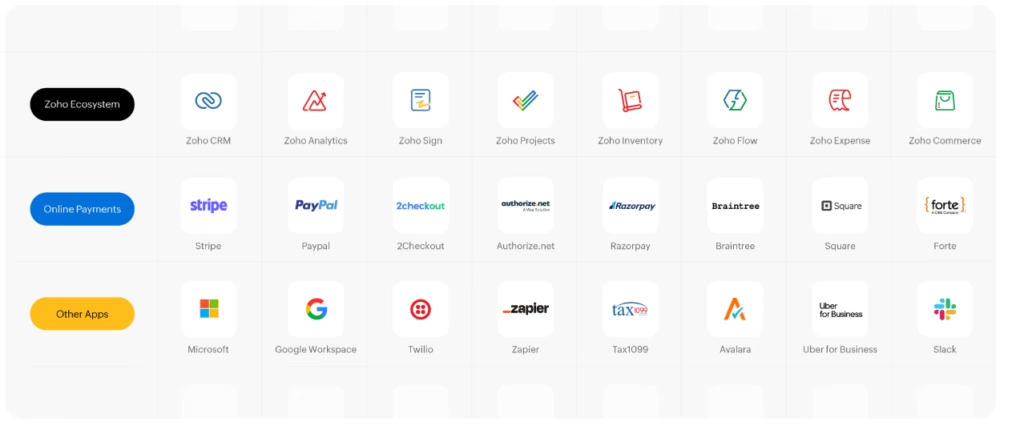
Zoho Books connects natively with multiple services, including:
- Zoho Apps: CRM, Inventory, Projects, Expense, Billing, Commerce, People, Sign, Desk, Bigin, Flow, and Analytics.
- Payment gateways: Stripe, PayPal, Authorize.Net, Braintree, 2Checkout, CSG Forte, PayU, Paystack, Razorpay-owned Cashfree, and more.
- Automation tools: Zapier, which connects Zoho Books with more than 500 apps.
- Cloud integrations: G Suite, Office 365, and Slack.
- Document management: Zoho WorkDrive, Dropbox, Google Drive, Box, Evernote, and OneDrive.
- Open API for custom development and integration with external software.
For accounts payable management, Zoho Books also includes BillPay, an add-on that centralizes vendor onboarding and approval, invoice matching against purchase orders, and batch payments.
These integrations allow businesses to centralize accounting and operational data without switching between multiple platforms.
Security and Data Compliance
Zoho Books adheres to the highest international security and privacy standards:
- AES-256 encryption at rest and TLS 1.2/1.3 in transit.
- Compliance with GDPR (EU), PCI DSS (SAQ-D), and other global standards.
- ISO 27001 certification and regular internal audits.
- Multi-Factor Authentication (MFA) and role-based access control.
- Audit Trail to track all operations.
- Full ownership of data by the user, with no transfer to third parties.
Language – Customer Support and Interface
The interface is fully available in major international languages, including Spanish, with menus, reports, invoicing templates, and template settings in various languages. Support is offered via:
- Chat and email.
- Updated knowledge base.
- Webinars and online videos.
- Zoho Books Academy learning center with practical guides.
The lack of direct phone support can be a limitation, although digital channels offer good coverage for most SMEs/SMBs.
AI Language
Zia, Zoho’s AI, supports multiple languages and has been trained to operate correctly across diverse linguistic and regional contexts. Features such as receipt scanning and smart categorization work well with documents in various formats, though minor errors may occur with uncommon layouts. Since Zoho Books does not rely on natural language for complex tasks, its AI functions primarily as an automation engine.
Mobile Access
Zoho Books offers fully featured mobile apps for iOS and Android, enabling users to issue invoices, scan receipts, perform bank reconciliations, and generate reports directly from their mobile device. The mobile functionality is robust enough for full on-the-go use, without depending on the desktop version.
Support, Onboarding Process, and Account Management
Zoho Books provides guided onboarding with:
- Interactive demo account.
- Step-by-step documentation.
- Free webinars and video tutorials.
- Technical support via tickets or chat.
It also facilitates migration from other systems (QuickBooks, Xero, etc.) through the Zwitch service, which automates data import.
Dedicated account management is available only on advanced plans, but the self-learning resources are sufficient to get started without prior technical experience.
Ease of Use / UX
Zoho Books keeps things clean and intuitive, organizing all functionality into modules accessible from a side menu. You don’t need prior accounting experience to get started and the learning curve is progressive. Most SMEs can start getting real value out of the platform within a week of active use.
Pricing and Plans
Pricing and plans vary by country. Generally, Zoho Books offers:
- Scalable plans with more features and users.
- Free trial at all levels.
- Monthly or annual subscriptions, without frequent price increases.
Plans include advanced modules such as inventory, automation, custom reports, and analytics with Zoho Analytics.
Case Study
A small design agency migrated its accounting management to Zoho Books after years of using Excel and manual invoicing. By automating bank reconciliations and client management from the mobile app, they reduced the time spent on administrative tasks by 60%. Furthermore, by integrating Zoho Books with Zoho CRM, they centralized their financial and commercial data, enabling quicker and more accurate decision-making. The three-person team now manages their finances professionally without the need for external accounting software or dedicated advisors.
Tool vs. Alternatives
| Comparison | Key Differences |
| Zoho Books vs. QuickBooks | Zoho offers deeper integration within its own ecosystem while QuickBooks has greater global presence and direct phone support. Zoho stands out for its multilingual support and more accessible pricing. |
| Zoho Books vs. Xero | Zoho provides stronger tax localization for businesses in multiple markets. Xero offers a more visual interface and a more active community in English-speaking countries. |
Related Tools
| Tool | |
|---|---|
 | |
 | |
 | |
 | |
 |
FAQs
Is Zoho Books a good tool for SMEs/SMBs?
Yes. It is one of the most complete and accessible accounting platforms for automating processes without relying on complex software.
Does Zoho Books support Spanish?
Yes. The interface, support, and several of its AI functions are fully available in Spanish.
What are the best alternatives to Zoho Books?
QuickBooks and Xero. The choice depends on the preferred type of support, country localization, and ecosystem integration.
Does Zoho Books have a mobile application?
Yes. Its apps for Android and iOS allow managing invoices, expenses, inventory, and reports from anywhere.