

Reseña de Ada
Ada AI es una plataforma especializada en atención automatizada al cliente mediante inteligencia artificial conversacional.
Esta herramienta es ideal para pymes con un alto volumen de consultas, que disponen de una base de conocimientos o FAQs claras y un presupuesto para integraciones. Su soporte en varios idiomas y la capacidad de integrarse con proveedores como Twilio para WhatsApp, la hacen práctica para hábitos de consumo regionales. Además, Ada ha desarrollado soluciones específicas para distintos sectores. En el comercio en línea ayuda a gestionar picos de solicitudes en periodos de descuentos; en los servicios financieros y de seguros resuelve más del 80% de las consultas garantizando el cumplimiento normativo. En el ámbito sanitario simplifica coberturas y promueve decisiones más saludables. En el campo de los videojuegos mantiene a los jugadores activos y leales. En los sectores de software bajo suscripción y de viajes facilita ampliar la atención en múltiples canales e idiomas sin incrementar los costes de personal.
Recomendación Agent Aya: buena opción para pymes que planean escalar la experiencia de cliente y están dispuestas a invertir en una pila integrada de soporte; no es la mejor si buscas una solución barata e inmediata sin integraciones.
Promedio del desglose siguiente
- Pymes de comercio electrónico en crecimiento que necesitan soporte 24/7 en web y WhatsApp.
- Equipos pequeños que cuentan con cierta capacidad técnica o con un integrador externo.
- Negocios que requieren soporte multilingüe y automatizaciones más avanzadas que un bot basado únicamente en reglas.
- Autónomos o microempresas con volúmenes de soporte muy bajos y presupuesto nulo para integraciones.
- Equipos que necesitan una interfaz o soporte completamente en español desde el primer día sin ajustes.
- Negocios que requieren aplicaciones móviles nativas para operar directamente desde el terreno.
Características principales de Ada AI
- Construir agentes de IA y desplegar en chat, voz, correo y canales de mensajería.
- Ingesta de base de conocimientos (conexión a documentos existentes para generar respuestas).
- Derivación a agentes humanos con contexto y creación de tickets.
- Analítica, pruebas y herramientas de mejora continua.
- En los canales sociales, el agente de IA también procesa los mensajes con imágenes, audio, video u otros archivos y responde según el contexto, en lugar de devolver una respuesta fija de "mensaje no admitido". El cambio se aplica de forma automática, sin configuración.
Funciones de la IA
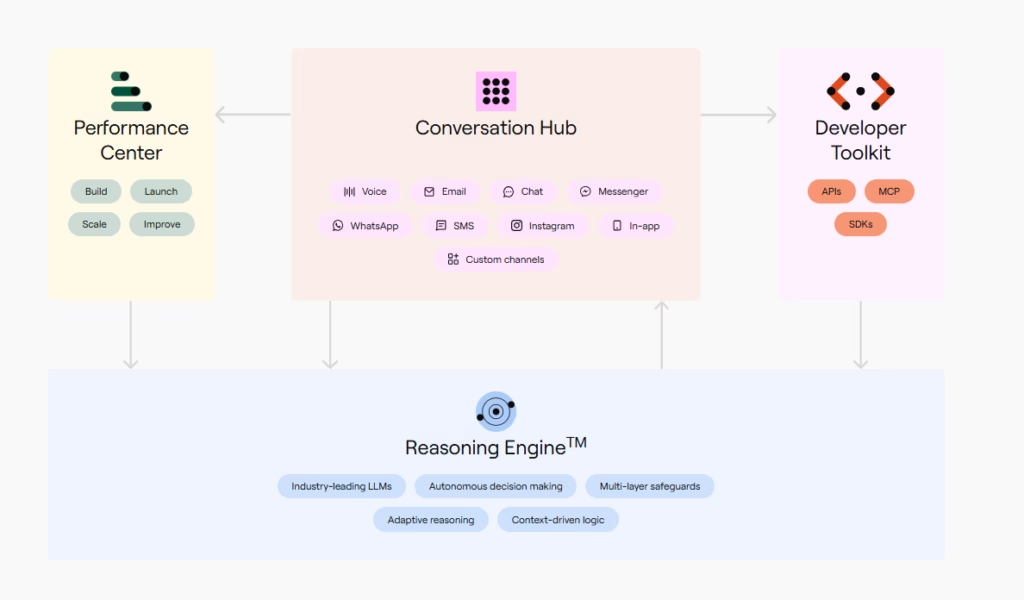
Ada presenta su producto como una plataforma ACX y describe el Reasoning Engine, como un motor de razonamiento unificado que aporta inteligencia compartida a los canales de voz, mensajería y correo, y permite gestionar el agente desde un solo lugar. Este mecanismo decide cómo ayudar mejor a cada cliente, combinando conocimiento, automatización y mejora continua.
Cuando un cliente hace una consulta, el motor evalúa cuatro fuentes de información:
- Pregunta de aclaración: si necesita más datos, formula preguntas antes de continuar.
- Base de conocimientos: si la respuesta existe en el contenido cargado, la usa para generar el mensaje.
- Sistemas de negocio: si el dato está disponible en un sistema integrado, ejecuta una Acción para recuperarlo.
- Playbooks: si aplica un flujo automatizado, inicia la Playbook correspondiente y realiza una serie de pasos predefinidos.
- Derivación: si ninguna de las opciones anteriores resuelve la consulta, transfiere la conversación a un agente humano.
Para que el agente mejore con el tiempo, las herramientas de Coaching ofrecen información sobre cómo se toman estas decisiones y ayudan a detectar oportunidades de optimización, de modo que el agente siga dando respuestas precisas, útiles y coherentes. En conjunto, estos elementos permiten que el agente razone, actúe y aprenda, de forma parecida a como un agente humano se apoya en su formación, sus herramientas y su experiencia.
Muchos chatbots son vulnerables a la inyección de prompts o al jailbreaking, es decir, mensajes diseñados para que el sistema revele información confidencial o insegura. Para prevenir la inyección de prompts, Ada indica que el Reasoning Engine está estructurado para dificultar estos ataques mediante:
- Varios subsistemas de IA trabajan juntos y modifican el contexto que rodea al mensaje del cliente.
- Instrucciones que definen con claridad la tarea, indican al agente no revelar su funcionamiento interno ni sus instrucciones y redirigen las conversaciones fuera de la charla casual.
- Modelos que buscan detectar y filtrar contenido dañino, tanto en las entradas como en las salidas.
- Pruebas de IA generativa antes de cada nuevo despliegue.
Integraciones
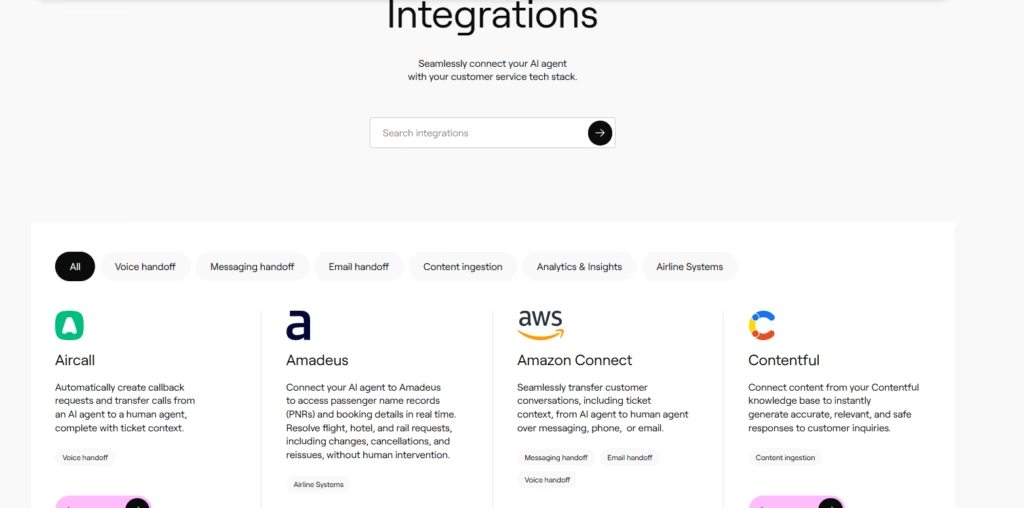
Ada ofrece un amplio ecosistema de integraciones preconfiguradas, organizadas en las siguientes categorías:
- Analítica y métricas: por ejemplo, Dimension Labs, que permite obtener información avanzada sobre la interacción y los patrones de conversación.
- Gestión de contenidos: conectores como Contentful o Github, que facilitan la ingestión de conocimiento existente.
- Derivación por correo electrónico: integraciones como Zendesk Support o Help Scout, que permiten escalar conversaciones a agentes humanos con traspaso completo de contexto.
- Derivación por mensajería: soluciones como Gorgias o Kustomer.
- Derivación por voz: integraciones como Aircall o Amazon Connect.
- Sistemas de aerolíneas: integraciones como Amadeus, Galileo by Travelport y Sabre, que dan acceso en tiempo real a los registros de reserva (PNR) y a los datos de itinerario para resolver cambios, cancelaciones y reembolsos.
- El ecosistema de derivación también se amplió con opciones como Dixa, Freshworks, Genesys, Gladly, NICE CXone, ServiceNow, Twilio Flex y Microsoft Dynamics.
Para complementar estas integraciones, Ada dispone de un conjunto robusto de APIs REST, que permiten sincronizar perfiles de usuarios en tiempo real, importar y gestionar contenido, y cumplir con regulaciones de privacidad. Además, agrupa sus recursos para desarrolladores en un kit de herramientas que incluye APIs, SDKs y un servidor MCP. Desde la página Servidor MCP del panel (en Plataforma > MCP Server) se pueden ver las conexiones de asistentes de IA autorizadas mediante OAuth, con el correo de quien las autorizó y la fecha de conexión.
Seguridad y cumplimiento de datos
Ada AI ofrece seguridad de nivel empresarial y aplica prácticas líderes de protección de datos durante todo el ciclo de vida de la información. Sus controles de seguridad y exactitud mantienen las interacciones alineadas con las políticas de cada empresa.
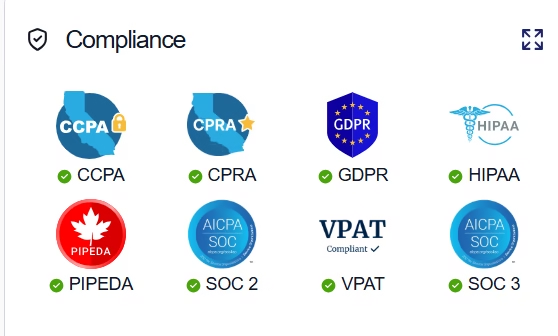
En cumplimiento normativo, abarca HIPAA, SOC 2, GDPR, CCPA, CPRA, PIPEDA, VPAT, SOC 3 y PCI DSS. Ada declara haber obtenido además la certificación AIUC-1, un estándar centrado en la confianza en la adopción de agentes de IA, comparable a SOC 2 pero pensado para IA; según la empresa, participó como contribuyente técnico fundador del estándar y fue la primera plataforma de atención al cliente en certificarse. El Ada Trust Center reúne y da transparencia a estas certificaciones y estándares.
La plataforma aplica retención cero de datos con los proveedores de modelos de lenguaje: los datos de cliente no se almacenan con ellos ni se usan para entrenar modelos de terceros, y la información personal se enmascara según las políticas configuradas.
En el control de accesos, las integraciones usan claves de API que permiten gestionar, rotar y revocar accesos de forma segura. Los administradores también pueden revocar cualquier conexión de asistente de IA desde la página Servidor MCP: la sesión activa sigue funcionando hasta cinco minutos, hasta que caduca el token, y después se corta el acceso; para recuperarlo, la persona debe volver a autorizar la conexión.
Idioma – Atención al cliente e interfaz
El soporte e interfaz se encuentran principalmente en inglés. Aunque Ada ofrece una variedad de idiomas para comunicarse con los clientes, el panel de control está disponible únicamente en inglés.
Idioma de la IA – La herramienta en sí
La plataforma admite hasta 60 idiomas en su base de conocimientos y en las respuestas por correo electrónico, y 42 idiomas de forma nativa en el canal de voz, entre ellos el español. Además, dispone de herramientas y guías para utilizar múltiples idiomas en una cuenta, por lo que resulta adecuada para audiencias en español y latinoamericanas; sin embargo, el contenido de conocimiento debe redactarse solo en los idiomas admitidos.
La cobertura varía según el canal: en el chat web se admite la mayoría de los idiomas, en correo las conversaciones comienzan en inglés pero el cliente puede cambiar de idioma al responder en otra lengua, y en voz se admiten 42 idiomas nativos, con la posibilidad de fijar el idioma inicial mediante número o dirección SIP, encabezado SIP o el perfil del usuario.
Acceso móvil
Ada no cuenta con una app móvil dedicada para agentes; en su lugar, se integra con canales de mensajería (WhatsApp, web chat, apps propias mediante SDK) y las consolas administrativas son solo accesibles vía web. Desde el lado del cliente, muchos canales son totalmente utilizables desde móvil, pero la administración de Ada es siempre desde el panel de control web, no con una app móvil propia.
Soporte, proceso de incorporación y gestión de cuentas
Ada ofrece soporte, incorporación y gestión de cuentas que la destacan por su enfoque empresarial y escalabilidad. Los clientes pueden acceder a demos personalizadas y orientación práctica, incluyendo revisiones de sus canales de servicio y sugerencias para la adopción de IA, más ejemplos reales adaptados al sector y volumen de la empresa. La herramienta cuenta con Ada Academy para aprendizaje autoservicio, junto con una documentación clara y completa para guiar la configuración, personalización y optimización del agente. Las pymes y equipos técnicos menos experimentados tienen la opción de acelerar la puesta en marcha mediante socios de implementación autorizados o consultores especializados, recomendados por Ada.
Para casos complejos, las Playbooks permiten automatizar flujos multietapa siguiendo procedimientos operativos estándar (SOP), todo en lenguaje natural, documentos o diagramas, sin necesidad de scripting. Puedes acceder a documentación, cursos online, recursos y soporte directo desde la biblioteca online y Ada Education Academy.
Facilidad de uso / UX
Ada AI se destaca por su constructor visual de flujos low-code, intuitivo y accesible para equipos pequeños que buscan soluciones rápidas y personalizables. La plataforma integra herramientas de previsualización y pruebas que simplifican la creación y ajuste de automatizaciones, permitiendo a usuarios sin experiencia técnica gestionar tareas básicas y probar resultados en tiempo real.
No obstante, para desplegar una automatización omnicanal completa es necesario dedicar tiempo a configurar, adaptar y validar los flujos y contenidos, así como realizar pruebas adicionales para optimizar la experiencia. La localización en idiomas distintos al inglés requiere ajustes adicionales y validación, especialmente en ciertos mercados como España.
Precios y planes
Ada ofrece precios simples basados en la cantidad de uso que el usuario hará de su plataforma completa, y puedes solicitar una cotización compartiendo tu correo, empresa y volumen esperado de contactos, además de reservar una demo directamente desde la página. El paquete incluye todo lo necesario: resolución con razonamiento usando múltiples modelos, conexión a tu contenido existente, control del comportamiento del agente, despliegue en canales de mensajería, voz y email, traducción instantánea en traducción en varios idiomas, métricas como CSAT y automatización de transferencia a agentes humanos con creación/actualización de tickets. Además, es fácil estimar el ahorro inmediato y a largo plazo con su calculadora de ROI.
Caso práctico
Dott, operador europeo de micromovilidad, pasó de un 32 % a un 77 % de resolución automatizada tras tratar la IA como un requisito de producto y no como una simple herramienta de soporte.
En 2019, su objetivo era resolver el 80 % de los tickets en un plazo de seis horas, y un chatbot con guiones atendía cerca del 30 % del volumen. El resto pasaba a agentes humanos. Cuando Dott lanzó un agente de IA en noviembre de 2024, la resolución automatizada subió del 32 % al 62 % en tres meses y alcanzó el 77 % en febrero de 2026. El tiempo de respuesta bajó a menos de tres segundos, según Nicolas Gorse, director de operaciones de la empresa.
La clave fueron 25 automatizaciones conectadas por API a los sistemas internos de Dott, que permiten al agente resolver sin escalar: reembolsos, comprobaciones de vehículos y gestión de viajes. Un buen ejemplo es el cierre de trayectos. La micromovilidad depende del GPS y, cuando un usuario no puede finalizar un viaje, el agente entiende el problema, determina qué hace falta y ejecuta la llamada a la API que cierra el trayecto en segundos, en lugar de derivarlo a una cola de atención.
El análisis de conversaciones a escala también reveló causas que el equipo no lograba validar de forma manual. En un mercado, un aumento de solicitudes de reembolso parecía un fallo del proceso de reembolso, pero resultó ser un problema de precios: los clientes no usaban sus minutos antes del vencimiento. En otro caso, el agente parecía fallar en un tema concreto por artículos de conocimiento contradictorios que enviaban a los clientes a bucles.
Por qué es relevante: el caso de Dott muestra cómo un equipo de atención al cliente deja de gestionar una cola de tickets para gestionar el rendimiento del agente de IA, y convierte cada conversación en información útil para el resto del negocio. Puedes leer el caso de estudio completo aquí.
Demo oficial / solicitar demo: página de demos de Ada.
Herramienta vs Alternativas
Comparativa Ada AI vs Intercom vs Zendesk
- Ada AI se destaca por su soporte multilingüe, automatización low-code y una oferta omnicanal que permite gestionar interacciones a través de chat, voz, correo y mensajería. Su ecosistema de integraciones nativas y APIs está diseñado para entornos empresariales, lo que facilita la conexión con CRMs y herramientas de soporte avanzadas y resulta especialmente útil para empresas que buscan escalar y optimizar la gestión del cliente en varios idiomas y canales.
- Intercom es más ágil en la configuración y está especialmente adaptada a la mensajería y al soporte conversacional en pymes; ofrece entrenamiento de agentes sin código e integración multimedia sencilla, aunque tiene menor especialización en el canal de voz empresarial y su modelo de precios por resolución puede ser difícil de prever.
- Zendesk, con su IA integrada (AI Agents y Copilot), sobresale en ticketing y automatización, y aporta un ecosistema flexible con altos estándares de seguridad y cumplimiento normativo. Muchas de sus funciones de IA son complementos, lo que puede aumentar la complejidad y el coste de la solución según las necesidades de cada empresa.
Preguntas frecuentes
¿Cómo puede ayudar a aumentar las ventas el chat en línea de Ada AI?
El chat en línea de Ada AI permite atender a los clientes en tiempo real, en su idioma y canal preferido (web, WhatsApp, email o voz). Al responder dudas de producto, disponibilidad o envío al instante, evita la pérdida de ventas por falta de información. Además, puede recomendar artículos relacionados, guiar el proceso de compra y reducir la fricción en el proceso de pago. Esto incrementa la conversión y mejora la experiencia del cliente.
¿Cuál es el retorno de inversión (ROI) de usar Ada AI?
El ROI exacto dependerá del volumen de interacciones de cada empresa, pero las valoraciones de clientes destacan reducciones de tiempo de respuesta, mayor satisfacción y más ingresos por soporte mejorado. Para medirlo se tienen en cuenta los siguientes puntos: Ahorro en costes de soporte,automatiza hasta un 70–80% de las consultas repetitivas, reduciendo la necesidad de personal adicional.Incremento de ventas y escalabilidad.
¿Cómo funciona Ada AI?
Es una plataforma low-code/no-code que permite a los equipos diseñar flujos conversacionales, conectar bases de conocimiento (FAQ, artículos, documentos) e integrarse con sistemas como CRM o plataformas de mensajería. Su motor de IA procesa la intención del usuario, busca la mejor respuesta en los contenidos cargados y responde automáticamente; cuando es necesario, deriva al agente humano con todo el contexto.
¿Aún dudas con Ada?
Compáralo con las demás herramientas que hemos analizado en Agentes de IA.