

Agentiqa Review
A standout pick for SMEs that need UI regression coverage fast, as long as you accept the rough edges of an early-stage product.
Agentiqa is one of the most accessible entry points into automated QA we have tried. You paste a URL, describe what you want checked in plain language, and the agent runs the flow in a real browser. You write no selectors and share no source code, which makes it especially appealing to founders building with AI coding tools, where the interface looks finished but hides broken flows underneath.
The honest counterpoint: this is a young product from an early-stage startup, now reporting a user base in the hundreds. The team iterates quickly on real usage, but the community is brand new, support channels remain informal, and AI-generated tests tend to cover the happy path while missing edge cases. Our recommendation: if your team has no automated UI testing today, Agentiqa is a fast, low-friction way to get real coverage. If you already maintain a large Playwright or Selenium suite, it complements that suite rather than replacing it.
Averaged from the breakdown below
- Solo founders and small product teams with no dedicated QA engineer or SDET
- Teams building with AI coding tools who need to verify flows the generated code never exercised
- Teams suffering from locator churn, where tests break every time the UI changes
- SMEs that want E2E coverage on web apps without writing or maintaining test code
- Teams that need unit test generation, load testing, or evaluation of LLM outputs
- Projects where visual fidelity itself is the problem (fonts, layout shifts), which is visual AI testing territory
- Enterprises that require a mature support organization and a long vendor track record
- Teams committed to keeping every test as deterministic, code-owned scripts
Key Features
-
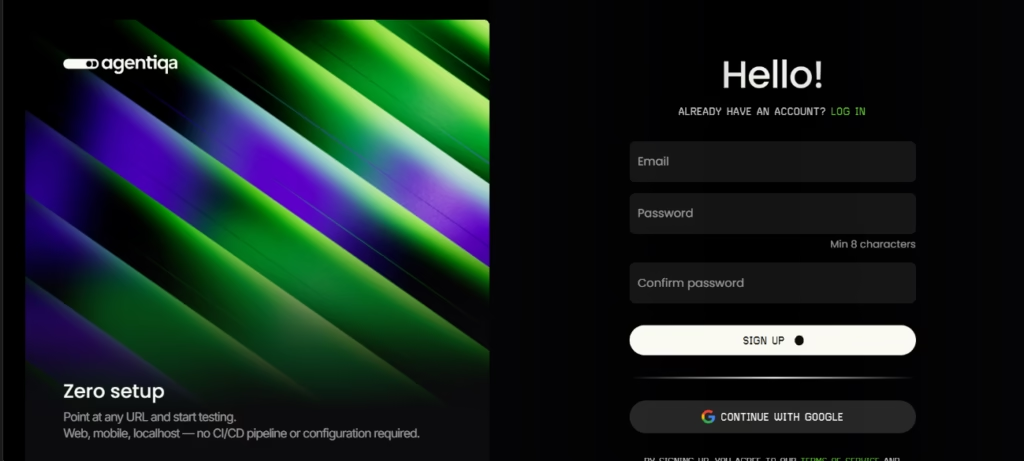
Zero-setup testing from a URL: point Agentiqa at any web app, on localhost, staging, or production, with no CI/CD pipeline or configuration required
-
Real browser execution: the agent runs flows against the actual interface, not a simulation of it
-
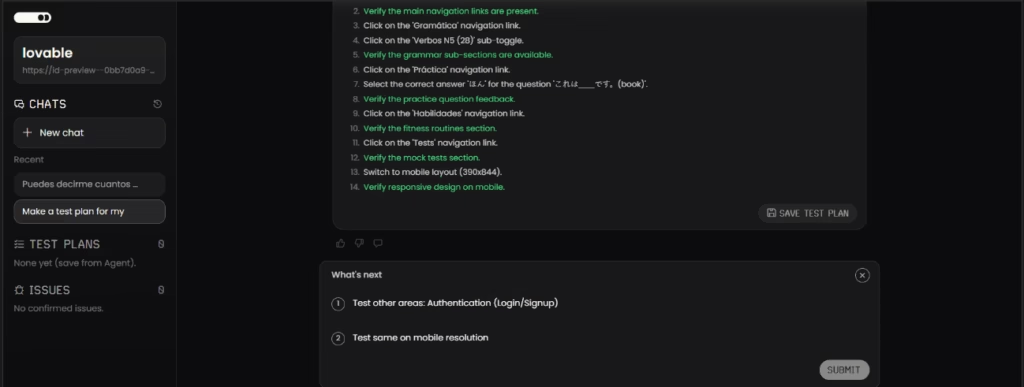
Plain-language test plans: tests are written as step descriptions anyone on the team can read and review
-
Video artifacts and reproduction steps: runs produce recordings and step-by-step reproduction so a bug can be understood and fixed quickly
-
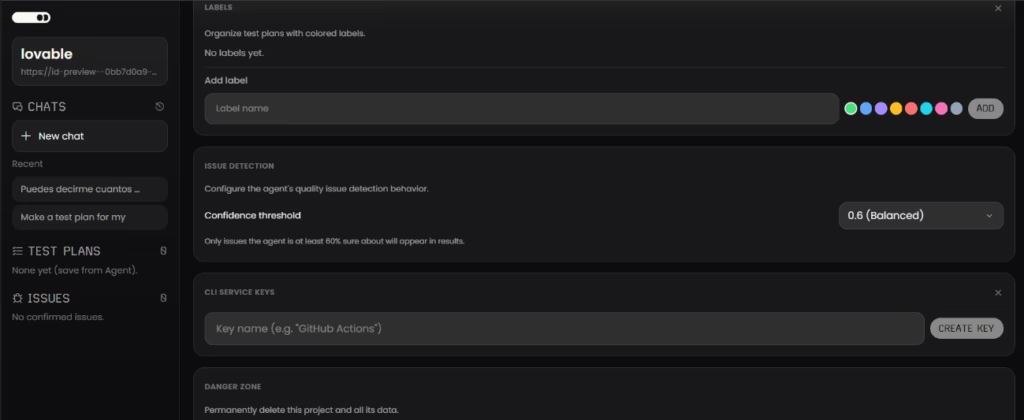
Project workspace: each project is tied to a URL, with chats to direct the agent, saved test plans, and a list of confirmed issues
-
Desktop and cloud execution: run tests on your own machine or in the cloud from any browser, with parallel runs on paid plans
-
Multiple access points: web app, desktop app, CLI tools (with service keys), browser and IDE plugins, a Claude Code plugin, and APIs
-
Notifications: optional browser alerts that let you know when agent tasks and test runs finish, so you can step away while the agent works
For an SME, the practical payoff is time. A first regression suite for a new feature can go from URL to running tests in under an hour, without hiring for QA or pausing development to write test code.
AI Features
- Runtime element identification: the agent identifies buttons, fields, and links using vision and DOM context (role, text, position, visual appearance) instead of stored selectors
- AI test generation: Agentiqa explores a running app or replays a user flow and generates candidate test plans in plain language
- Flow-level behavioral assertions: the agent verifies outcomes, such as whether a checkout completed or a login landed on the dashboard, which catches regressions where an element still looks right but no longer works
- Autonomous navigation with reliability controls: the agent handles authentication and preview environments and includes loop detection and safer navigation for unattended runs
- Ambiguity handling: when the agent cannot identify an element unambiguously, it surfaces the question for human review rather than guessing
What is genuinely intelligent here is the element identification and outcome verification: each test run starts from what is on the page now, not what was there when the test was written, so tests usually survive UI changes without modification. The surrounding workflow of projects, saved plans, and issue tracking is standard software. The AI also has known limits: vision-based selection can drift on unusual layouts, ambiguous instructions can match the wrong element, and generated tests lean toward happy paths, so human review is still part of the job.
Integrations
- CLI tools for terminal-based workflows, with service keys for automation
- IDE plugins for VS Code and Cursor
- A Claude Code plugin: ask Claude Code in plain English to test your app, and the Agentiqa agent explores it and reports bugs with screenshots and reproduction steps
- Browser plugins
- CI/CD integration for running tests on deploys
- APIs for programmatic access
- Bring your own key (BYOK) for third-party AI model providers, available in the desktop app only; the web app uses managed API access included with your plan
There is no documented integration with regionally popular business tools such as WhatsApp, which is unsurprising for a developer-focused QA product. An API exists, so technical teams can connect Agentiqa to their own pipelines.
Data Security and Compliance
Agentiqa's policies are clearer than most early-stage tools. You retain full ownership of the applications you test and of all test results, screenshots, and reports; the company claims no intellectual property rights over them. Anonymized, aggregated usage data may be used to improve the product, but the company states it will not identify you or your tested applications, and it does not sell personal information.
Credentials are encrypted in transit and at rest, and the AI types passwords without seeing their values. Only test execution context, meaning page structure and screenshots, is sent to third-party AI model providers, never your credentials or source code. Cloud test data is retained only temporarily, while on desktop it stays local on your machine. As a German company, Agentiqa operates under the GDPR, uses Standard Contractual Clauses for international transfers, and processes payments through Stripe without storing card numbers. The Team plan adds a zero data retention option and an SLA. Sign-in is available through Google and GitHub.
Language: Customer Support and Interface
The product, documentation, and support channels are in English. Support is handled by email, with priority support on the Pro plan and a dedicated communication channel on the Team plan. No live chat or phone support is documented, and there is no indication of support staffed in languages other than English.
AI Language: The Tool Itself
The agent chat is multilingual: you can write your test instructions in Spanish or English, and the agent understands them and acts accordingly, even though the interface itself is presented in English. Beyond the chat, the rest of the AI does not depend on natural language at all: element identification works from vision and DOM context on the running app, so it operates the same way regardless of the language of the application being tested. In practice, the language barrier that exists in many AI tools is largely absent here.
Mobile Access
Agentiqa can test web and mobile applications, but the tool itself is operated from the web app, the desktop app, or developer integrations. No dedicated iOS or Android app for managing Agentiqa is documented.
Support, Onboarding, and Account Management
The zero-setup design means there is little to configure, and the free tier includes a 14-day Pro trial. The Team plan adds dedicated onboarding with optional video calls and a shared communication channel. The company recently opened a Discord community with channels for test strategies, prompt crafting for better test plans, feature requests, and bug-hunting challenges, with team office hours announced as starting soon. It is brand new and informal, which early adopters may enjoy shaping but which does not yet replace a documentation portal or knowledge base. For SMEs with little technical experience, the plain-language approach helps considerably, though developer-oriented features like the CLI assume some comfort with tooling.
Ease of Use / UX
Agentiqa's strongest quality is how little stands between signing up and a running test. The web app is organized around simple projects, each tied to a URL, with a chat to direct the agent, saved test plans, and confirmed issues in one place. Because tests are described in plain language rather than code, the learning curve is shallow, and a non-technical founder can get a meaningful result on the first day.
In our own test we pointed Agentiqa at an app built with Lovable. The agent reviewed the app, suggested what was worth testing, and waited for our approval before doing anything. Once we confirmed, it ran the flow on its own, and we could watch the video live as it worked, following each step the agent took in real time as it clicked through the interface and checked the flow, and then download the full recording for later review.
At the end we were left with a recording of the whole process, so the run could be reviewed again later. That approval step before execution is a sensible touch: it keeps the person in control while still letting the agent do the work. An SME can realistically obtain value within the first session.
Pricing and Plans
Agentiqa uses a freemium model. The Community plan is free forever and includes the desktop app, web app testing, bring-your-own-key support, and a 14-day trial of the Pro plan. The Pro plan, billed monthly at a founding price, adds cloud execution, parallel runs, priority support, and a monthly AI usage allowance. The Team plan, priced per user, increases the AI usage allowance and adds dedicated onboarding, a communication channel, an SLA, and zero data retention. Custom enterprise plans are available with on-premise deployment, advanced security features, and volume discounts. Plans can be upgraded or downgraded at any time, with changes taking effect immediately.
Agentiqa has also partnered with the AI Perks platform, where founders access AI and SaaS tools, so that early-stage startups can reach AI-powered testing alongside their other credits rather than treating it as an afterthought months after launch.
Case Study
A solo founder is building a niche CRM add-on for dental clinics, mostly generated with AI coding tools and refined in Cursor, on a stack of Next.js, Supabase, and Stripe. In every demo the happy path looks flawless, but AI-generated code has a habit of slipping silent regressions into the edge cases, things like contact imports and calendar syncing. So before launch, the founder points Agentiqa at the staging URL and describes the three flows every prospect will see: creating a patient record, scheduling a recall, and generating an invoice. The agent runs them in a real browser on each deploy and catches a broken confirmation step that looked perfectly fine on screen. The founder fixes it before a single prospect ever notices, without writing one line of test code.
Agentiqa vs Alternatives
Agentiqa and Applitools solve different problems, and comparing them feature by feature would be misleading. Agentiqa is a real-UI AI testing tool: it runs complete user flows and verifies behavioral outcomes, catching the button that still looks correct but no longer works. Applitools is an enterprise AI testing platform built around Visual AI: it compares the interface against baselines to flag visual regressions such as layout shifts and font drift, and extends into functional, API, accessibility, cross-browser, and component testing, with codeless, framework-based, and plain-English test creation.
| Agentiqa | Applitools | |
|---|---|---|
| Category | Real-UI AI testing, AI test generation | Visual AI testing platform (functional, API, accessibility, cross-browser) |
| Pros | Zero setup from a URL, no source code needed, plain-language tests, behavioral assertions, free tier | Mature Visual AI, enterprise-proven, broad platform, flexible deployment including behind a firewall |
| Cons | Young product, informal support, generated tests favor happy paths | Enterprise-oriented; visual-diffing approaches in general can require baseline tuning and miss purely functional regressions |
| Best for | SMEs needing flow coverage without QA staff | Larger teams where visual fidelity across many browsers is the core problem |
If your tests break from locator churn, Agentiqa is the right category; if visual fidelity across browsers is the problem, Applitools is. Teams with large existing Selenium or Playwright suites may instead want a self-healing tool such as Testim, Mabl, or Functionize. The wider market also includes record-and-replay tools, AI add-ons for code-first frameworks, test analytics platforms, mobile-specific testing, AI-assisted load testing, and evaluation tooling for LLM-based products.
FAQs
Is Agentiqa good for SMEs?
Yes. Its zero-setup approach, free tier, and plain-language tests make it one of the most SME-friendly QA tools available, especially for teams without a dedicated QA engineer.
Does Agentiqa require access to my source code?
No. Agentiqa tests the running application from a URL. Only page structure and screenshots are processed, and credentials are encrypted and never shared with AI model providers.
Does Agentiqa work with Claude Code?
Yes. A Claude Code plugin lets you ask in plain English to test your app, and the agent explores it like a real user and reports bugs with screenshots and reproduction steps.
Can Agentiqa replace my Playwright or Selenium tests?
Not necessarily. Some developers use Agentiqa to discover and validate flows quickly, then keep critical paths in code-owned suites. The two approaches coexist well.
Still weighing up Agentiqa?
See how it compares with the other tools we've reviewed in AI Automation.