
Chalkie Review
A mature, accessible platform for teachers who want to reduce their planning load without relying on complex or costly solutions.
Chalkie delivers on its promise: it cuts planning time without requiring technical knowledge. It works best when the starting point is specific. In our testing, a tightly scoped topic produced a coherent history lesson with no additional supporting material; generating from a URL also delivered complete, well-structured results. When the source is a long PDF, performance drops because of the page limit the tool imposes.
This tool is fully multilingual, and its command of English is excellent: the content it generates reads naturally and stays pedagogically sound across subjects. What sets Chalkie apart is its library of themes adapted for dyslexia, ADHD, low vision, low stimulation, and early readers, each available with a single click as you design. It is a practical answer to real classroom needs that most educational content generators overlook.
Like any AI tool, the content needs a review before it reaches the classroom: images do not always fit the context, and the results get better the more detail the teacher gives when creating the lesson. The platform says as much in its responsible-use section.
Averaged from the breakdown below
- New teachers who need a supporting curriculum structure from day one.
- Substitute teachers who have to prepare lessons outside their specialty.
- Instructional coordinators and department heads looking to standardize materials across levels.
- International or bilingual schools managing multiple curriculum frameworks.
- Teachers whose reference material consists of long documents, given the per-file page limit.
- Users who expect publish-ready content with no editorial intervention.
- Institutions that require formal service-level agreements or specific enterprise security certifications.
Key features
- Lesson planner: generation of complete presentations with learning objectives, key vocabulary, and built-in activities, starting from a topic, a URL, a file, or a Google Drive document.
- Unit planner: creation of sequences of three to twenty-five lessons on a single topic, with an editable outline before the full content is generated.
- Worksheet generator: activity sheets with varied question types (multiple choice, short answer, open-ended questions, fill-in-the-blank, and completion exercises) that can be differentiated by difficulty level.
- Classroom activities built into each lesson: discussions, matching exercises, creative writing, sorting, and quizzes, all of which can be regenerated with a single click if the result does not suit the group.
- Automatic curriculum alignment with national and regional frameworks, available on paid plans.
- A library of visual themes with five accessibility categories: early readers, low stimulation, dyslexia, low vision, and ADHD.
- Shared workspaces for teaching teams, with a remix function that creates a personal copy without altering the team's original resource.
- QR codes for audio activities, which students can scan from their own devices both in class and at home.
- Export to Google Slides, Google Docs, Microsoft PowerPoint, Microsoft Word, and PDF.
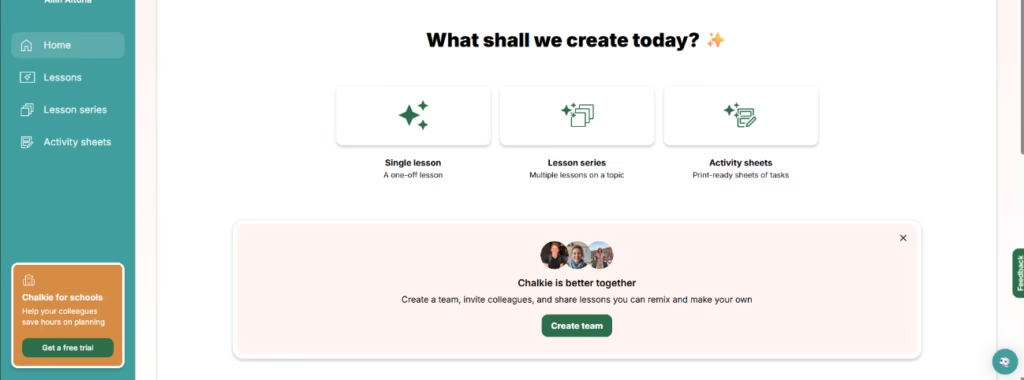
The combination of the unit planner and shared workspaces makes it possible to build a coherent base of institutional materials without investing extra hours in manual coordination. The ability to apply accessibility themes to any lesson with a single click makes this more than an aesthetic option: it is a functional response to the diversity of the classroom.
AI features
- Generation of structured content from a free topic, a URL, an uploaded file, or a Google Drive document.
- AI-assisted editing within the presentation editor: the teacher can request that the language be adapted for special educational needs, that the tone be made more dynamic, or that a specific slide be rewritten.
- Automatic suggestions of YouTube videos built into the lesson (available on paid plans).
- Generation of audio activities with listening clips tied to the lesson (available on paid plans).
- Automatic alignment with the selected curriculum framework, with editable, optional objectives.
What distinguishes Chalkie's artificial intelligence component from a conventional presentation editor is the thematic coherence of the generated content when the starting point is precise: the tool does not produce isolated slides but a structure with internal progression, identified key vocabulary, and activities related to the main topic.
Integrations
- Direct export to Google Slides and Google Docs.
- Export to Microsoft PowerPoint and Microsoft Word.
- Export in PDF format.
- File upload from the user's computer and from Google Drive.
- Integration with YouTube to suggest and embed videos in lessons (available on paid plans).
The platform does not document the availability of a public API, which limits the potential for integration with learning management systems or custom automation workflows at the institutional level.
Data security and compliance
The user retains ownership of the generated content. By using the platform, you grant Chalkie a license to operate, improve, and develop the service, including the use of aggregated and anonymized data to train artificial intelligence models, as stated in the company's privacy policy. Payments are processed through Stripe; Chalkie does not directly store complete credit card or bank account details.
The platform complies with the General Data Protection Regulation (GDPR) in its United Kingdom and European Union versions, and with the Family Educational Rights and Privacy Act (FERPA) for educational institutions in the United States.
The underlying artificial intelligence models are provided by OpenAI, Anthropic, and Google Vertex AI.
Language: customer support and interface
Chalkie's interface is available in ten languages: English, Spanish, French, Italian, German, Dutch, Danish, Norwegian, Estonian, and Polish. The interface language and the language of the generated resources can be set independently, which is useful for teachers who teach in a language different from their preferred interface language.
AI language: the tool itself
The platform can generate educational resources in forty languages. Chalkie is fully multilingual, and its command of English is excellent: in the testing carried out for this review, the generated content was well structured, with coherent learning objectives and activities that were clearly formulated and ready for the classroom.
Mobile access
Chalkie is a web browser-based platform. The official information available at the time of this review does not document the existence of a dedicated iOS or Android application.
Support, onboarding, and account management
The platform requires no technical training to start using. The four-step flow (topic, refinement, outline, and design) is self-explanatory, and the AI-assisted editing function reduces dependence on external tutorials. User support is offered through the in-platform Intercom chat and by email.
The schools plan includes administrator controls, linked teacher accounts, and centralized billing, which suggests a distinct level of institutional support.
Ease of use / UX
Chalkie's interface is straightforward and requires no technical knowledge. Creating lessons follows four well-defined steps (topic, refinement, outline, and design), and at each one the teacher can adjust the parameters before moving on. This gives more control than the platform's own marketing emphasis on speed would suggest.
The quality of the result improves consistently when more context is provided: a generic topic produces a generic lesson, while a topic with a defined educational level, a selected curriculum framework, and additional details produces a much more tailored result. We confirmed this in testing: generation from a URL was more complete than generation from a PDF, not because of a difference in the artificial intelligence engine but because the URL provided complete content neatly confined to a single topic.
The editor lets you modify text, images, and structure without leaving the platform, and AI-assisted editing makes quick adjustments easier. A teacher with no prior experience in AI tools can get a first editable result within the same exploratory session.
Pricing and plans
Chalkie operates on a subscription model that includes a free plan and three paid plans. The free plan allows you to create up to five resources per week with a limited number of AI edits, no curriculum alignment, and a watermark on exported materials. It is enough to explore the tool or for occasional use without committing any payment details.
- The Pro plan adds curriculum alignment, YouTube video integration, the creation of series of up to twelve lessons, presentations of up to twenty-five slides, up to three reference files per lesson, and a significantly higher monthly volume of resources and edits. This three-file limit can feel restrictive for many professionals.
- The Max plan expands all of the above limits (series of up to twenty-five lessons, presentations of up to thirty-five slides, and a higher monthly volume) and adds the ability to use custom themes and fonts.
- The schools plan has custom pricing and includes linked teacher accounts, administrator controls, institutional monitoring, and centralized billing. It is the right option for institutions that want to manage the tool at the school level.
The refund policy includes a fourteen-day guarantee period for the first purchase.
Case study
An adult education center serving a highly varied student profile: from people working toward their high school diploma to migrants in the process of integration who need to strengthen their language skills. That mix of profiles, needs, and levels within a single space turns lesson planning into a high-complexity task with a constant demand for adapted materials.
There were three initial use cases: visual materials on renewable energy, functional English situations tied to everyday life (public transport, medical appointments, shopping), and content on responsible consumption connected to the local area. In all three, the workflow was the same: the teacher defined the topic along with the group's specific level and context, reviewed the generated outline before producing the full content, and fine-tuned the result to fit the actual students.
A center like this is also a natural fit for the platform's audio activities. For a functional English group with immigrant students, listening clips with accompanying comprehension questions meet a teaching need that standard materials rarely address with this level of personalization. The QR code that Chalkie generates for each audio element lets students open the exercise on their own device, in the classroom or at home, without relying on the teacher to project the content in real time. For groups with fragmented schedules or highly variable attendance, common in adult education, this feature offers concrete practical value.
The shared workspaces feature adds a useful institutional layer for centers like this one, where several teachers can coordinate the materials for a single module without extra coordination meetings. And for students with specific needs, the accessibility themes built into the editor (low stimulation, low vision, dyslexia) make it possible to adapt the full design of any lesson with a single click, without rebuilding the material from scratch.
Chalkie AI vs. alternatives
| Tool | User profile | Main focus | Key limitation |
|---|---|---|---|
| Chalkie AI | Teacher preparing the materials for others | Generation of editable lessons, worksheets, and curriculum sequences; accessibility built into the design and easy exercise creation. | Page limit when processing PDF files. Topic-based generation works best with precise prompts and tightly scoped topics. |
| Gizmo AI | Student or trainee professional | Turns your own material into flashcards and quizzes with spaced repetition and gamification. | Uneven results with long YouTube videos; topic-based generation works best with precise prompts and tightly scoped topics. |
| NotebookLM | Researcher, consultant, business with Google Workspace | Deep document analysis with verifiable citations; generates multiple formats and accepts long documents. | No gamified study modes. |
All three tools operate in the field of knowledge and education, but they are not interchangeable. Chalkie is designed for the teacher who needs to prepare content for students: its value lies in generating classroom-ready materials. Gizmo is designed for someone who already has the material and wants to study it actively: its strength is memorization through spaced repetition and collaborative review. NotebookLM is ideal for deep document analysis in professional or research contexts and is the most suitable option when the goal is to reason over your own sources with verifiable citations.
FAQs
Is Chalkie AI a good option for multilingual teaching teams?
Yes. The platform is fully multilingual, with an excellent command of English, and generates good-quality content across subjects. As with any AI tool, reviewing the result before using the materials in class is recommended.
What file formats can I upload to Chalkie?
The platform accepts files from the user's computer, from Google Drive, and via URL. There is a per-file page limit, so for long documents it is best to use a URL that points to the complete content or to break up the material before uploading it.
What are the best alternatives to Chalkie AI?
Gizmo AI for independent study and memorizing your own material; NotebookLM for deep document analysis in professional or business contexts.
Can I use Chalkie AI for free?
Yes. The free plan lets you create up to five resources per week without entering any payment details. It is enough to explore the tool and assess whether it fits the teacher's workflow.
Still weighing up Chalkie?
See how it compares with the other tools we've reviewed in AI for Research.