

Smithery Review
A powerful infrastructure platform for developer-led SMEs building with AI agents, and the current standard for MCP server distribution and management.
Smithery is the most complete platform currently available for managing MCP server connections at the SME level. It removes the most technically demanding parts of agent integration, such as OAuth configuration, token refresh, credential storage, and session management, replacing them with a single CLI login and a standardized connection workflow. For development teams already working inside environments like Claude Code, Cursor, or Codex, the platform fits naturally into existing workflows.
The main limitation is that Smithery was built by and for developers. Non-technical users will find the learning curve steep, since the platform's strengths show up most clearly in agentic coding tools and background agents.
Our recommendation: for SMEs with at least one developer on the team who is building or deploying AI agents, Smithery is worth exploring seriously. For non-technical teams, consider starting with simpler automation platforms and returning to Smithery once an agentic coding workflow is in place.
Averaged from the breakdown below
- SMEs with a developer or technical team building AI-powered workflows or agents.
- Development teams working inside Claude Code, Cursor, Codex, or other agentic coding environments.
- Developers who want to publish their own MCP servers and reach a broad audience quickly.
- Teams managing multiple external service connections who need centralized credential and session handling.
- Non-technical users or SMEs without a developer on the team.
- Teams looking for a no-code or low-code automation platform.
- Organizations that require strict auditability of third-party CLI tools before deployment.
Key Features
- MCP Registry: A public directory of over 7,300 MCP servers, each showing monthly call volume, uptime percentage, success rate, available tools, and a copy-paste connection snippet. Categories include web search, browser automation, finance, coding tools, and academic research.
- Smithery CLI: A command-line interface for searching the registry, adding servers to local clients, listing and calling tools, publishing servers, and minting scoped service tokens. It requires Node.js 20 and installs with a single npm command.
- Toolbox: A personal collection of saved MCP servers that keeps a team's most-used connections organized and accessible.
- Skills Library: A separate catalog of reusable agent skills, which are structured instruction sets that extend what an AI agent can do inside environments like Claude Code. Skills cover areas including frontend design, document creation, competitive analysis, financial modeling, and deployment workflows.
- Uplink: A tunneling feature that exposes a locally running MCP server as a live Smithery connection, useful for testing before publishing or for running private tools that depend on local resources.
- Deep linking: A protocol that lets supported AI clients install an MCP server configuration automatically when a user clicks a link, eliminating manual JSON configuration.
- Triggers (preview): A mechanism that allows MCP servers to surface upstream events as webhooks, so consumers receive real-time notifications without Smithery being in the delivery path.
- Publishing tools: Developers can publish URL-based MCP servers or bundled MCPB files to the registry from the CLI, with automatic scanning, metadata extraction, and a tool playground on the server page.
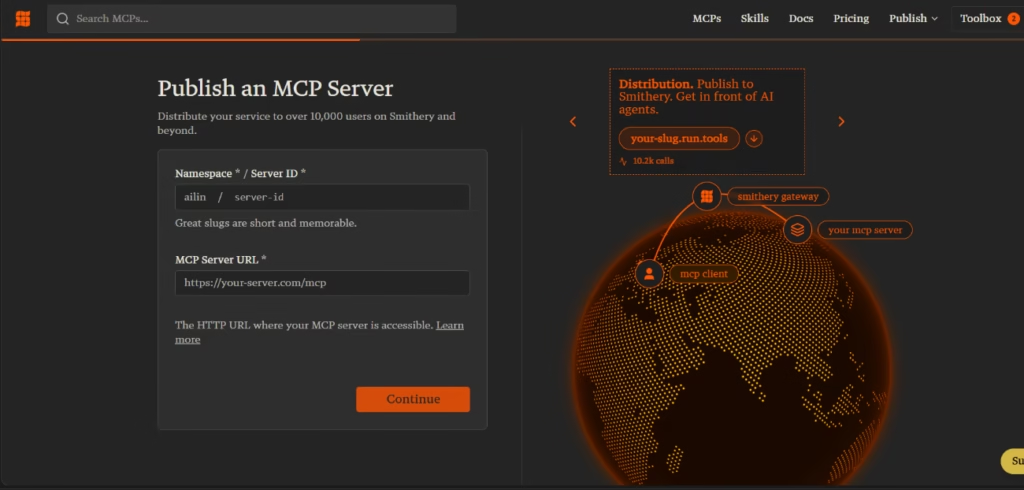
These features collectively allow a small development team to connect their AI agents to external services in minutes rather than days, without building or maintaining the underlying authentication and session infrastructure.
AI Features
- Context-aware tool discovery: MCP servers publish a JSON schema describing their capabilities, which AI agents read at runtime to decide which server fits a given task. This differs from hardcoded function calling because the agent discovers capabilities dynamically rather than relying on pre-programmed routes.
- Natural language to tool call translation: MCP clients translate a user's natural language request into the precise tool call the server expects, without requiring the user to know the underlying API syntax.
- Intelligent tool filtering through schema design: Well-designed MCP servers expose only the tools relevant to a use case, reducing context pollution in the agent's working memory. Servers like Exa Search follow this principle by returning only the fields an agent needs rather than full API payloads.
- Skills as higher-order agent instructions: The Skills Library provides reusable instruction sets that go beyond individual tool calls, encoding best practices for complex tasks such as building interfaces or analyzing financial statements.
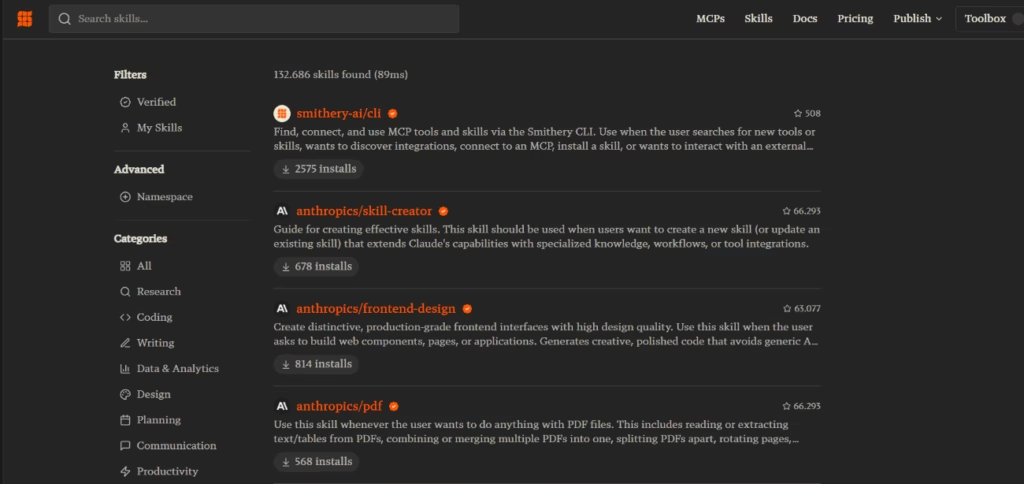
What distinguishes the MCP approach from standard integrations is the agent's ability to discover and chain tools at runtime, without those routes being hardcoded in advance. This is what makes MCP infrastructure rather than just tooling: it is the layer that allows AI-native software to exist, where agents are the primary users of a service and no human-facing interface is required.
That said, the quality of this intelligence depends heavily on implementation. MCP servers that expose hundreds of tools without filtering, or that return unprocessed API payloads, degrade rather than improve agent performance. Smithery's observability tools exist in part to help developers identify and address these issues.
Integrations
- Productivity and communication: Gmail, Slack, Google Drive, Notion, Jira, Linear, Attio.
- Web and research: Exa Search for web search and content retrieval, Browserbase for remote browser control, Semantic Scholar and arXiv for academic paper search and citation analysis, Context7 for SDK and framework documentation.
- Development tools: GitHub, Vercel for deployment, Figma, and various database connectors.
- Business operations: Stripe and a range of CRM and finance connectors.
Each server page shows which MCP clients use it most, giving teams a practical signal about real-world compatibility before connecting.
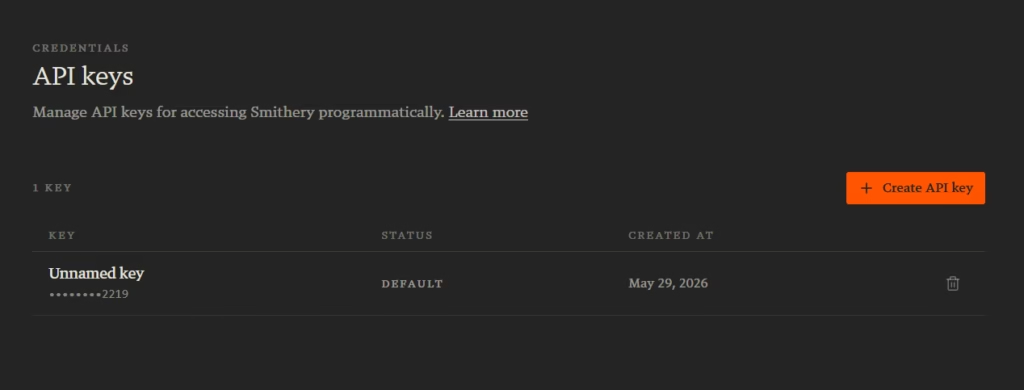
The Smithery API, powered by the open-source agent.pw, provides a programmatic interface for managing connections at scale, including creating connections with metadata tags and scoping tokens per user or workspace.
Security and Data Compliance
Data ownership under Smithery follows a layered model. Smithery, operating as Clavia, Inc., acts as the controller of personal data collected through the platform itself, such as account information, usage data, and connection metadata. When developers publish MCP servers, those servers interact directly with the underlying services, and data handling at that level is governed by each service's own policies.
Regarding AI training, Smithery's privacy notice does not indicate that customer data is used to train AI models. The platform collects usage analytics such as tool call volumes, client sources, and latency metrics, primarily for observability and product improvement.
Credentials and API keys are stored with encrypted, write-only storage, meaning they cannot be read back after being saved. OAuth tokens are handled automatically, including refresh, so long-lived credentials are not exposed to client applications. Service tokens are scoped with explicit constraints covering namespace, resource, operation, metadata, and time-to-live, and cannot exceed the permissions of the parent token that minted them.
Smithery supports OAuth-based login through providers such as Google. One note for teams with strict security requirements: the Smithery CLI is distributed as a minified npm package. The CLI source was initially closed at launch, and the founder announced plans to open-source it shortly after. Teams in security-sensitive environments should review the current repository status before deploying the CLI in production.
Language: Customer Support and Interface
The Smithery platform, documentation, and CLI are entirely in English. The public registry, server pages, blog, and developer documentation are written in English, and there is no Spanish-language version of the interface at the time of this review.
Customer support is available via email at contact@smithery.ai. The platform also offers a Discord community for developer discussion, feedback, and technical support, which operates primarily in English.
AI Language
Smithery's own platform functions, such as tool discovery, schema parsing, and connection management, do not depend on natural language processing. The MCP protocol is JSON-based and language-agnostic: an MCP server schema works identically for an agent receiving instructions in Spanish or English, because the protocol operates at the structured data level rather than the text level.
The language experience for end users therefore depends on the AI client used alongside Smithery, not on Smithery itself. If the underlying agent runs on a multilingual model such as Claude, it can understand and respond in Spanish regardless of the MCP server's language. The MCP layer is transparent to the model's language capabilities.
Mobile Access
Smithery does not offer a dedicated mobile application for iOS or Android. The platform is a web-based registry and a command-line tool, both designed for desktop or laptop environments.
The smithery.ai website is accessible from mobile browsers, and the registry catalog can be browsed on a phone. However, the CLI requires a terminal environment, and meaningful use of Smithery, such as connecting servers, calling tools, publishing, and managing namespaces, is a desktop workflow.
This is consistent with the platform's developer-first positioning and is not a significant limitation for its target audience.
Support, Onboarding, and Account Management
Smithery's documentation covers the core workflows: connecting to MCP servers, managing credentials, publishing servers, using the CLI, token scoping, and Uplink. The documentation is structured for developers already familiar with the command line and JSON configuration, with code examples in TypeScript and cURL throughout.
For teams new to MCP, the platform's blog includes a detailed conceptual introduction to the protocol, covering the server-client relationship, schema structure, and practical examples, which provides a useful starting point before working with the CLI.
The Discord community serves as the primary onboarding resource for questions not covered in the documentation.
There is no dedicated account management function documented for standard plans. The Custom tier includes Slack support and an uptime SLA, which suggests higher-touch onboarding is available for larger accounts on request.
Teams without prior MCP experience should budget time for the learning curve. The CLI commands are concise and well-documented, but understanding why MCP works the way it does requires reading beyond the quickstart.
Ease of Use / UX
The Smithery web interface is easy to understand.
The registry is well-organized, server pages surface the information that matters such as uptime, call volume, and tool list, and the toolbox provides a sensible way to manage a personal collection of servers. For browsing and discovery, the experience is straightforward.
The CLI is the real working environment, and it reflects solid developer experience design: commands are intuitive, the help menu is organized, JSON output is available for scripting, and verbose logging is one flag away when debugging.
For a non-developer, the experience is different. There is no visual workflow builder, no drag-and-drop interface, and no guided setup wizard beyond the documentation.
The speed at which an SME derives value from Smithery depends almost entirely on the team's technical starting point. A developer already using Claude Code can add and test an MCP server in under ten minutes.
Pricing and Plans
Smithery offers three tiers structured around Remote Procedure Calls (RPCs). An RPC is a single JSON-RPC 2.0 request to an MCP server, such as listing tools, calling a tool, or reading a resource.
The Hobby plan is free and includes 50,000 RPCs per month and up to three namespaces, with managed OAuth and persistent connections included. No payment method is required to start.
The Pay as You Go plan carries a flat monthly fee and includes 100,000 RPCs per month and up to 100 namespaces. This tier suits SME development teams with moderate agent usage who need more namespace capacity than the free plan provides.
The Custom plan is available on request and includes everything in Pay as You Go plus custom rate limits, an uptime SLA, and dedicated Slack support.
Publishing an MCP server to the Smithery registry is completely free, regardless of plan tier. Developers only pay for RPC consumption when using servers as clients. For SMEs evaluating the platform, the free tier provides enough capacity to test integrations and build proof-of-concept workflows before committing to a paid plan.
Case Study
A small software consultancy spends much of each week in client meetings, discovery calls, and internal standups. The team used Granola to capture and transcribe these conversations, but the notes stayed locked inside the note-taking app, away from the tools where the team actually acted on them. After every call, someone had to read back through a transcript and manually carry decisions, bugs, and action items into tickets, project boards, and follow-up emails.
After connecting Granola to their Claude Code setup through Smithery with a single CLI command, that meeting context became directly queryable by the agent. Granola's MCP server exposes a focused set of tools: the agent can ask natural-language questions across the team's entire meeting history, list meetings by date range, pull summaries and attendees for specific calls, and retrieve full transcripts. So instead of opening the app and hunting for the right call, a developer could ask the agent what was decided in that morning's client meeting and use the answer, complete with citations back to the source notes, as context for drafting the follow-up or scoping the next task. Because Smithery handled authorization automatically, the only setup step was running the command once.
The value was less about any single feature and more about closing the gap between what was said in a meeting and what happened next. By turning meeting context into something an agent already in their daily workflow could reach, the team removed a recurring manual step and stopped relying on memory and copy-paste to move work forward. It is worth noting that the depth of access depends on the Granola plan.
Videos
Smithery vs Alternatives
Both Smithery and Firebase serve developer teams building AI-enabled products, though they solve different problems.
| Smithery | Firebase | |
| Primary purpose | MCP registry and agent tool connectivity | Full application backend platform |
| Target user | Developers building AI agents | Developers building web or mobile apps |
| Auth management | Managed OAuth, token refresh, scoping | Firebase Authentication for app users |
| Integration breadth | 7,300+ MCP servers | 100+ extensions, mainly Google ecosystem |
| Free tier | 50K RPCs/month, 3 namespaces | Generous quotas across products |
Firebase suits SMEs building complete mobile or web apps that need authentication, databases, hosting, and analytics. But the two are not direct competitors: Firebase builds the application layer, while Smithery connects the agent to external services, so a team could use both. Firebase does offer its own MCP server and Gemini CLI, but only within the Google Cloud ecosystem, not the open registry Smithery provides.
Direct API integration with function calling still works for teams with a few reliable, hand-coded integrations. It just does not scale, since every new service means more custom work, and that is where Smithery earns its place: the more services an agent needs to reach, the more its value shows.
FAQs
Is Smithery a good choice for SMEs?
Yes, for SMEs with at least one developer. The free tier is usable for early projects, and pricing scales with actual usage.
What are the best alternatives to Smithery?
Firebase, for full-stack application development with a partial Spanish interface. For no-code automation, Make or Zapier are more accessible entry points, though with less agent connectivity.
Is Smithery compatible with Claude?
It integrates most reliably with Claude Code, Cursor, and Codex. Claude Desktop has known tool-name recognition issues, and the Claude.ai web interface does not natively support Smithery connections.
Is publishing an MCP server on Smithery free?
Yes. Listing a server is completely free regardless of plan. Costs apply only when consuming servers through RPC calls.
Still weighing up Smithery?
See how it compares with the other tools we've reviewed in AI Agents.