
Devin Review
Devin offers a broad ecosystem and a level of reasoning about code that few competitors match. Its technical barrier to entry, along with the need to pay before you can use the full agent, makes it less accessible to the smallest SMEs in the region.
Devin is an agent you hand a task to, and it comes back with the work done. Its ecosystem spans the cloud (Devin Cloud), the terminal (Devin CLI), a full desktop environment (Devin Desktop, formerly Windsurf), a code review layer (Devin Review), and a Windows virtual machine for building and testing natively.
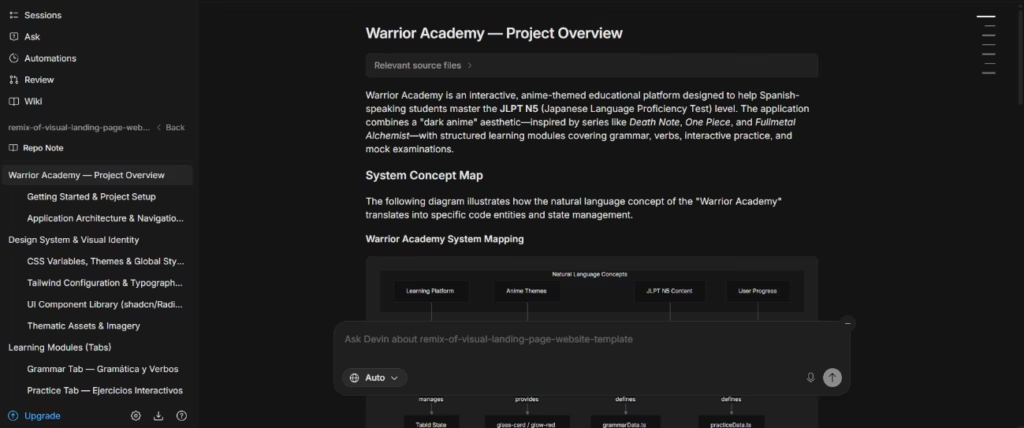
Cognition's own rule of thumb captures the scope well: if a task would take you about three hours, Devin can probably handle it. Our testing bore that out. The agent understands and responds in Spanish with real technical quality, and free capabilities like DeepWiki and Ask Devin can generate verifiable documentation of your own repository in minutes.
That said, the quality of the work always comes down to how precise your instructions are. And creating full agent sessions requires at least the paid plan. For SMEs with technical expertise, it is a solid recommendation. For teams without a developer, it is out of reach.
Averaged from the breakdown below
- SMEs with at least one developer on the team
- Technical teams with a large backlog of repetitive tasks, such as bugs, tests, or migrations
- Startups that want to delegate code maintenance and gain product velocity
- Teams already working with GitHub, Slack, Linear, or Jira that want to automate workflows
- SMEs with no technical expertise on the team
- Businesses looking for a ready-to-use tool with no learning curve
- Teams that expect results without writing detailed instructions
- Those who want to evaluate the full autonomous agent without subscribing to a paid plan
Key features
- Devin Cloud: agents that run on secure virtual machines in the cloud. You hand off a task and come back to a finished pull request.
- Devin Desktop (formerly Windsurf): a full development environment with syntax highlighting, autocomplete, and debugging, plus the Agent Command Center for managing local and cloud agents from a single surface.
- Devin CLI: run Devin from the local terminal for interactive work, with the option to hand off long tasks to the cloud.
- Devin Review: code review that organizes diffs, detects moved or copied code, and flags vulnerabilities and bugs in every pull request.
- Devin Windows VM: builds, runs, and tests natively on its own Windows virtual machine, useful for .NET environments.
- DeepWiki: automatic, living documentation of any repository, with architecture diagrams and module explanations.
- Ask Devin: natural-language questions about the codebase, with grounded answers and citations down to the file and line.
- Event-driven automations: tasks triggered from Slack mentions, Linear issues, continuous integration failures, or alerts from monitoring tools.
The whole point of these features is to recover time. Instead of a developer stopping their work to fix an error or clear out obsolete code, those tasks can go to the agent, which comes back with a pull request ready to review.
AI features
- It investigates the affected code path and the root cause of a problem before proposing a solution.
- It writes and validates the fix in an isolated environment, runs the tests and scanners, and iterates until the checks pass.
- It is model-agnostic, routing among frontier models from Anthropic, OpenAI, Google, and Cognition and picking the best fit for each task.
- It automatically detects vulnerabilities in every pull request, with severity classification and CWE labeling.
- It detects moved or copied code, showing the exact source and destination.
- It improves over time by reading the trajectories of previous sessions and absorbing the team's knowledge through Knowledge and Playbooks.
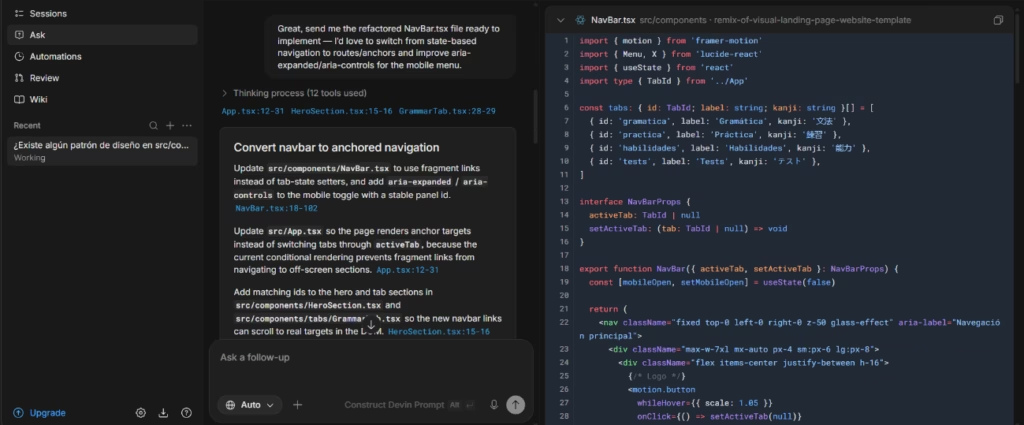
Devin's real strength is not writing code but reasoning about a whole codebase. Asked about possible accessibility and SEO improvements in a specific component, it skipped the generalities: it caught that the navigation was a state-based tab switcher rather than real routes, explained why that hurts indexing, suggested specific accessibility attributes, and cited the exact files and lines behind each claim. That traceability, shared by DeepWiki, is what separates an agent that understands the project from an autocomplete that only sees the open file.
Integrations
- Git providers: GitHub, GitLab, and Bitbucket.
- Communication: Slack and Microsoft Teams, where you can tag Devin directly.
- Task management: Linear and Jira, to turn tickets into pull requests.
- Monitoring and observability named in its workflows: Datadog, Sentry, and PagerDuty.
- A catalog of MCP (Model Context Protocol) servers with a large number of connectors, among them Notion, Figma, Stripe, Vercel, and Atlassian.
It also offers an API for automating and orchestrating agents programmatically.
Data security and compliance
Cognition states that it does not train its models on customer code, which matters to any company weighing whether to give an outside agent access to its repository. Sessions run in isolation on dedicated, ephemeral virtual machines, and a human always controls the merge: branch protections and required reviewers stay in force, and every session produces an audit-ready transcript.
Cognition reports compliance with SOC 2 Type II, ISO/IEC 27001:2022, and CCPA. On request, and once you sign a confidentiality agreement, its Trust Center hands over audit reports, penetration test reports, and the network diagram, along with legal documentation such as the list of subprocessors. The published risk profile lists internal data access, substantial impact, and a 48-hour recovery objective.
On the higher Enterprise tiers, the platform offers single sign-on (SSO with SAML/OIDC), user provisioning through SCIM, and role-based access control (RBAC). For the U.S. public sector, Cognition reports FedRAMP High authorization and compliance with ITAR and with several Department of Defense impact levels, which speaks to its security maturity.
Language: customer support and interface
Devin's official documentation is localized into several languages, English and Spanish among them. Support comes by email, through Slack Connect (available to Teams plan users), and through an in-app feedback button.
AI language: the tool itself
The agent handles English well, understanding and answering in the language. When we put a technical question to it about a real repository, Devin reasoned and answered, with a specific analysis of the code rather than canned replies.
Mobile access
Cognition indicates that some of its agents and its session management can be handled remotely, and its community materials raise the idea of orchestrating agents from a phone. There are no Android or iOS apps.
Support, onboarding, and account management
Onboarding covers setting up the environment, indexing the repository, configuring a VPN where applicable, and feeding in knowledge through files such as AGENTS.md. You sign up in the web app, and connecting the repository, in our case via GitHub with OAuth, is straightforward.
For learning, Cognition offers Devin University, with guided video tutorials that run from first steps through MCP connectors and turning tickets into pull requests. There is also a community with in-person events, an ambassador program, and a blog with product announcements. Inside the account, configuration resources and administration (repositories, members, API, and analytics) sit together in a single dashboard.
Priority support and dedicated account management are reserved for the higher plans. For an SME with no technical experience, though, neither the materials nor the account management offsets the learning curve, because the whole ecosystem assumes the user can already code.
Ease of use / UX
How easy it feels depends a lot on which surface you pick. DeepWiki and Ask Devin are usable right away and pay off with no setup, since you just point them at a repository and ask, whereas creating and monitoring autonomous agent sessions means writing precise instructions and making sense of the result in code.
It is a plus that Devin remembers the context of earlier interactions and reads every repository in the organization to avoid duplication, but there can be a certain opacity about how it arrives at some decisions, and you have to be very specific so it does not start working on the wrong part of the code.
Pricing and plans
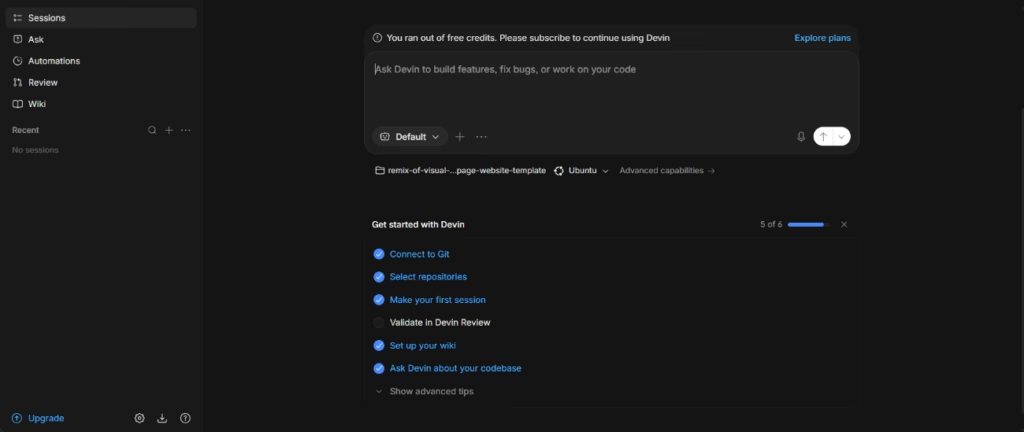
The Free plan allows limited usage and includes Devin Review and DeepWiki, which makes it a solid entry point for evaluating the tool with no commitment. One key point: creating full agent sessions, that is, delegating tasks for the agent to write, run, and test, requires at least the paid Pro plan.
The Pro plan widens the quotas and adds access to frontier models from the leading providers, the leading open models, and the cloud agents, with the option to buy more usage. The Max plan raises those quotas significantly.
The Teams plan adds unlimited members, collaboration, centralized billing, an admin dashboard with analytics, and priority support.
The Enterprise plan adds top-priority support, dedicated account management, SSO with SAML/OIDC, advanced admin controls, and the option of a dedicated deployment.
To keep spending in check, the account lets you set a per-message usage limit and runs on an on-demand usage balance that pauses sessions once it runs out.
Case study
Ramp, a financial operations platform, is a clear example of what a technical team can do with Devin at scale. According to the case study, a small group of engineers who knew the tool well got to the point of merging around 80 pull requests a week and saving more than ten thousand hours a month on routine work.
The team put Devin to work on three fronts: internal tooling, like a feature flag removal system; event-driven automation, like resolving recurring errors in their data processes; and backlog cleanup, covering hundreds of slow or flaky tests. For the feature flag removal, a job that can stretch over several days given its complexity, they ran several instances of the agent in parallel and, by the account recorded in the case study, saved more than a thousand engineering hours in a single month.
Devin vs. alternatives
Devin and Cursor compete in the same category, AI agents for software development, but they come at it from different philosophies. Cursor is a code editor where the developer stays in charge and the agent works alongside them; Devin is an agent you hand a task to so it can solve it on its own and return a finished pull request.
| Devin | Cursor | |
|---|---|---|
| Type | Autonomous agent ecosystem (cloud, terminal, desktop, review, and Windows VM) | Code editor with a built-in agent, based on Visual Studio Code |
| Requires coding knowledge | Yes | Yes |
| Spanish-language interface | Yes, configurable from preferences | No, English only |
| The agent understands Spanish | Yes | Yes |
| Free plan | Yes, with limited usage (includes Devin Review and DeepWiki) | Yes, with usage limits |
| Working model | Delegate tasks to an autonomous agent that returns pull requests | Work inside the editor with the agent as a collaborator |
| Ideal for | Technical teams that want to delegate engineering work from start to finish | Development teams looking for an editor with a deeply integrated agent |
Devin stands out for its ecosystem and autonomy: hand it a ticket, a bug, or a failed check, and it comes back with a pull request ready to review, without your hand on every step. DeepWiki and Ask Devin, both in the free plan, let you get to know a repository and query it in plain language before you pay. It is the best fit for teams sitting on a large backlog of repetitive tasks.
Cursor goes after the same technical audience from a different angle. Instead of delegating and waiting, the developer works inside a familiar editor, based on Visual Studio Code, where the agent plans before it acts, debugs against real execution logs through its Debug Mode, and reviews every pull request with Bugbot.
Which one fits comes down to your workflow. If you want to hand whole tasks to an autonomous agent in the cloud, Devin is the better choice. If you want to keep the developer at the center with an agent helping step by step, Cursor wins. Either way, you need technical expertise.
FAQs
Is Devin a good AI tool for SMEs?
It is, for SMEs that have at least one developer. For technical teams sitting on a backlog of maintenance, bugs, or migrations, it offers a real edge in speed and coverage. For teams without technical expertise, it is not the right tool.
Is Devin multilingual?
Yes. The agent and the documentation support several languages, English and Spanish among them, and you can set the interface to different languages in the preferences.
What are Devin's plans and pricing?
Devin has a free plan with limited usage that includes Devin Review and DeepWiki, paid individual plans (Pro and Max) with rising quotas, a team plan, and an Enterprise plan with custom pricing. Creating full agent sessions requires at least the Pro plan.
Can I try Devin without paying?
Yes. The free plan lets you use Devin Review and DeepWiki, which is enough to judge the quality of the code analysis on your own repository before you commit to a paid plan.
What is the best alternative to Devin?
Cursor is the most direct alternative for teams that would rather work inside a code editor with a deeply integrated agent than hand tasks off to autonomous agents in the cloud.
Still weighing up Devin?
See how it compares with the other tools we've reviewed in AI Agents.